Vidney

AI Image Generator

MOSS Image | Posters and signs from a prompt

Describe the poster, quote the words that should appear, and say where to place each line. MOSS Image creates a new image at about 1 MP. Check the lettering in the result before sharing or printing.

Video

Image

Vidney Workbench

31 models
0/2000
Required: 6 credits

Output

Sample

Text layout examples

01

Two languages on one sign

The English headline and Traditional Chinese line use separate rows.
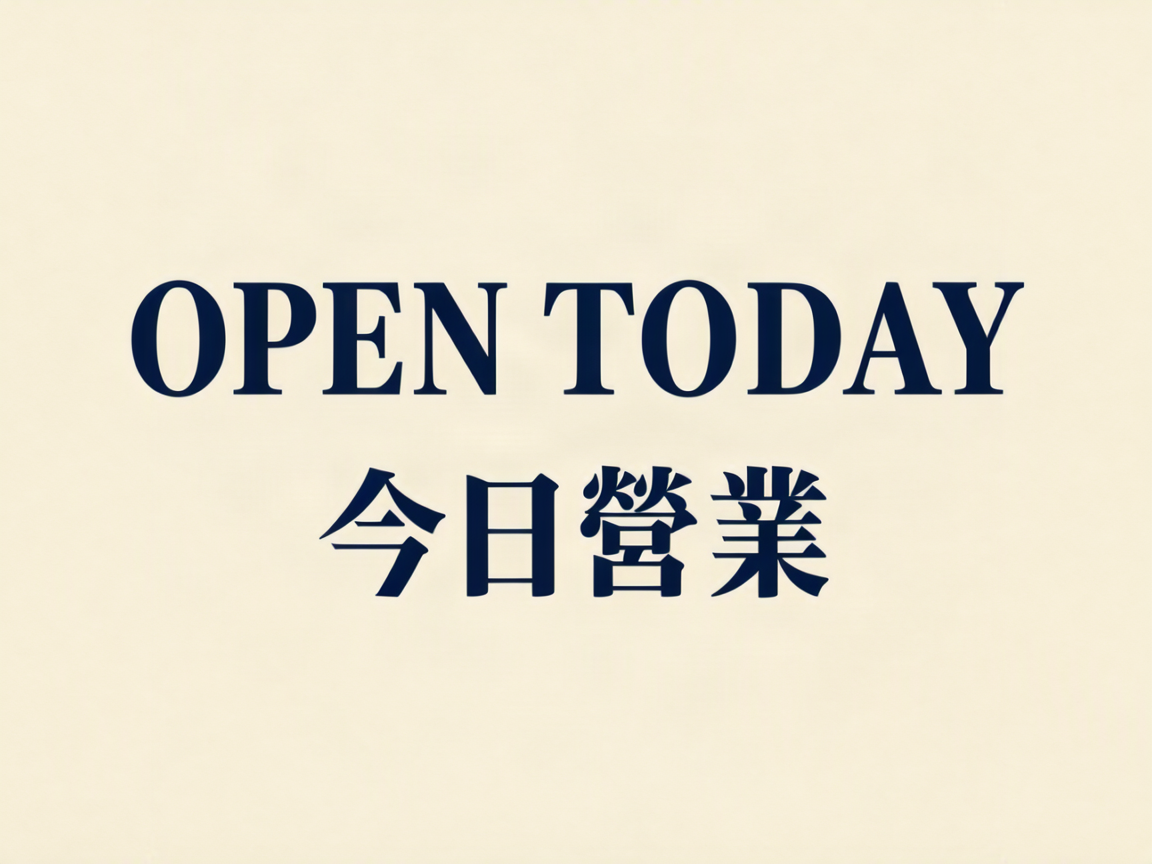
Two languages on one sign: A minimalist bilingual notice printed on warm ivory paper, dark navy lettering, centered straight-on flat scan. Render exactly two lines in large type. First line: OPEN TODAY. Second line: 今日營業. Do not add any other writing.
Settings
  • Text to image
  • 4:3
Prompt

A minimalist bilingual notice printed on warm ivory paper, dark navy lettering, centered straight-on flat scan. Render exactly two lines in large type. First line: OPEN TODAY. Second line: 今日營業. Do not add any other writing.

02

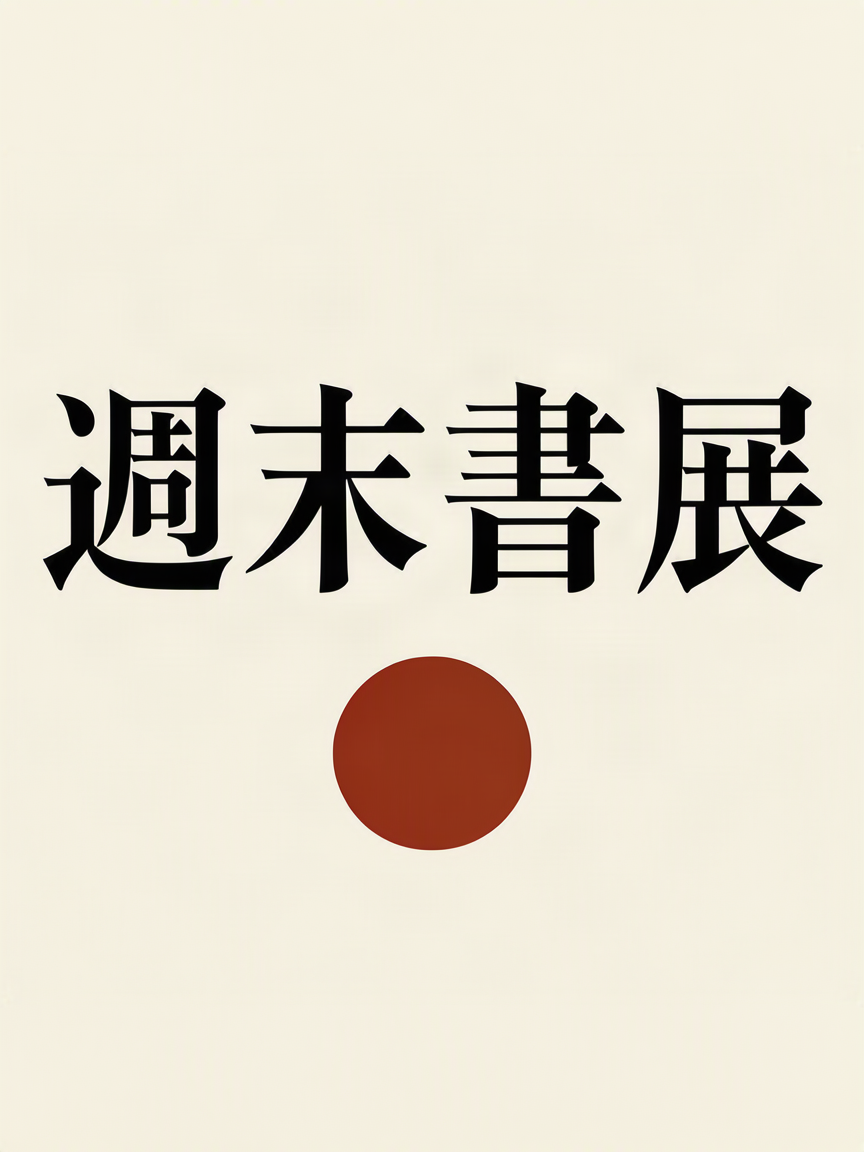
A Traditional Chinese book fair sign

Four characters sit above a single circle.

A Traditional Chinese book fair sign: Flat sign on cream paper. Print exactly these four Traditional Chinese characters as one large centered line: 週末書展. Add a single solid rust-red circle under the line. Plain background with no objects, borders, marks or other writing.
Settings
  • Text to image
  • 3:4
Prompt

Flat sign on cream paper. Print exactly these four Traditional Chinese characters as one large centered line: 週末書展. Add a single solid rust-red circle under the line. Plain background with no objects, borders, marks or other writing.

03

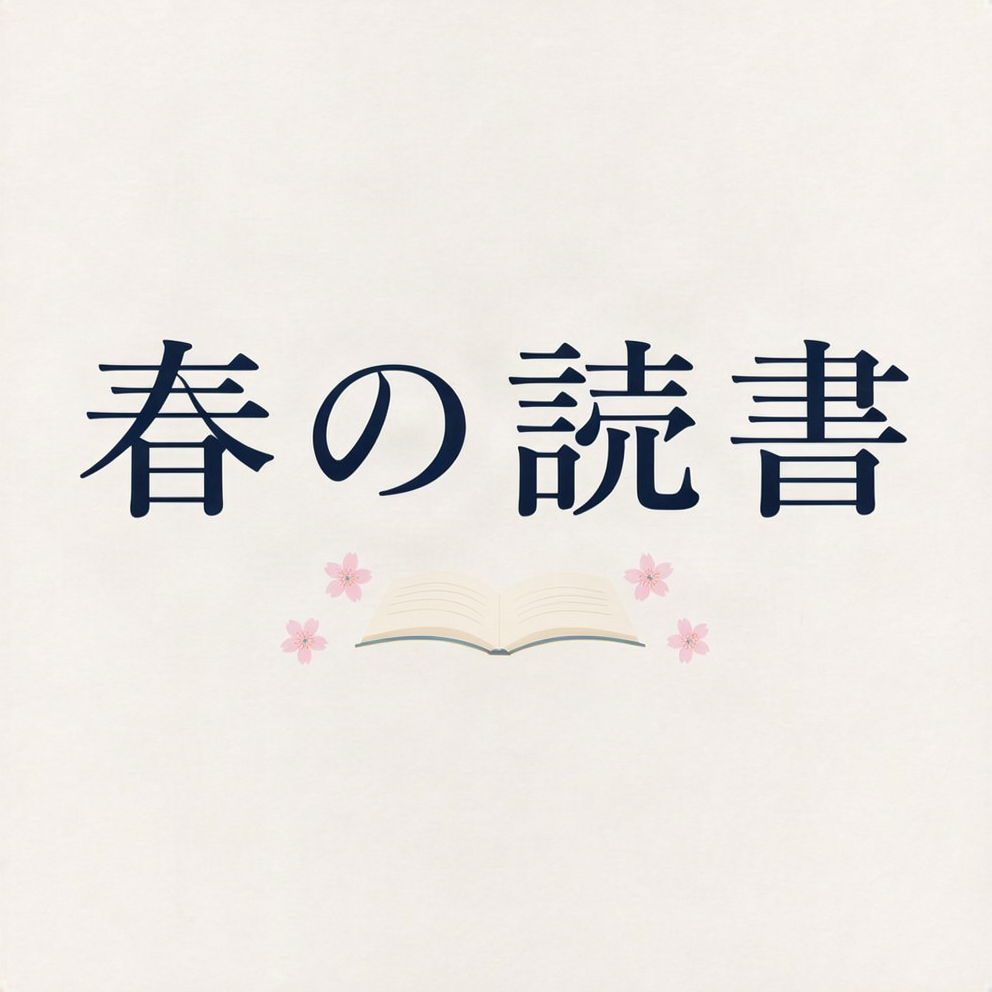
A Japanese bookshop notice

The short title sits above a book and cherry blossoms.

A Japanese bookshop notice: A Japanese bookshop notice on off-white paper. One large horizontal Japanese title in dark navy, precisely the hiragana and kanji: 春の読書. Beneath it a small illustration of an open book and cherry blossoms. No other text.
Settings
  • Text to image
  • 1:1
Prompt

A Japanese bookshop notice on off-white paper. One large horizontal Japanese title in dark navy, precisely the hiragana and kanji: 春の読書. Beneath it a small illustration of an open book and cherry blossoms. No other text.

04

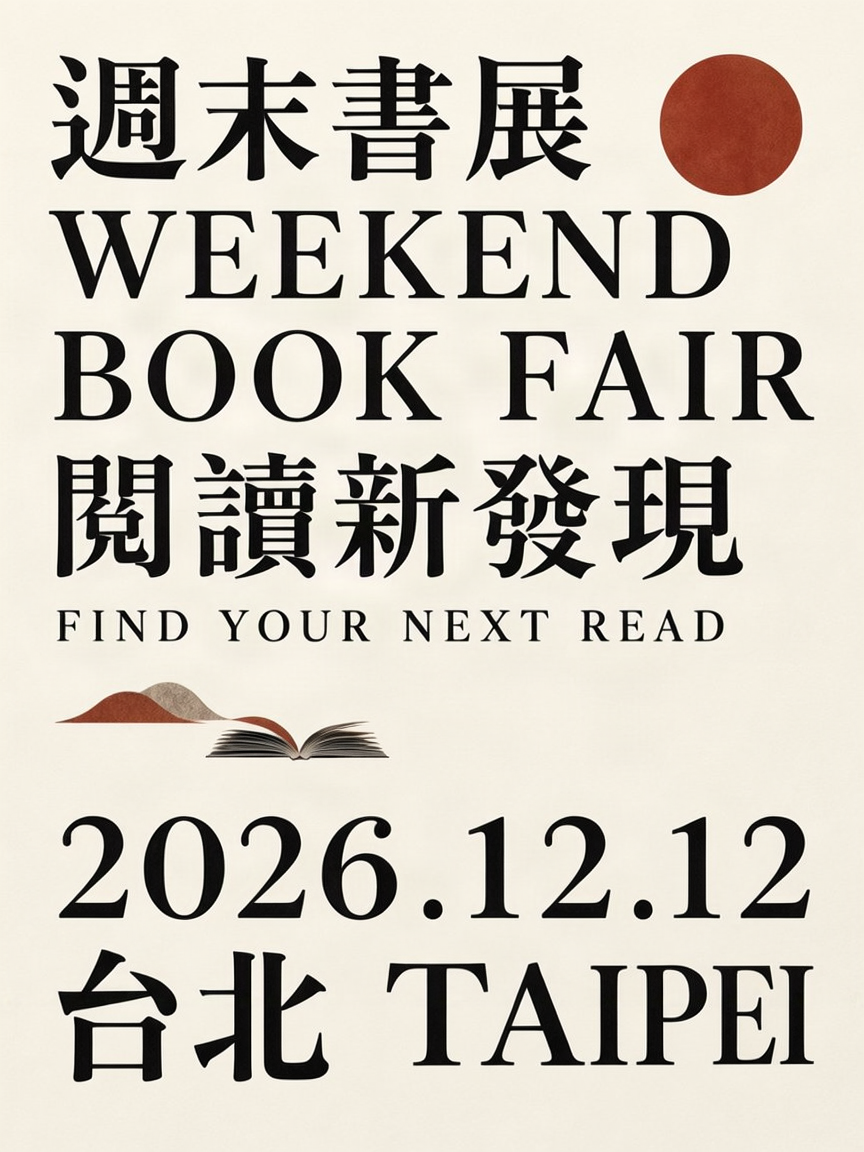
A bilingual book fair poster

A Chinese and English title and subtitle lead down to a date and location.

A bilingual book fair poster: Design a complete vertical bilingual book fair poster, displayed straight-on as flat print artwork, no mockup. Ivory paper, dark ink, one vermilion circle and a small abstract open book illustration kept clear of the type. Use a clean editorial grid with generous margins. Render exactly these six lines, one line per quoted string, in this order: "週末書展", "WEEKEND BOOK FAIR", "閱讀新發現", "FIND YOUR NEXT READ", "2026.12.12", "台北 TAIPEI". The first two lines form the prominent title. The next two are the subtitle in smaller type. Place the date and venue together at the bottom with high contrast and enough size to read. Match every character, letter and period. No logos or extra writing.
Settings
  • Text to image
  • 3:4
Prompt

Design a complete vertical bilingual book fair poster, displayed straight-on as flat print artwork, no mockup. Ivory paper, dark ink, one vermilion circle and a small abstract open book illustration kept clear of the type. Use a clean editorial grid with generous margins. Render exactly these six lines, one line per quoted string, in this order: "週末書展", "WEEKEND BOOK FAIR", "閱讀新發現", "FIND YOUR NEXT READ", "2026.12.12", "台北 TAIPEI". The first two lines form the prominent title. The next two are the subtitle in smaller type. Place the date and venue together at the bottom with high contrast and enough size to read. Match every character, letter and period. No logos or extra writing.

Artwork with a job for each line

A poster with a clear reading order

Put the event title in quotes and name its position. Describe the illustration and reserve another area for the date.

Chinese and English in one layout

Quote each language separately and describe its placement and relative size. Check both lines on the result.

The technology behind MOSS Image

How the model works, based on public documentation and sourced evidence.

OpenMOSS describes MOSS Image as a 5B diffusion transformer for text to image with Chinese and English lettering and structured layout control. The project publishes both Base and SFT checkpoints. Its layout format assigns text and objects to bounding boxes on a shared canvas.

Sources: github.com · arxiv.org

Start with the words and their placement

OpenMOSS built MOSS Image for text to image generation with an emphasis on Chinese and English lettering and layout. Describe what should go at the top, where the visual focus belongs and which words should be visible. Check the spelling, line breaks and small print before publishing. Output is approximately 1 MP.

How to generate image with MOSS Image

Create AI image with MOSS Image on Vidney in three steps.

Glowing panels with one model selected from severalStreams of light forming into an emerging imageA finished image materializing from a vortex of glowing light

MOSS Image vs Qwen Image 3.0 vs Seedream 4.5

Specs side by side with similar models, all runnable on Vidney. The workspace shows the credits for your selected settings before generation.

MOSS ImageQwen Image 3.0Seedream 4.5
Task modesText to ImageText to Image · Image to Image (Image ≤1)Text to Image · Image to Image (Image ≤14)
Aspect ratios1:1 · 4:3 · 3:4 · 16:9 · 9:161:1 · 4:3 · 3:4 · 16:9 · 9:161:1 · 4:3 · 3:4 · 16:9 · 9:16
Cost6 credits per generation12 credits per generation12 credits per generation

Related models

More AI image models you can run on Vidney.

Fast native 4K image creation and multi-reference editing from MiniMax.

6 credits per generation
Live

Create from a brief or bring your own visual references.

6 credits per generation
MidjourneyMidjourney V7
Live

Create textured portraits, sunlit interiors and graphic illustrations with V7. Explore real prompts and compare the results below.

6 credits per generation
Live

Generate AI image with Nano Banana: text to image and image to image, all from one Vidney workspace.

6 credits per generation
Live

Generate AI image with Flux Kontext: text to image and image to image, all from one Vidney workspace.

6–12 credits per generation
Live

Generate AI image with Seedream 4.0: text to image and image to image, all from one Vidney workspace.

6–9 credits per generation

Frequently asked questions

How should I prompt MOSS Image for text on a poster?

Put the exact words in quotes. Give each line a position, such as a headline at the top and a date in the lower right. Proofread the letters and line breaks in the result before sharing it.

What is MOSS Image?

MOSS Image is an AI image model you can run on Vidney. It supports text to image from a single workspace.

How much does MOSS Image cost per generation?

MOSS Image costs 6 credits per generation. The exact credit cost is shown on the generate button before you run it. That is about $0.18 per run at the Starter plan rate ($0.03 per credit).

What aspect ratios does MOSS Image support?

MOSS Image supports the following aspect ratios: 1:1, 4:3, 3:4, 16:9, 9:16.

Is MOSS Image free to use?

You can start with MOSS Image for free on Vidney using your sign-up credits, no card required to try it. After that each run costs 6 credits per generation, and the exact cost is always shown on the generate button before you spend a credit.

Can I use MOSS Image images commercially?

Yes. The images you generate with MOSS Image on Vidney are yours to use in commercial projects: ads, social posts, client work, and product content. You keep the output; Vidney only handles generation and storage.

Does MOSS Image add a watermark?

Only on the free plan. Free-plan downloads carry a small Vidney watermark; on any paid plan, MOSS Image images download clean, ready to publish or hand to a client. Upgrading also removes the watermark from images you already made.

What are the best MOSS Image alternatives?

The closest MOSS Image alternatives on Vidney are MiniMax H3 Image, Kling Image 4.0, and Seedream 5.5. They all run in the same workspace from one credit balance, so you can run the same prompt on each and compare the results side by side.

Do I need an API key or a provider account to use MOSS Image?

No. Vidney runs MOSS Image for you, so there are no API keys to manage and no separate provider account to set up.

Create with MOSS Image now