AI Video Generator

Gemini Omni 1.1 Flash

Three ways into a shot, and the sound arrives in the same pass as the picture.

Vidney Workbench

27 models
0/2000
Required: 42 credits

Output

Sample

What Gemini Omni 1.1 Flash does well

01

A line said to camera

A night market cook turns skewers over glowing charcoal, smoke and sparks rising, then looks up, laughs and speaks a line to the lens. Her voice, the sizzle and the crowd arrive with the picture, no second pass.

Prompt

A street food vendor at a lantern-lit night market flips skewers over glowing charcoal, sparks rising in the smoke. She looks up at the camera, laughs, and says: "Best in town, try one." Sizzling meat, crowd murmur and distant music in the background, handheld close shot, warm practical light.

02

Push in from one still

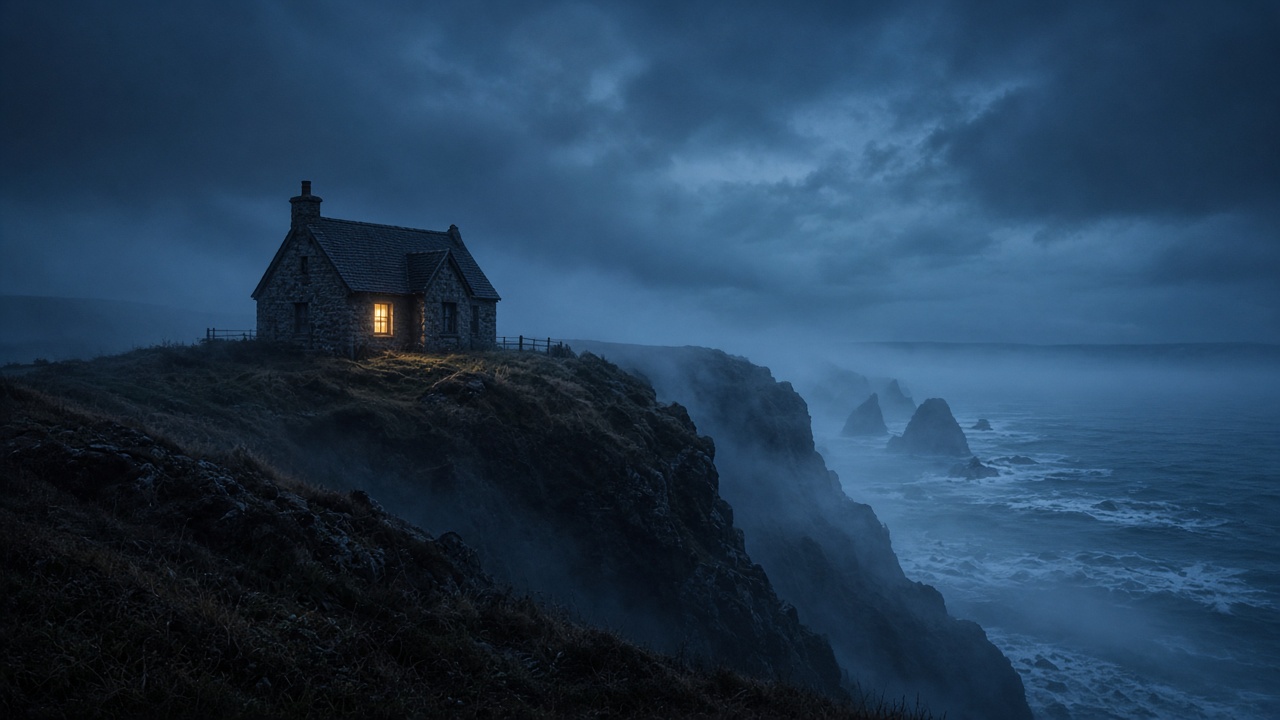
The stone cottage on the cliff, the lit window, the swell below: all of it grows out of a single still. The camera moves in slowly, mist crosses the grass, gulls cut the sky, the frame you approved stays itself.

Prompt

Slow cinematic push-in toward the stone cottage on the cliff. The lit window flickers, sea mist drifts across the grass, waves roll in below and gulls cross the darkening sky. Wind, distant surf and a faint creak of the old fence.

03

Two references, one shot

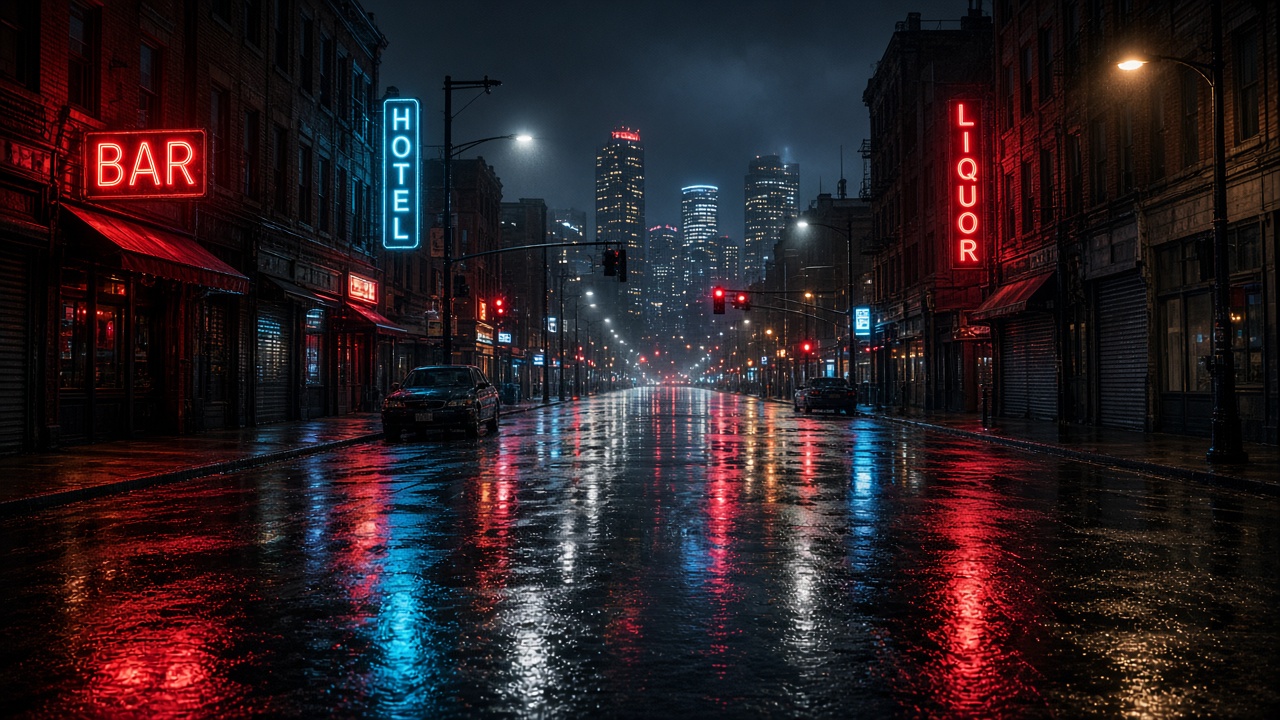
One image supplies the woman in the yellow raincoat, the other the wet street under neon. She walks toward the camera there, opens the red umbrella and smiles, both references holding inside a single take.

Prompt

The woman in the yellow raincoat from the first reference walks toward the camera down the rain-soaked neon street from the second reference. Rain starts to fall, she opens the red umbrella and smiles, neon signs reflecting on the wet asphalt. Footsteps, rain on the pavement and the hum of the city.

What you can make with Gemini Omni 1.1 Flash

Clips that speak

Write the line and the delivery, and voice, room tone and ambience come back in one pass, ready to cut without a separate audio session.

Animate an approved frame

Start from a still your team already signed off, name the camera move and the weather, and the art direction holds through the clip.

A character into a place

One image says who it is, another says where it happens, up to seven references. Good for recurring characters and vertical social cuts.

The technology behind Gemini Omni 1.1 Flash

How the model works, based on public documentation and sourced evidence.

Gemini Omni 1.1 Flash is Google's video generation and editing model, announced on August 27, 2026. One model covers text to video, animating a still image, reference driven scenes, first and last frame control, natural language editing and scene extension. Google's model page lists the id as gemini-omni-1.1-flash, with clips of 3 to 10 seconds at 24 FPS, returned as mp4 with audio. Every clip carries a generated soundtrack of speech, music and sound effects rather than a silent picture you dub afterwards, and 720p is the standard size, with 1080p and 4K listed as upscaled.

Working with it reads more like a conversation than a render queue. Google's docs describe a previous interaction id that carries the conversation history and the generated video state without re-uploading the previous video, so a change is a short follow-up instruction rather than a fresh job. The role of each supplied image or video is named inside the prompt with simple tags for the first frame, the last frame and each reference, not in separate fields. Audio has no on or off switch, because all generated videos include it. The frame is 16:9 or 9:16 only.

Against Google's own Veo 3.1 the split is control against length. Veo 3.1 fixes clips at 4, 6 or 8 seconds, while Omni takes any length from 3 to 10 seconds, accepts video references of up to 3 seconds each, and extends footage in 10 second increments to a cumulative 40 seconds. Billing differs too. Veo 3.1 carries an official API list price of $0.40 for each second of 720p or 1080p video, while Omni bills video output at $17.50 per million tokens, which Google's pricing page puts at 5,792 tokens for one second of 720p, or roughly $0.10.

On Vidney the model runs three of those modes: text to video, image to video from a first frame, and reference to video with up to seven reference images. Clips are 4, 6, 8 or 10 seconds, at 720p or 1080p, in 16:9 or 9:16. The soundtrack is always generated and cannot be switched off here, so plan the shot with sound in mind. Last frame control, video references, 4K, conversational editing and scene extension stay closed on Vidney for now, which is our integration's current boundary rather than a limit of the model.


Sources: blog.google · google.dev

Who reaches for Gemini Omni 1.1 Flash

Gemini Omni 1.1 Flash is Google's video model for people who need a shot and its sound in one pass. On Vidney it runs three ways: write the scene, animate a first frame, or hand it up to seven reference images and say in the prompt who appears where. Clips run 4, 6, 8 or 10 seconds at 720p or 1080p, in 16:9 or 9:16, and audio is generated natively with the picture on every run, dialogue included. Last frame, video references, 4K, editing and extension stay closed here for now, so pick it when sound and a fast first cut matter more than a long finishing pass.

How to generate video with Gemini Omni 1.1 Flash

Create AI video with Gemini Omni 1.1 Flash on Vidney in three steps.

Glowing panels with one model selected from severalStreams of light forming into an emerging imageA finished image materializing from a vortex of glowing light

Gemini Omni 1.1 Flash vs MiniMax H3 Max vs Wan 3.0 vs Seedance 2.5

Specs side by side with similar models, all runnable on Vidney.

Gemini Omni 1.1 FlashMiniMax H3 MaxWan 3.0Seedance 2.5
Task modesText to Video · Image to Video · Reference to VideoText to Video · Image to VideoText to Video · Image to Video · Reference to VideoText to Video · Image to Video · Reference to Video
Duration4, 6, 8, 10 seconds5–15 seconds2–30 seconds5–30 seconds
Resolution720p · 1080p480P · 768P480p · 720p · 1080p480p · 720p
AudioNo audio trackNo audio trackSupportedNo audio track
Cost84 credits per generation48 credits per generation90 credits per generation63–66 credits per generation

What creators say about Gemini Omni 1.1 Flash

Recurring themes from public reviews, comparisons and creator write-ups. Both the good and the bad.

What gets praised

  • The cheap draft tier changes how the model gets used. Google puts 360p generation at up to 60% faster and a third of the cost of standard 720p, and a hands-on review recommends generating cheap at 360p to check whether a prompt and composition work before re-running or upscaling for the finish.

  • Sound arriving in the same pass is the next thing reviewers single out. Google's docs state that all generated videos include audio, so speech, music and effects come out cut to the picture and a clip that needs a voice or a room tone does not go through a separate dubbing step.

  • It landed as a working tool rather than a demo. Adobe Firefly, Figma Weave, Runway and GMI Cloud had it integrated at announcement, and a hands-on review reports the model at the top of LMArena's text to video board, with environments and slow moving elements looking convincing.

Common complaints

  • Character work is where hands-on testing breaks it. In one reviewer's clip the robot's head comes apart mid animation and the lettering on its hat repeats identically on both sides in a way the geometry does not support, while the background in the same render holds up much better.

  • The control surface is thin. Google's docs list system instructions, temperature, stop sequences and negative prompts as unsupported, and there is no seed, so exclusions go into the ordinary prompt and the same text will not come back the same way twice. Only English is fully supported; other languages are not evaluated.

  • Cost is counted in output tokens rather than clips. Google's official API list price is $17.50 per million video output tokens, at 5,792 tokens for one second of 720p, so ten seconds runs to about a dollar before you go up in size. The model is paid tier only, with no free allowance to test on.

  • The ceilings arrive early. 1080p and 4K are upscaled rather than rendered at that size, the frame is locked to 16:9 or 9:16, each video reference is capped at 3 seconds, and extension stops at a cumulative 40 seconds, so anything longer has to be cut from several generations.

Related models

More AI video models you can run on Vidney.

Live

Generate AI video with MiniMax H3: text to video, image to video, and reference to video, all from one Vidney workspace.

39–45 credits per generation
Live

Generate AI video with Seedance 2.5: text to video, image to video, and reference to video, all from one Vidney workspace.

63–66 credits per generation
Live

Generate AI video with Kling 2.6: text to video and image to video, all from one Vidney workspace.

57 credits per generation

Generate AI video with Kling 2.5 Turbo: text to video and image to video, all from one Vidney workspace.

69 credits per generation
Live

Three ways into a clip: write the scene, animate a frame you already approved, or hand it an image and a motion reference.

90 credits per generation
Live

Generate AI video with MiniMax H3 Max: text to video and image to video, all from one Vidney workspace.

48 credits per generation

Frequently asked questions

What is Gemini Omni 1.1 Flash?

Gemini Omni 1.1 Flash is an AI video model you can run on Vidney. It supports text to video, image to video, and reference to video from a single workspace.

How much does Gemini Omni 1.1 Flash cost per generation?

Gemini Omni 1.1 Flash costs 84 credits per generation. The exact credit cost is shown on the generate button before you run it.

What aspect ratios does Gemini Omni 1.1 Flash support?

Gemini Omni 1.1 Flash supports the following aspect ratios: 16:9, 9:16.

How long can Gemini Omni 1.1 Flash videos be?

Gemini Omni 1.1 Flash generates clips of 4, 6, 8, 10 seconds.

Does Gemini Omni 1.1 Flash generate audio?

No. Gemini Omni 1.1 Flash generates video without an audio track.

Is Gemini Omni 1.1 Flash free to use?

You can start with Gemini Omni 1.1 Flash for free on Vidney using your sign-up credits, no card required to try it. After that each run costs 84 credits per generation, and the exact cost is always shown on the generate button before you spend a credit.

Can I use Gemini Omni 1.1 Flash videos commercially?

Yes. The videos you generate with Gemini Omni 1.1 Flash on Vidney are yours to use in commercial projects: ads, social posts, client work, and product content. You keep the output; Vidney only handles generation and storage.

Does Gemini Omni 1.1 Flash add a watermark?

No. Gemini Omni 1.1 Flash videos generated on Vidney are delivered clean, with no Vidney watermark, ready to publish or hand to a client as-is.

What are the best Gemini Omni 1.1 Flash alternatives?

The closest Gemini Omni 1.1 Flash alternatives on Vidney are MiniMax H3 Max, Wan 3.0, and Seedance 2.5. They all run in the same workspace from one credit balance, so you can run the same prompt on each and compare the results side by side.

Do I need an API key or a provider account to use Gemini Omni 1.1 Flash?

No. Vidney runs Gemini Omni 1.1 Flash for you, so there are no API keys to manage and no separate provider account to set up.

Create with Gemini Omni 1.1 Flash now