Vidney

AI Video Generator

Vidu Q4 Preview

Shengshu's next flagship, out early: a still or a stack of references in, a scene with its own sound out.

Vidney Workbench

28 models
Required
0/2000

Output ratio follows your source image.

4s
3s16s
Required: 128 credits

Output

Sample

What Vidu Q4 Preview does well

01

A ladle of broth, then the line

A noodle seller at a night market ladles broth over the steaming pot, then turns to the customer with a grin and says the first bowl is on her. Her voice, the bubbling pot and the market chatter come out with the picture, and the stall from the first frame stays as it was.

Input
  • A ladle of broth, then the line: Start frameStart frame
Settings
  • Image to video
  • 6s
  • 1080p
Prompt

She lifts the ladle, tastes the broth, pauses, then breaks into a warm grin and says to the customer just off camera: "Just right. Sit down, the first bowl is on me." Steam drifts through the string lights. Slow push in from a medium shot to a close up, handheld documentary feel. Sound: her voice close and natural, broth bubbling, night market chatter, a scooter passing far off, no music.

02

A toy from one picture, a street from another

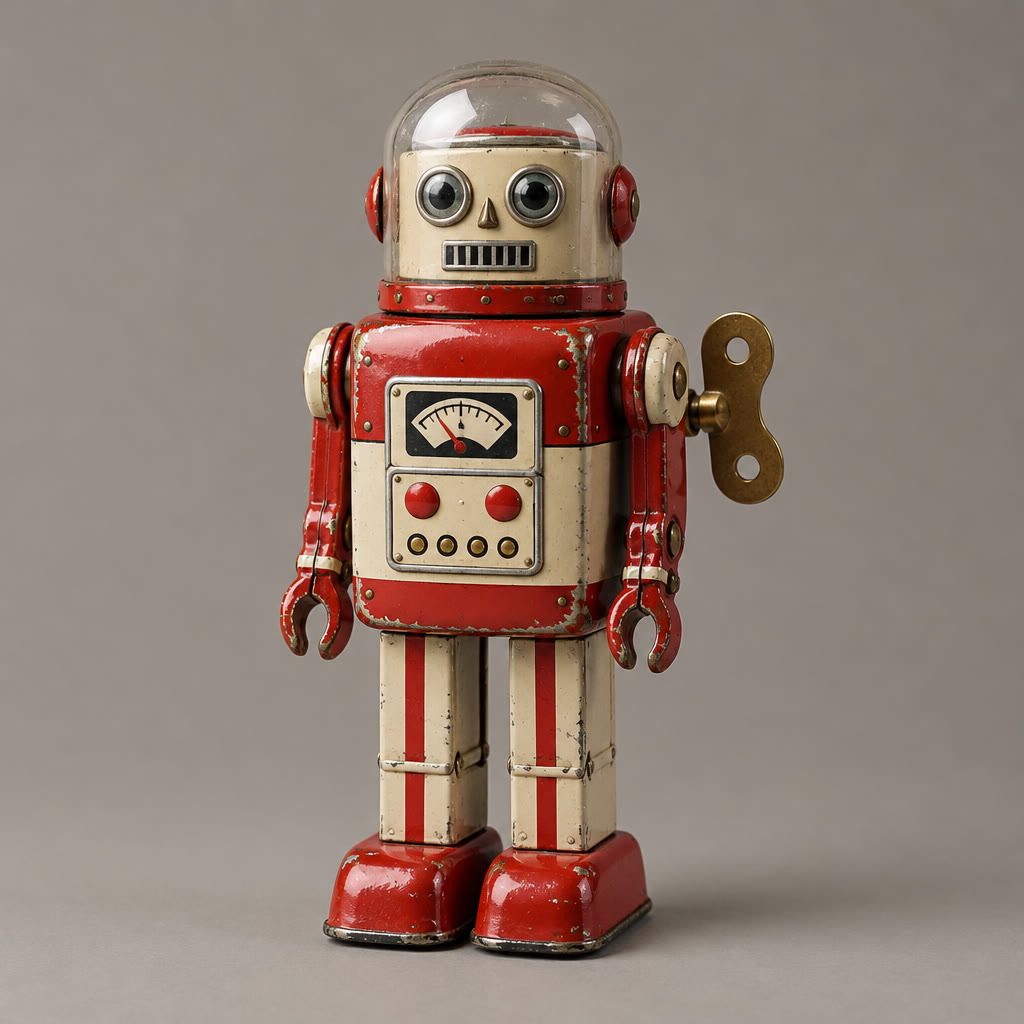
The tin robot comes from a plain product shot, the rainy shop window from a second image. It marches along the sill and lifts a hand while the camera rises toward the neon alley, paint wear, glass dome and brass key intact.

Input
  • A toy from one picture, a street from another: Image 1Image 1
  • A toy from one picture, a street from another: Image 2Image 2
Settings
  • Reference to video
  • 6s
  • 1080p
  • 16:9
Prompt

The tin robot from image 1 marches stiffly along the rain-soaked windowsill of the toy repair shop in image 2, its brass wind-up key turning on its back. It stops at the edge, tilts its glass dome up toward the rain and gives a tiny wave. The camera tracks alongside at sill height, then cranes up to reveal the glowing shop window and the neon alley behind. Sound: ticking clockwork, rain on glass and stone, a distant tram bell, no music.

03

A voice borrowed from a clip

A clay otter captain at the wheel of a storm-tossed boat delivers his line in the gravelly voice from a short audio clip. Give the same clip to every shot and the character keeps one voice from scene to scene.

Input
  • A voice borrowed from a clip: Image 1Image 1
  • Audio 1
Settings
  • Reference to video
  • 6s
  • 1080p
  • 16:9
Prompt

The otter captain from image 1 grips the ship's wheel as a wave bursts over the bow, then turns to his crew and says, "Steady now, lads. Storm or no storm, we bring her home by morning," speaking in the voice of audio 1. The camera starts close on his whiskered face, then pulls back to show the small fishing boat pitching in the storm. Sound: his voice, howling wind, creaking rigging, crashing waves, no music.

What you can make with Vidu Q4 Preview

A character who speaks

Start from a portrait you already made, write the line and how it should be said, and the voice, room tone and mouth movement come back with the picture.

Your product in any setting

One image for the object, one for the place, up to 15 in total. The object keeps its shape and finish while the scene and the camera move around it.

One voice across a series

Attach the same voice clip, an MP3 of 3 to 12 seconds, to each shot, and a recurring character sounds like the same person from episode to episode.

The technology behind Vidu Q4 Preview

How the model works, based on public documentation and sourced evidence.

Vidu Q4 Preview comes from Shengshu Technology, the company behind the Vidu line, and went public on October 7, 2026 as an early release of its next flagship video model. Preview is meant literally: the full Q4 has no announced date, Shengshu says feedback from people using the preview in real projects will shape the final model, and resolutions, features and terms may still change. The preview works from pictures only. It animates a single first frame, or builds a scene from one to fifteen reference images plus up to three reference voice clips, and there is no prompt-only text to video.

Shengshu pitches Q4 on performance: facial expression, emotion, body movement and voice coordinated inside one take, camera work that stays with fights and chases, and effects such as explosions and fireworks that sit inside the light of the scene. Output runs from 540p to 4K at 24 frames per second, a clip lasts up to 16 seconds, and the 2K and 4K tiers are delivered in 10-bit colour. On Artificial Analysis' image to video leaderboard it debuted third with an Elo score of 1,179, sixteen places and 123 points above Vidu Q3 Pro; arena placements move as more votes arrive.

Against Vidu Q3 the trade is reach for range. Q3 still covers text to video and clips as short as one second, and Q4 drops both. In return Q4 adds 2K and 4K, takes up to fifteen reference images for characters, wardrobe, props, products and places, and can borrow a voice from a short audio clip so a recurring character sounds the same from shot to shot.

On Vidney both modes are open. Image to video takes one first frame, and the clip keeps that image's shape. Reference to video takes up to 15 images and up to 3 voice clips, which must be MP3 files of 3 to 12 seconds, in 16:9, 9:16, 1:1, 4:3 or 3:4. Every whole second from 3 to 16 and all five resolutions from 540p to 4K are available. Sound is on by default with a switch to turn it off, and muting does not change the price. The 2K and 4K files come back as 10-bit HEVC, which some browsers will not preview inline, so download them to play or edit. An end frame, video references and text to video are not offered because the preview does not take them.


Sources: artificialanalysis.ai

Who reaches for Vidu Q4 Preview

Vidu Q4 Preview is the early release of Shengshu's next flagship video model, out since October 7, 2026. Preview means the full Q4 has not shipped and Shengshu is still shaping it with feedback, so behaviour and options can change before the final version. It works from pictures only: animate one first frame, or give it up to 15 reference images and up to 3 voice clips and say in the prompt who appears where and who speaks. Clips run any whole number of seconds from 3 to 16 at 540p, 720p, 1080p, 2K or 4K, and sound is generated with the picture unless you switch it off. Next to Vidu Q3 it adds 2K and 4K, many more references and voice references, and it debuted third on the Artificial Analysis image to video leaderboard, where Q3 Pro sits nineteenth. What it gives up is text to video, an end frame and clips under 3 seconds, which is why the Vidu Q3 page stays open beside it.

How to generate video with Vidu Q4 Preview

Create AI video with Vidu Q4 Preview on Vidney in three steps.

Glowing panels with one model selected from severalStreams of light forming into an emerging imageA finished image materializing from a vortex of glowing light

Vidu Q4 Preview vs Grok Imagine Video 1.5 vs Grok Imagine Video 1.5 Lite vs Kling 4.0

Specs side by side with similar models, all runnable on Vidney.

Vidu Q4 PreviewGrok Imagine Video 1.5Grok Imagine Video 1.5 LiteKling 4.0
Task modesImage to Video · Reference to VideoText to Video · Image to Video · Reference to VideoText to Video · Image to VideoText to Video · Image to Video
Duration3–16 seconds1–15 seconds1–15 seconds3–30 seconds
Resolution540p · 720p · 1080p · 2K · 4K480p · 720p · 1080p480p · 720p · 1080p (upscaled from 720p)720p · 1080p
AudioSupportedIncluded, always onIncluded, always onIncluded, always on
Cost159 credits per generation18 credits per generation18 credits per generation215 credits per generation

What creators say about Vidu Q4 Preview

Recurring themes from public reviews, comparisons and creator write-ups. Both the good and the bad.

What gets praised

  • The jump over its predecessor is the headline. Artificial Analysis placed Q4 Preview third on its image to video board at launch, 123 Elo points and sixteen places above Vidu Q3 Pro, and within about twenty points of the top spot.

  • Reference capacity stands out. Fifteen images for characters, wardrobe, props, products and settings, plus three voice references, give a recurring cast more to hold on to than most image to video tools allow.

  • An early user singled out how it handles Chinese text inside the frame, a point AlphaSignal relays while noting that it comes from one tester rather than a controlled benchmark.

Common complaints

  • There is no text to video. Every clip needs an image first, so a prompt-only idea has to go through an image model before it reaches Q4.

  • Sixteen seconds is the ceiling, shorter than the 30 seconds Seedance 2.5 and Wan 3.0 allow, so longer scenes have to be cut together with continuity handled at each join.

  • Much of the pitch is still Shengshu's own word. The acting claims and the promise of up to five times the output for the same budget have not been checked independently, and the efficiency figure is set against a full price Q4 that has not been released.

  • It is a preview. Shengshu says resolutions, features and terms may change before the final release, so a look you rely on today may shift.

Related models

More AI video models you can run on Vidney.

Live

Write the scene, the lines and the sound, and Shengshu's Q3 returns all three together, from one second to sixteen.

75–90 credits per generation

Every clip comes back with its own sound, dialogue and lip sync included.

18 credits per generation
Live

Up to 30 seconds in one pass, sound included: write the scene, animate a start frame, or cast it from reference images.

90 credits per generation
Live

Generate AI video with MiniMax H3: text to video, image to video, and reference to video, all from one Vidney workspace.

39–45 credits per generation
Live

Alibaba's Wan 2.7 makes the frame and then moves it: stills, edits and clips with sound from one model family.

15–126 credits per generation

Three ways into a shot, and the sound arrives in the same pass as the picture.

84 credits per generation

Frequently asked questions

What is Vidu Q4 Preview?

Vidu Q4 Preview is an AI video model you can run on Vidney. It supports image to video and reference to video from a single workspace.

How much does Vidu Q4 Preview cost per generation?

Vidu Q4 Preview costs 159 credits per generation. The exact credit cost is shown on the generate button before you run it. That is about $4.77 per run at the Starter plan rate ($0.03 per credit).

What aspect ratios does Vidu Q4 Preview support?

Vidu Q4 Preview supports the following aspect ratios: 1:1, 4:3, 3:4, 16:9, 9:16.

How long can Vidu Q4 Preview videos be?

Vidu Q4 Preview generates clips of 3–16 seconds.

Does Vidu Q4 Preview generate audio?

Yes. Vidu Q4 Preview can generate video with an audio track, and you can toggle sound on or off before generating.

Is Vidu Q4 Preview free to use?

Not with sign-up credits alone. New accounts get 10 to 30 free credits, and Vidu Q4 Preview costs 159 credits per generation, so running it needs a plan. You can spend the free credits on lower-cost models first; the exact cost is always shown on the generate button before you spend a credit.

Can I use Vidu Q4 Preview videos commercially?

Yes. The videos you generate with Vidu Q4 Preview on Vidney are yours to use in commercial projects: ads, social posts, client work, and product content. You keep the output; Vidney only handles generation and storage.

Does Vidu Q4 Preview add a watermark?

Only on the free plan. Free-plan downloads carry a small Vidney watermark; on any paid plan, Vidu Q4 Preview videos download clean, ready to publish or hand to a client. Upgrading also removes the watermark from videos you already made.

What are the best Vidu Q4 Preview alternatives?

The closest Vidu Q4 Preview alternatives on Vidney are Grok Imagine Video 1.5, Grok Imagine Video 1.5 Lite, and Kling 4.0. They all run in the same workspace from one credit balance, so you can run the same prompt on each and compare the results side by side.

Do I need an API key or a provider account to use Vidu Q4 Preview?

No. Vidney runs Vidu Q4 Preview for you, so there are no API keys to manage and no separate provider account to set up.

Create with Vidu Q4 Preview now