Vidney

AI Video Generator

Kling 4.0

Kuaishou's newest Kling: up to half a minute in one take, with the sound generated alongside the picture.

Vidney Workbench

28 models
0/2000
4s
3s30s
Required: 172 credits

Output

Sample

What Kling 4.0 does well

01

Ten seconds, one unbroken take

The camera glides along a mossy stone path through misty bamboo at dawn, rises through the canopy and opens onto ridges floating in a sea of mist as the sun comes up. Ten seconds without a cut, from one text prompt, with a soundtrack generated alongside.

Settings
  • Text to video
  • 10s
  • 720p
  • 16:9
Prompt

One continuous shot with no cuts. At dawn the camera glides slowly forward along a mossy stone path through a misty bamboo forest, tall green stalks swaying in the breeze and drops of dew falling from the leaves. Without stopping, the camera rises smoothly past the tops of the bamboo and reveals layered mountain ridges wrapped in mist as the first sunlight breaks through the clouds. Sound: wind rustling the bamboo leaves, birdsong, a distant stream. No people, no animals, no buildings, no text, no signs.

02

A still that starts to cook

The noodle seller from the first frame lifts a ladle of broth through the steam and smiles at her customer. The hand-lettered menu boards and the night market behind her stay as they were in the photo.

Input
  • A still that starts to cook: Start frameStart frame
Settings
  • Image to video
  • 3s
  • 720p
Prompt

The noodle seller ladles steaming broth into a bowl and smiles at the customer, night market chatter and a bubbling pot in the background.

03

From the snow to the fireside

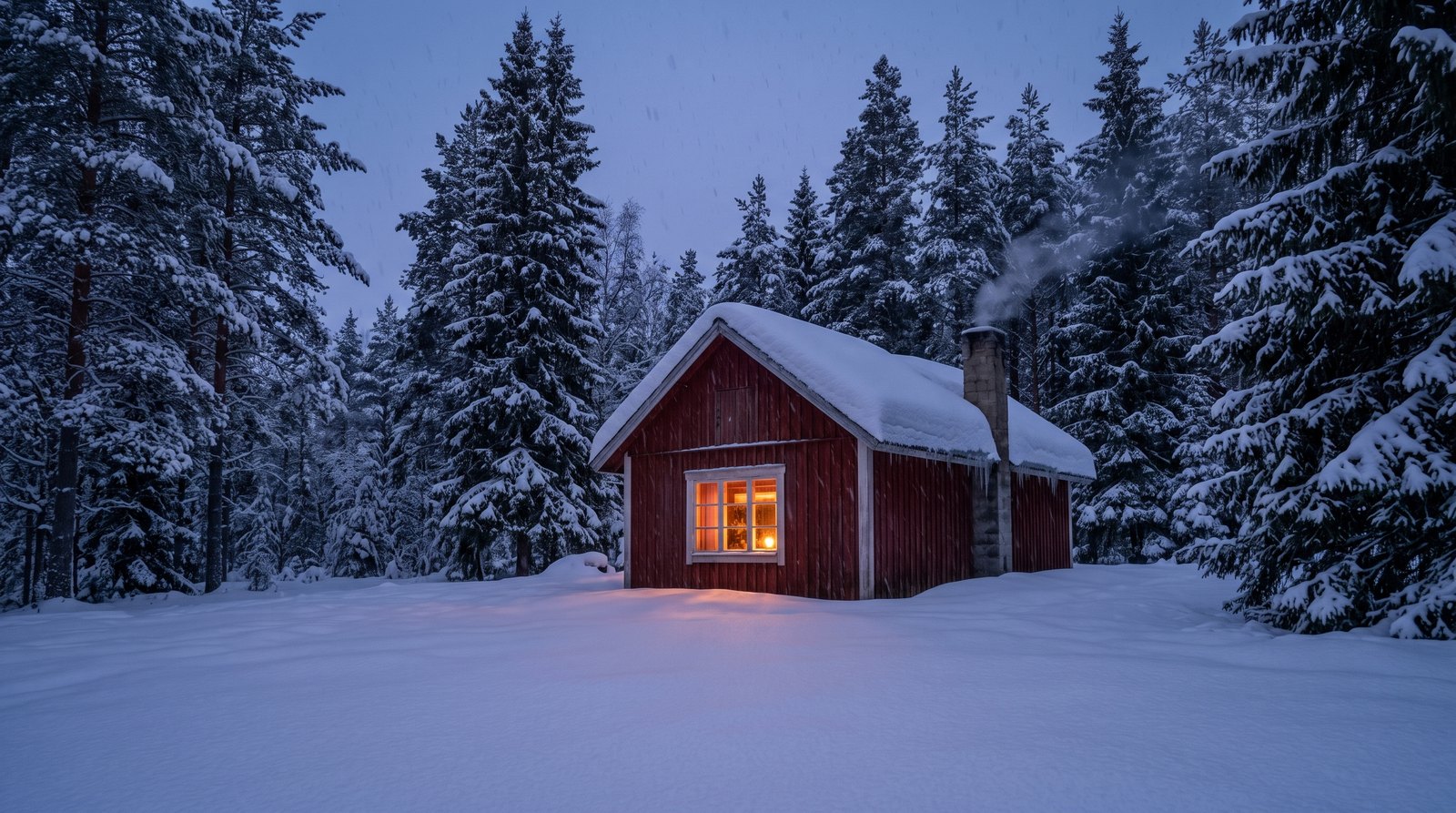
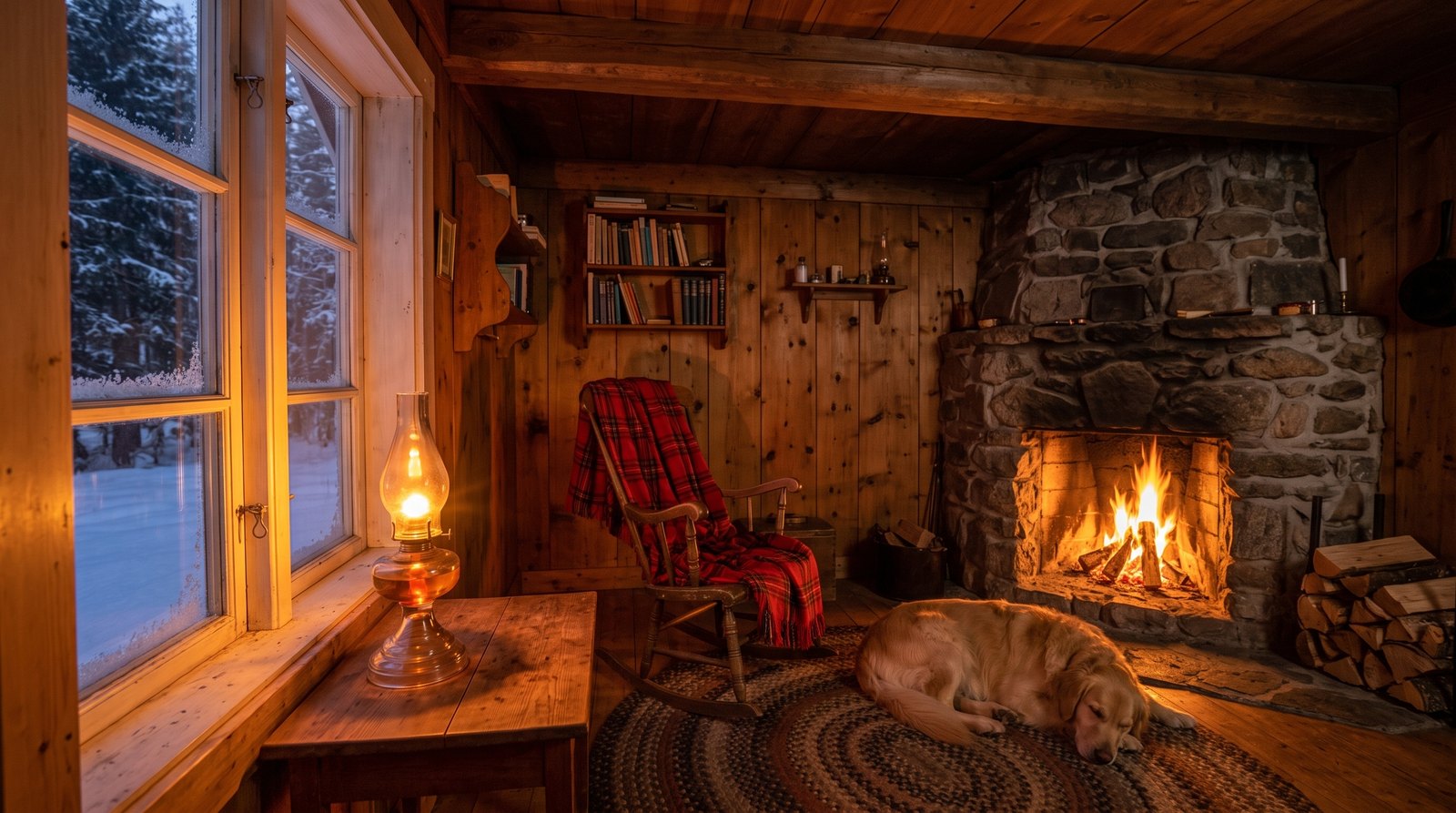
With a snowy cabin as the first frame and the room inside as the last, the camera glides up to the glowing window and through it. The clip opens on one still and lands on the other.

Input
  • From the snow to the fireside: Start frameStart frame
  • From the snow to the fireside: End frameEnd frame
Settings
  • Image to video
  • 3s
  • 720p
Prompt

The camera glides from the snowy forest toward the glowing cabin window and moves inside, ending in the warm room by the fireplace.

What you can make with Kling 4.0

Scenes that need time

Walkthroughs, product reveals and short story beats in one take of up to 30 seconds, instead of three short clips joined at the seams.

One clip for every feed

Horizontal for YouTube, vertical for Reels and TikTok, square for the feed: pick 16:9, 9:16 or 1:1 and get up to 30 seconds with sound in one go.

Transitions you plan

Outside to inside, day to night, before and after: set the first and last frame and let the model fill in the move between them.

The technology behind Kling 4.0

How the model works, based on public documentation and sourced evidence.

Kling 4.0 is the fourth generation of Kling, the video model line from Kuaishou, and it officially launched on October 15, 2026. Kuaishou frames the release around realism, control and professional quality: steadier large-scale motion, smoother continuity through fast action and complex camera moves, and native generation of up to 30 seconds in a single pass, which it ties to long takes and continuous storytelling. A lighter Kling 4.0 Flash opened earlier to a limited group of subscribers, with shorter clips and 720p only.

The full model comes with a wide set of inputs. Text to video and image to video sit alongside first and last frame control and multi keyframe control with up to 10 keyframe images. Omni Reference combines up to 15 references in one request, including up to 10 images, up to 5 reference videos and voice references, plus named elements for recurring characters, props and scenes. Kuaishou lists 720p, 1080p and 4K output, stereo sound, dialogue in English, Chinese, Japanese, Korean, Spanish, Portuguese, German and French, and 10-bit HDR at 1080p and 4K marked as coming soon.

Against Kling 3.0 the clearest change is length. On Vidney Kling 3.0 runs from 3 to 15 seconds; Kling 4.0 doubles the ceiling to 30 and brings sound with every clip. Most of the claims about realism and lip sync come from Kuaishou's own release notes and showcase clips, and independent comparisons were still thin in the first week.

On Vidney two modes are open. Text to video takes 16:9, 9:16 or 1:1. Image to video starts from a first frame, keeps that image's shape and can take an optional last frame so the clip ends on a picture you choose. Both run any whole second from 3 to 30 at 720p or 1080p, and every clip comes back with a stereo soundtrack generated with the picture; there is no silent option. 4K, HDR, the 21:9 ratio, middle keyframes, Omni Reference with videos, elements and voices, and Kling 4.0 Flash are not offered here yet.


Sources: wikipedia.org

Who reaches for Kling 4.0

Kling 4.0 is the video model Kuaishou officially launched on October 15, 2026, the successor to Kling 3.0. The headline change is length: one generation runs any whole number of seconds from 3 to 30, twice the 15 second ceiling of Kling 3.0 here, so a walk across a room, a spoken line and the reaction can sit in one take instead of three joined clips. On Vidney it covers text to video in 16:9, 9:16 or 1:1, and image to video from a first frame, with an optional last frame so the shot finishes where you planned. Both run at 720p or 1080p, and every clip comes back with a stereo soundtrack generated with the picture; there is no silent option. The 4K, HDR, multi keyframe control and Omni Reference with up to 15 references that Kuaishou also lists are not offered here yet. Reach for it when a scene needs room to play out, or when one take has to carry an idea from start to finish.

How to generate video with Kling 4.0

Create AI video with Kling 4.0 on Vidney in three steps.

Glowing panels with one model selected from severalStreams of light forming into an emerging imageA finished image materializing from a vortex of glowing light

Kling 4.0 vs Vidu Q4 Preview vs Grok Imagine Video 1.5 vs Grok Imagine Video 1.5 Lite

Specs side by side with similar models, all runnable on Vidney.

Kling 4.0Vidu Q4 PreviewGrok Imagine Video 1.5Grok Imagine Video 1.5 Lite
Task modesText to Video · Image to VideoImage to Video · Reference to VideoText to Video · Image to Video · Reference to VideoText to Video · Image to Video
Duration3–30 seconds3–16 seconds1–15 seconds1–15 seconds
Resolution720p · 1080p540p · 720p · 1080p · 2K · 4K480p · 720p · 1080p480p · 720p · 1080p (upscaled from 720p)
AudioIncluded, always onSupportedIncluded, always onIncluded, always on
Cost215 credits per generation159 credits per generation18 credits per generation18 credits per generation

What creators say about Kling 4.0

Recurring themes from public reviews, comparisons and creator write-ups. Both the good and the bad.

What gets praised

  • Length is the headline. Thirty seconds in one generation is twice what Kling 3.0 allows, long enough for an action and its consequence to play out without stitching clips together.

  • Control comes in several forms at once: start and end frames, up to ten keyframes and up to fifteen mixed references in Kuaishou's own app, more ways to pin a shot down than most video models offer.

  • Sound arrives with the picture in stereo, and Kuaishou lists dialogue in eight major languages plus regional accents such as Cantonese, Sichuanese, British and Indian English.

Common complaints

  • Much of the pitch is still Kuaishou's own word. The realism, motion and lip sync claims rest on release notes and showcase clips, and early coverage carried no independent leaderboard numbers.

  • Several headline features are not there yet. HDR and video extension are marked as coming soon, and the faster Flash variant started as a limited early access build.

  • Long clips cost more. Pricing is per second, so a 30 second take costs six times a 5 second one, and a wrong idea at full length is an expensive draft.

  • Reference video time is capped. Reference clips and edit inputs share a 30 second combined budget, which one early analysis calls the main constraint for longer productions.

Related models

More AI video models you can run on Vidney.

Live

Generate AI video with Kling 3.0: text to video and image to video, all from one Vidney workspace.

105 credits per generation
Live

Generate AI video with Kling 2.6: text to video and image to video, all from one Vidney workspace.

57 credits per generation
Live

Generate AI video with Kling V3 Omni: text to video and image to video, all from one Vidney workspace.

120 credits per generation

Generate AI video with Kling 2.5 Turbo: text to video and image to video, all from one Vidney workspace.

69 credits per generation
Live

Generate AI video with Kling O1: text to video and image to video, all from one Vidney workspace.

102 credits per generation
Live

Generate AI video with MiniMax H3 Max: text to video and image to video, all from one Vidney workspace.

48 credits per generation

Frequently asked questions

What is Kling 4.0?

Kling 4.0 is an AI video model you can run on Vidney. It supports text to video and image to video from a single workspace.

How much does Kling 4.0 cost per generation?

Kling 4.0 costs 215 credits per generation. The exact credit cost is shown on the generate button before you run it. That is about $6.45 per run at the Starter plan rate ($0.03 per credit).

What aspect ratios does Kling 4.0 support?

Kling 4.0 supports the following aspect ratios: 1:1, 16:9, 9:16.

How long can Kling 4.0 videos be?

Kling 4.0 generates clips of 3–30 seconds.

Does Kling 4.0 generate audio?

Yes. Kling 4.0 generates video with sound in the same pass: dialogue, effects and room tone. There is no switch to turn it off.

Is Kling 4.0 free to use?

Not with sign-up credits alone. New accounts get 10 to 30 free credits, and Kling 4.0 costs 215 credits per generation, so running it needs a plan. You can spend the free credits on lower-cost models first; the exact cost is always shown on the generate button before you spend a credit.

Can I use Kling 4.0 videos commercially?

Yes. The videos you generate with Kling 4.0 on Vidney are yours to use in commercial projects: ads, social posts, client work, and product content. You keep the output; Vidney only handles generation and storage.

Does Kling 4.0 add a watermark?

Only on the free plan. Free-plan downloads carry a small Vidney watermark; on any paid plan, Kling 4.0 videos download clean, ready to publish or hand to a client. Upgrading also removes the watermark from videos you already made.

What are the best Kling 4.0 alternatives?

The closest Kling 4.0 alternatives on Vidney are Vidu Q4 Preview, Grok Imagine Video 1.5, and Grok Imagine Video 1.5 Lite. They all run in the same workspace from one credit balance, so you can run the same prompt on each and compare the results side by side.

Do I need an API key or a provider account to use Kling 4.0?

No. Vidney runs Kling 4.0 for you, so there are no API keys to manage and no separate provider account to set up.

Create with Kling 4.0 now