AI Image Generator

Muse Image

Meta's image model checks its own draft before the picture comes back.

Vidney Workbench

21 models
0/2000
Required: 3 credits

Output

Sample

What Muse Image does well

01

A frame from an animated film

A mountain train crosses a viaduct at dusk, drawn in clean cel lines over a painted watercolour valley. It reads as a still lifted from a feature, right down to the glow in the carriage windows.
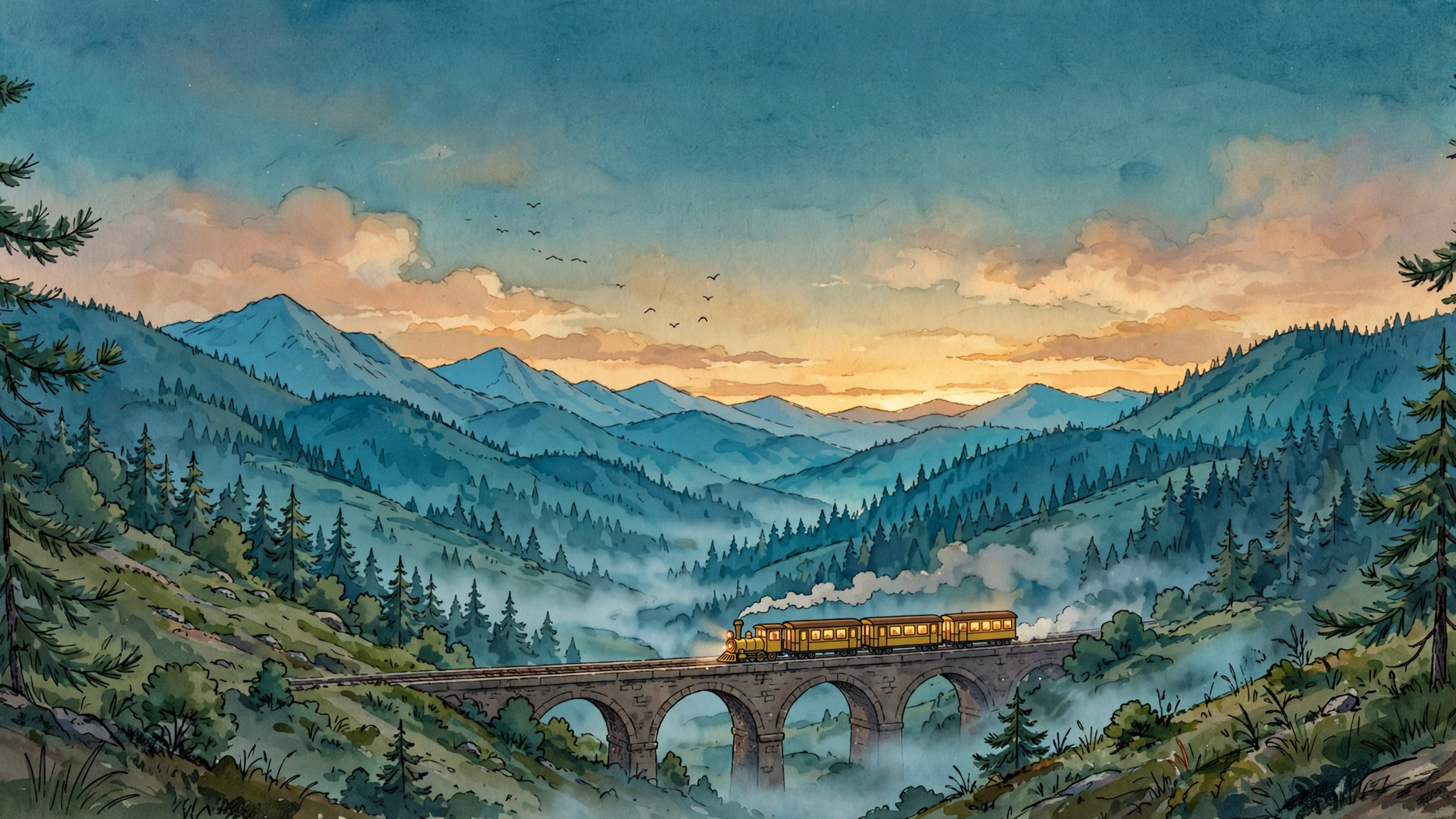
A frame from an animated film: A single frame from a hand drawn 2D animated feature: a small yellow mountain train crosses a stone viaduct at dusk, seen from a hillside across the valley. Cel shaded train with clean confident linework and flat warm colours, lit carriage windows glowing amber, a thin trail of steam behind it. Painted watercolour background of pine forest, layered blue ridges and a deep teal sky with the last warm light on the horizon, soft mist gathering in the valley floor. Wide composition with the viaduct running across the lower third, generous sky above, a few birds as small dark marks. Quiet, warm, unhurried mood, the look of a studio feature still rather than a digital illustration, subtle film grain. No people, no text, no signature, no watermark.
Prompt

A single frame from a hand drawn 2D animated feature: a small yellow mountain train crosses a stone viaduct at dusk, seen from a hillside across the valley. Cel shaded train with clean confident linework and flat warm colours, lit carriage windows glowing amber, a thin trail of steam behind it. Painted watercolour background of pine forest, layered blue ridges and a deep teal sky with the last warm light on the horizon, soft mist gathering in the valley floor. Wide composition with the viaduct running across the lower third, generous sky above, a few birds as small dark marks. Quiet, warm, unhurried mood, the look of a studio feature still rather than a digital illustration, subtle film grain. No people, no text, no signature, no watermark.

02

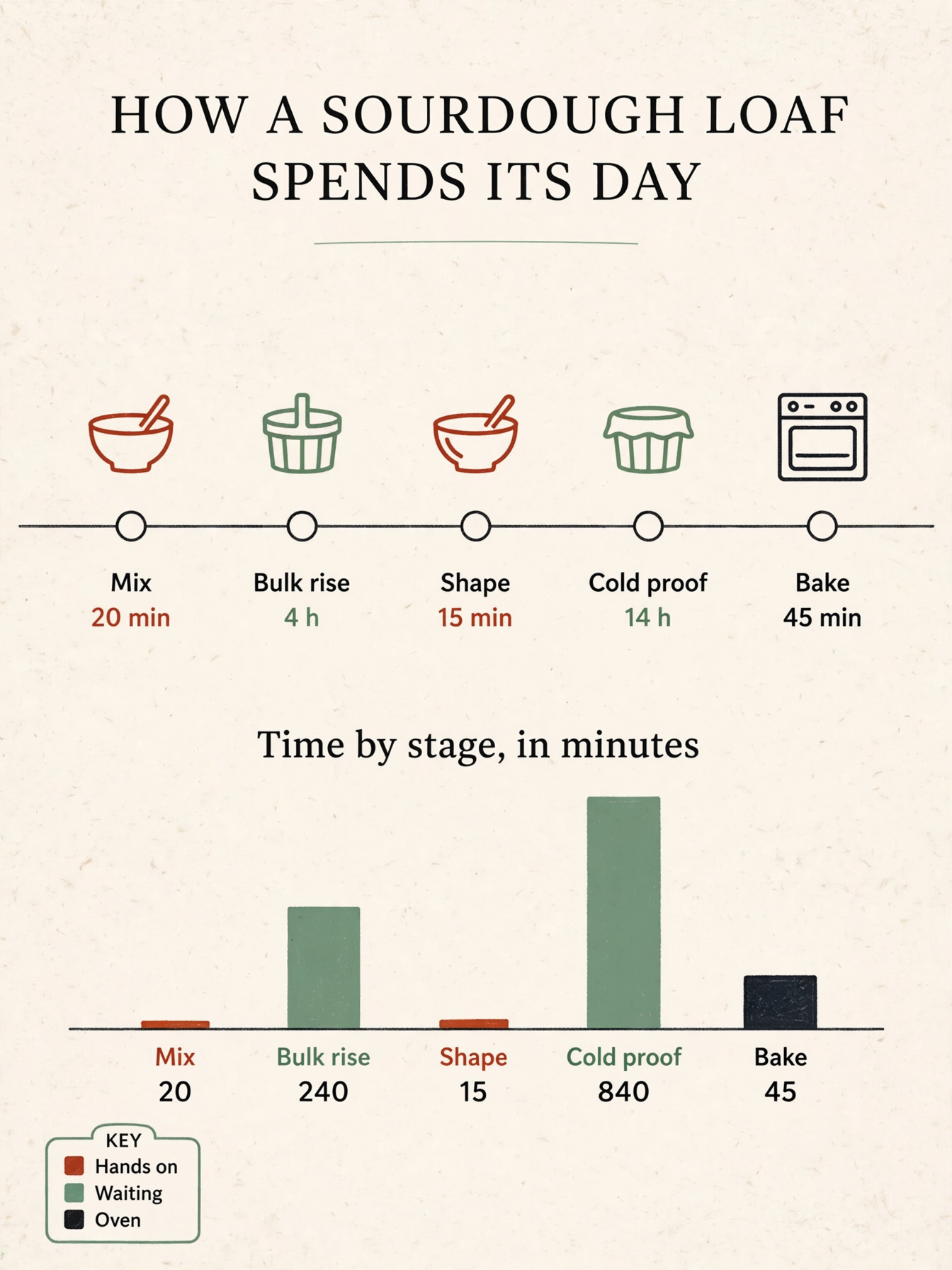
A chart with real numbers

A one page bake timeline where each bar is actually as tall as the figure printed beneath it. The labels and the numbers agree, so the page can go straight into a deck without being redrawn.

A chart with real numbers: A single page printed infographic titled 'HOW A SOURDOUGH LOAF SPENDS ITS DAY', portrait layout on warm off-white paper. Across the middle runs a horizontal timeline with five labelled stages and their durations, in order 'Mix 20 min', 'Bulk rise 4 h', 'Shape 15 min', 'Cold proof 14 h', 'Bake 45 min'. Below it sits a simple bar chart titled 'Time by stage, in minutes' with five bars whose heights are strictly proportional to the values 20, 240, 15, 840 and 45, so the 840 bar is three and a half times as tall as the 240 bar and the 20 bar is barely visible, each bar labelled with its own number under it. A small key in the lower left carries three colour swatches labelled 'Hands on', 'Waiting', 'Oven'. Flat editorial design in ink black, warm clay red and sage green, thin rules, clear type hierarchy, plenty of whitespace, three simple line icons for a mixing bowl, a proofing basket and an oven. All labels short and legible, spelled exactly as written, every number matching its bar. No other text, no logos, no watermark.
Prompt

A single page printed infographic titled 'HOW A SOURDOUGH LOAF SPENDS ITS DAY', portrait layout on warm off-white paper. Across the middle runs a horizontal timeline with five labelled stages and their durations, in order 'Mix 20 min', 'Bulk rise 4 h', 'Shape 15 min', 'Cold proof 14 h', 'Bake 45 min'. Below it sits a simple bar chart titled 'Time by stage, in minutes' with five bars whose heights are strictly proportional to the values 20, 240, 15, 840 and 45, so the 840 bar is three and a half times as tall as the 240 bar and the 20 bar is barely visible, each bar labelled with its own number under it. A small key in the lower left carries three colour swatches labelled 'Hands on', 'Waiting', 'Oven'. Flat editorial design in ink black, warm clay red and sage green, thin rules, clear type hierarchy, plenty of whitespace, three simple line icons for a mixing bowl, a proofing basket and an oven. All labels short and legible, spelled exactly as written, every number matching its bar. No other text, no logos, no watermark.

03

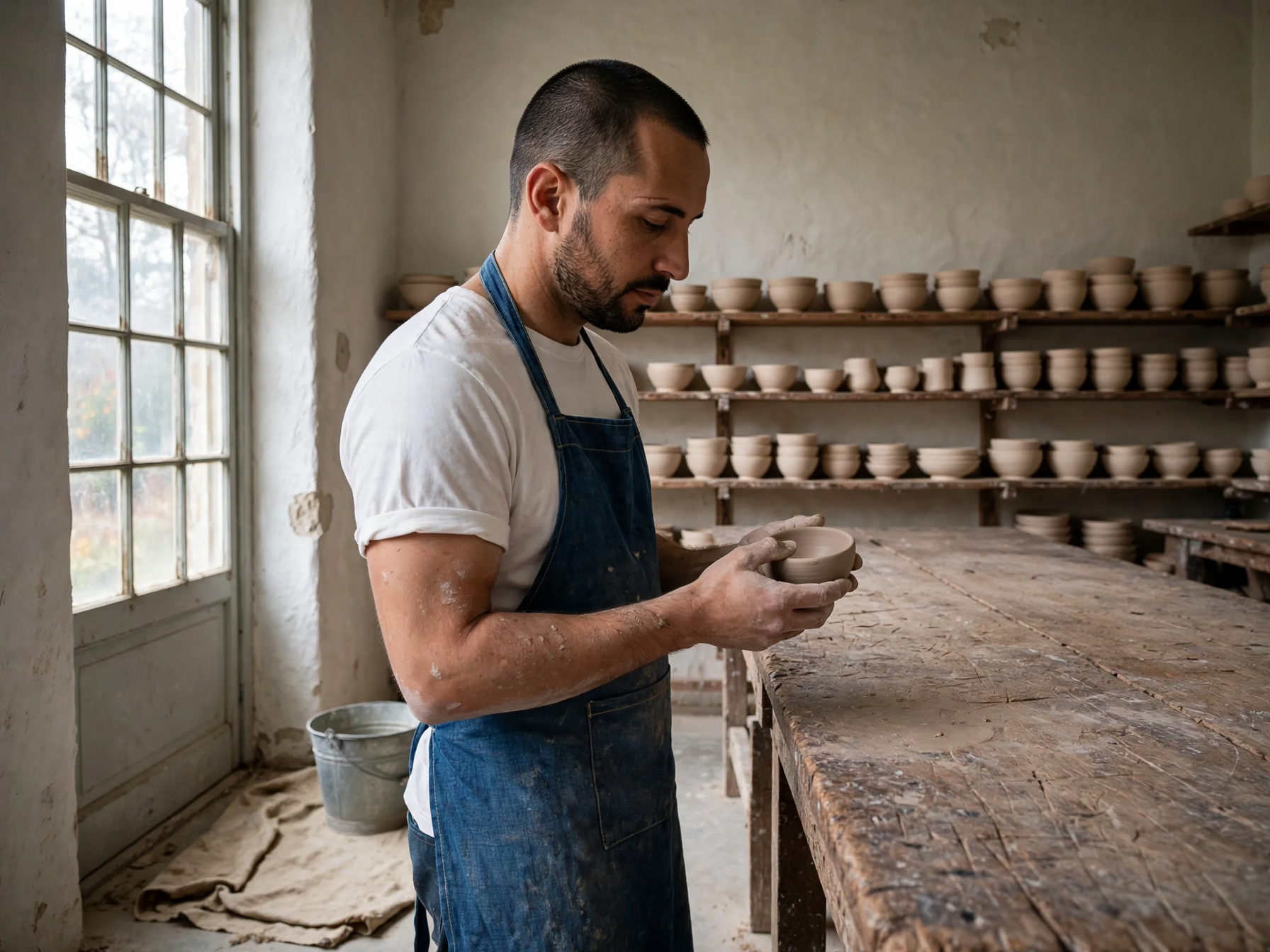
Three references, one photograph

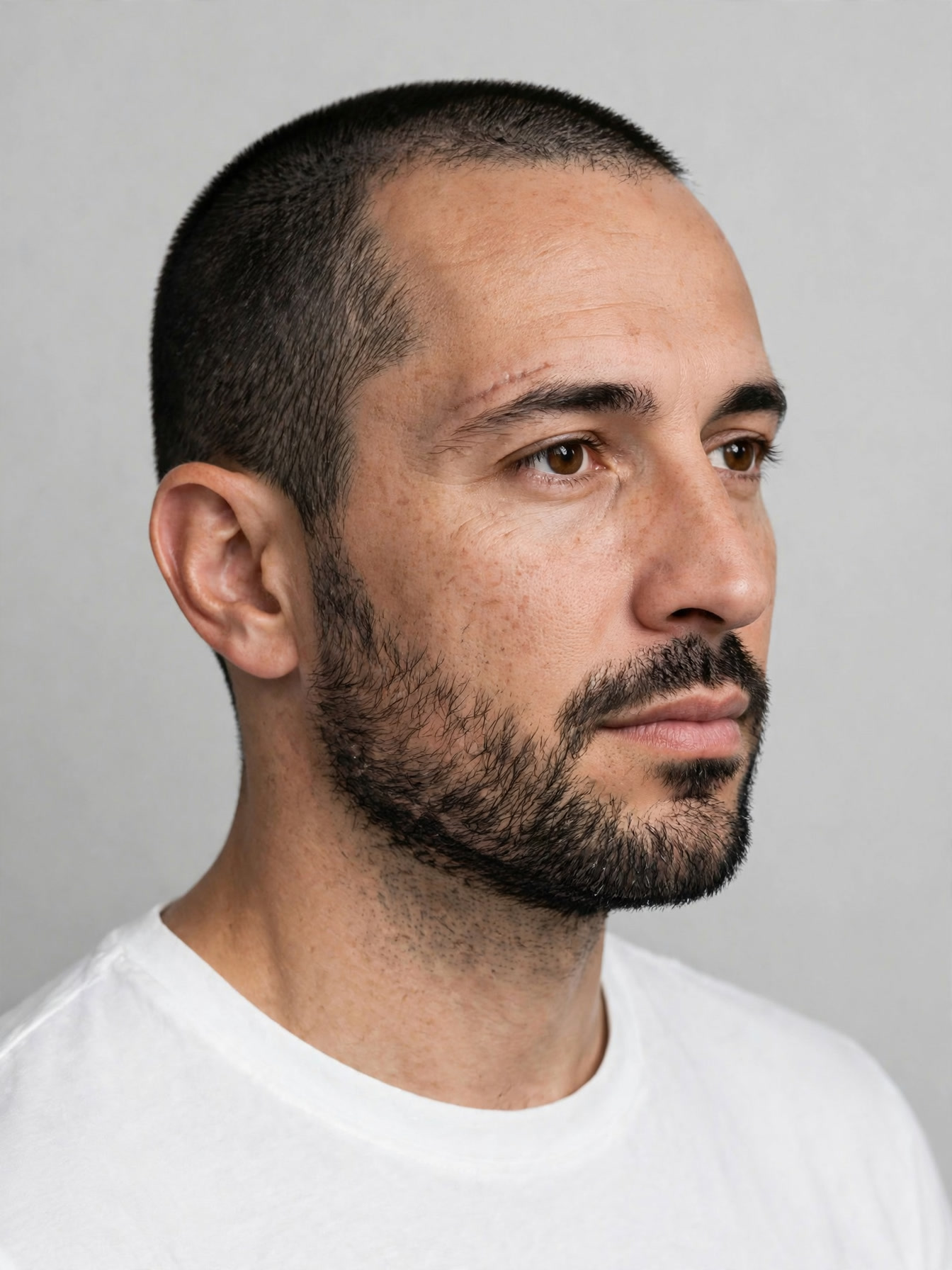
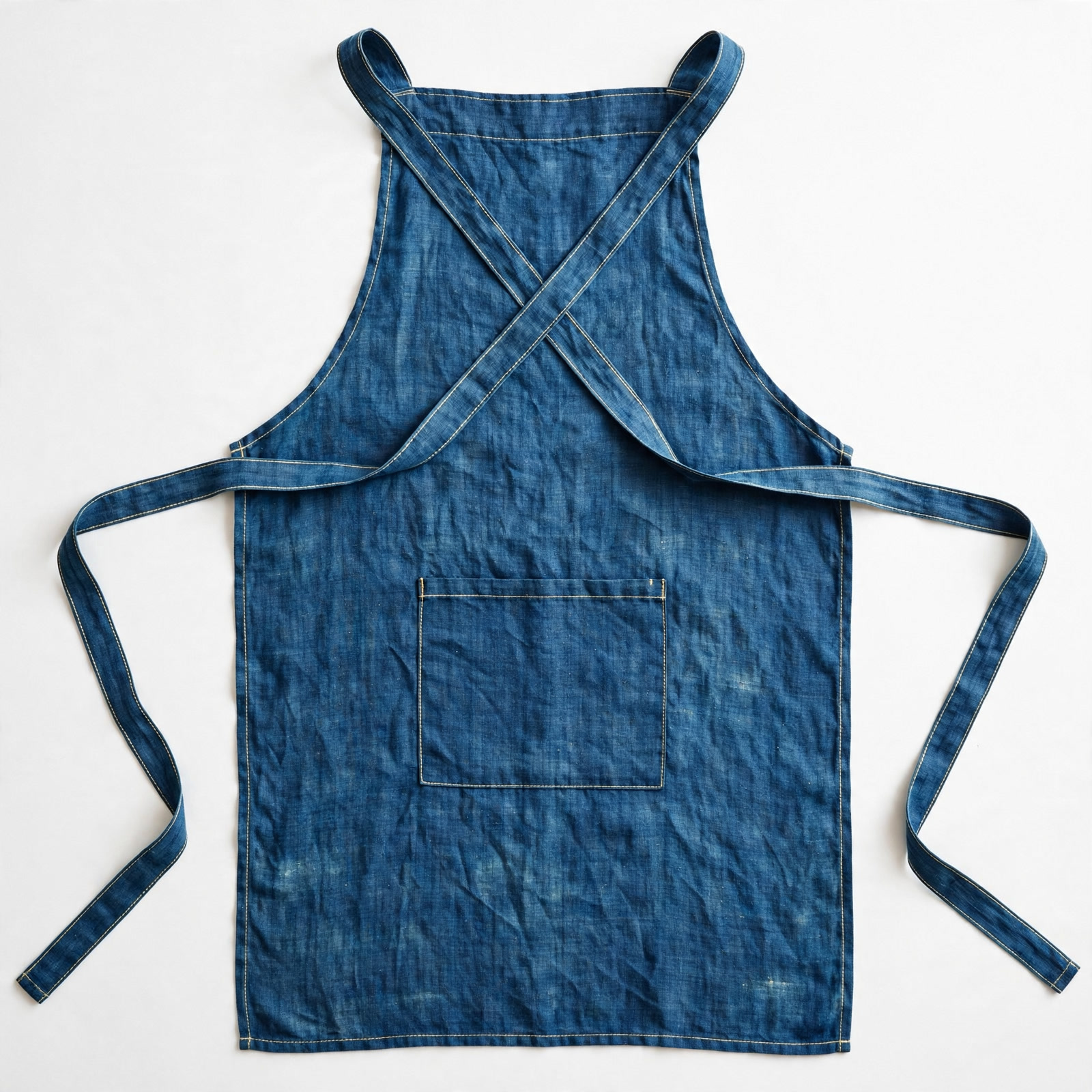
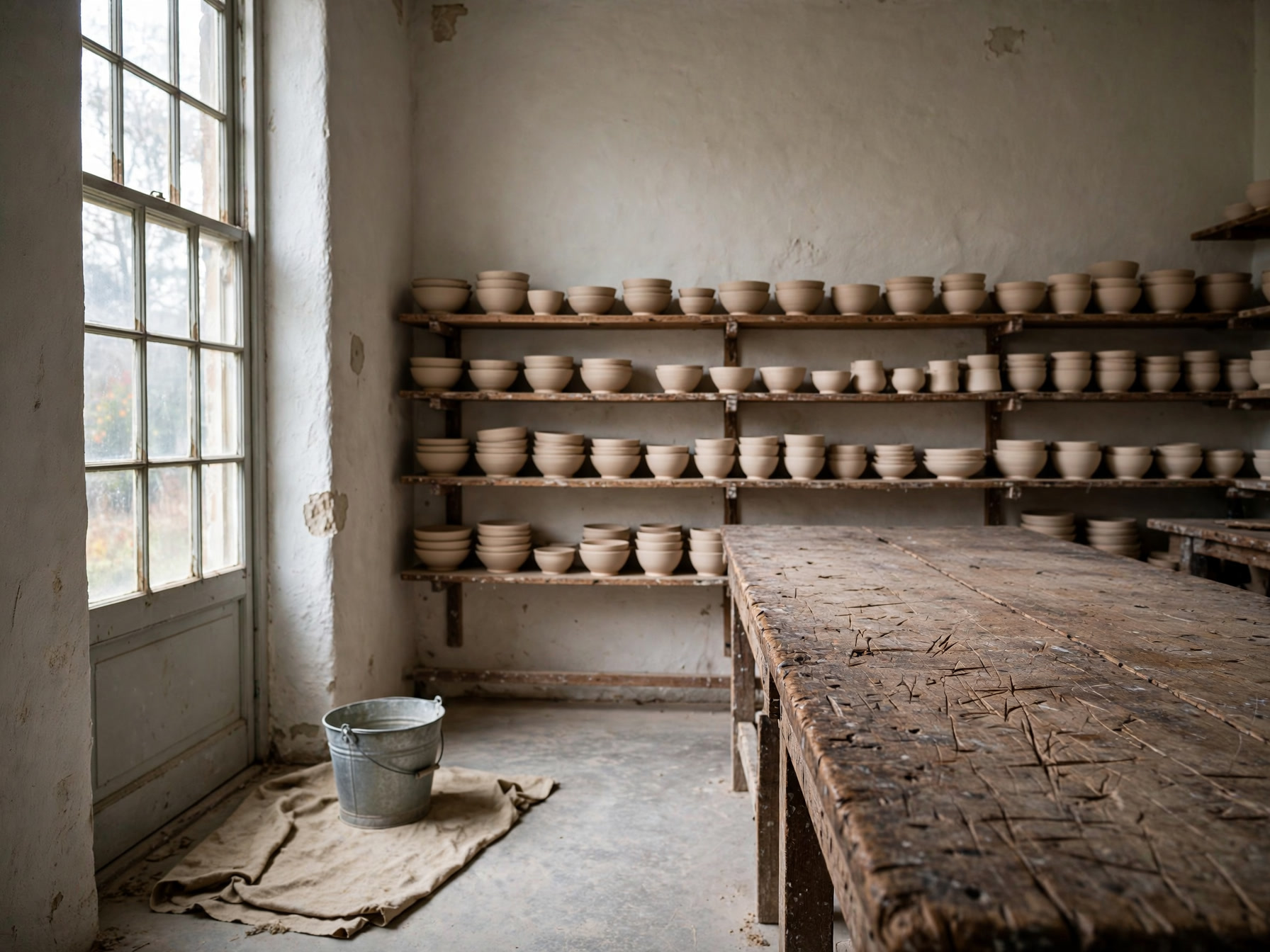
The face comes from one picture, the apron from a second and the workshop from a third, and they arrive as a single shot. The apron keeps its stitching and its pocket, and the window light falls on the man the same way it falls on the room.

Three references, one photograph: Use the first reference for the person, the second for the garment and the third for the setting. Keep the same man, his face, beard, haircut and build unchanged, and place him standing at the long workbench from the third reference, wearing the indigo cross back linen apron from the second reference over a plain white tee with the sleeves pushed to the elbow. Three quarter view from camera left, he is turning a small unglazed bowl in his hands and looking down at it. Match the light of the room: soft daylight from the tall window on the left, warm bounce off the plaster wall, a short shadow under the bench. The apron ties, topstitching and pocket shape stay exactly as in the reference, and the room keeps its own props and layout. Natural skin texture, fine linen weave, clay dust on the forearms, photoreal, 50mm lens, shallow depth of field. No extra people, no text, no logos, no watermark.
Prompt

Use the first reference for the person, the second for the garment and the third for the setting. Keep the same man, his face, beard, haircut and build unchanged, and place him standing at the long workbench from the third reference, wearing the indigo cross back linen apron from the second reference over a plain white tee with the sleeves pushed to the elbow. Three quarter view from camera left, he is turning a small unglazed bowl in his hands and looking down at it. Match the light of the room: soft daylight from the tall window on the left, warm bounce off the plaster wall, a short shadow under the bench. The apron ties, topstitching and pocket shape stay exactly as in the reference, and the room keeps its own props and layout. Natural skin texture, fine linen weave, clay dust on the forearms, photoreal, 50mm lens, shallow depth of field. No extra people, no text, no logos, no watermark.

What you can make with Muse Image

Stills from a film nobody shot

Ask for one moment out of an animated feature and get a frame of it, cel lines over painted backgrounds, the mood already set before a storyboard exists.

A one page explainer that holds up

Timelines, bars and keys where the labels and the figures agree, so the page goes into a deck or a handout without a designer redrawing it.

One person, borrowed wardrobe and room

Combine a face, a garment and a location from separate photographs into a single shot, useful for team portraits, lookbooks and recurring characters.

The technology behind Muse Image

How the model works, based on public documentation and sourced evidence.

Muse Image is the image model from Meta Superintelligence Labs, announced on July 7, 2026 alongside Meta AI and exposed to developers as muse-image-1.0. On the Arena boards dated July 5, 2026 it placed second in text to image, second in single image editing and second in multi image editing, a rare showing across all three at once.

What sets it apart from other image models is tool use. In training it learned to write and run code so that a chart or a QR code is rendered accurately rather than approximated, to look a fact up online before drawing it, and to criticise and revise its own draft inside a chain of thought before the final picture is returned.

Meta's own account of its strengths covers strict instruction following, precise editing that touches only what was named, multi reference composition where a person, an object, a garment, a style and an environment can each come from a different picture, and accurate detail in text and charts. Independent reviews add that the stylistic range is wide, from photoreal through flat illustration to animation, and that long strings of small type are where letters still go wrong.

On Vidney it runs text to image and image to image with up to 10 reference images, in 1:1, 4:3, 3:4, 16:9 and 9:16. There is no resolution picker: every run returns one output size, and a run costs 3 credits.

Sources: prnewswire.com

Who reaches for Muse Image

Muse Image is the image model from Meta Superintelligence Labs, released in July 2026 alongside Meta AI and placed second that week on the Arena boards for text to image, single image editing and multi image editing alike. It is a model that uses tools: it learned to write code so a chart or a QR code comes out accurate, to look a fact up before drawing it, and to criticise and redraw its own first draft before handing anything over. On Vidney it runs text to image and image to image with up to ten reference images, in 1:1, 4:3, 3:4, 16:9 and 9:16, at one output size with no resolution picker, for 3 credits a run. Pick it when the picture has to agree with the facts inside it.

How to generate image with Muse Image

Create AI image with Muse Image on Vidney in three steps.

Glowing panels with one model selected from severalStreams of light forming into an emerging imageA finished image materializing from a vortex of glowing light

Muse Image vs GPT Image 2.5 vs Midjourney V8.1 vs Grok Imagine Image 2.0

Specs side by side with similar models, all runnable on Vidney.

Muse ImageGPT Image 2.5Midjourney V8.1Grok Imagine Image 2.0
Task modesText to Image · Image to ImageText to Image · Image to ImageText to Image · Image to ImageText to Image · Image to Image
Resolution1K · 2K · 4K1K · 2K
Cost3 credits per generation3–5 credits per generation18 credits per generation9–15 credits per generation

What creators say about Muse Image

Recurring themes from public reviews, comparisons and creator write-ups. Both the good and the bad.

What gets praised

  • Instruction following is what reviewers keep returning to: a prompt carrying several conditions comes back with all of them honoured, rather than the two or three a model finds easiest.

  • Composition from several references is the other draw. A face from one picture, a garment from another and a room from a third arrive as one photograph with the light matched across them, which removes a manual compositing step.

  • Charts, diagrams and labelled figures come out with the numbers and the labels in agreement, so a one page explainer can go into a deck without being redrawn by a designer.

Common complaints

  • Small type at length is the weak spot. A paragraph of fine print or a long caption can still come back with letters wrong, so anything type heavy needs reading before it ships.

  • There is one output size and no resolution setting on Vidney, so work headed for large format has to be enlarged afterwards.

Related models

More AI image models you can run on Vidney.

Live

Two speeds on one page, and the words you typed come back spelled right.

3–5 credits per generation
Live

Generate AI image with Nano Banana 2: text to image and image to image, all from one Vidney workspace.

3 credits per generation
Live

Generate AI image with GPT Image 2.0: text to image and image to image, all from one Vidney workspace.

3 credits per generation
Live

Generate AI image with GPT Image 1.5: text to image and image to image, all from one Vidney workspace.

3 credits per generation
MidjourneyMidjourney V7
Live

Generate AI image with Midjourney V7: text to image and image to image, all from one Vidney workspace.

6 credits per generation
Live

Generate AI image with Nano Banana: text to image and image to image, all from one Vidney workspace.

6 credits per generation

Frequently asked questions

What is Muse Image?

Muse Image is an AI image model you can run on Vidney. It supports text to image and image to image from a single workspace.

How much does Muse Image cost per generation?

Muse Image costs 3 credits per generation. The exact credit cost is shown on the generate button before you run it.

What aspect ratios does Muse Image support?

Muse Image supports the following aspect ratios: 1:1, 4:3, 3:4, 16:9, 9:16.

Is Muse Image free to use?

You can start with Muse Image for free on Vidney using your sign-up credits, no card required to try it. After that each run costs 3 credits per generation, and the exact cost is always shown on the generate button before you spend a credit.

Can I use Muse Image images commercially?

Yes. The images you generate with Muse Image on Vidney are yours to use in commercial projects: ads, social posts, client work, and product content. You keep the output; Vidney only handles generation and storage.

Does Muse Image add a watermark?

No. Muse Image images generated on Vidney are delivered clean, with no Vidney watermark, ready to publish or hand to a client as-is.

What are the best Muse Image alternatives?

The closest Muse Image alternatives on Vidney are GPT Image 2.5, Midjourney V8.1, and Grok Imagine Image 2.0. They all run in the same workspace from one credit balance, so you can run the same prompt on each and compare the results side by side.

Do I need an API key or a provider account to use Muse Image?

No. Vidney runs Muse Image for you, so there are no API keys to manage and no separate provider account to set up.

Create with Muse Image now