
Vidney

AI Image Generator

Qwen Image 3.0 Pro

The higher-detail Qwen Image 3.0 tier, for polished final frames and edits that stay faithful to the source.

Vidney Workbench

22 models
0/2000
Required: 15 credits

Output

Sample

What Qwen Image 3.0 Pro does well

01

Texture at every scale

A tea house at dawn in light rain: tatami weave, lacquer, steam, wet stone and glowing shoji each hold their own texture in one frame. Fine detail stays sharp from the cup in front to the garden behind.

Texture at every scale: Photoreal interior of a small Japanese tea house at dawn during light rain, square format: tatami with visible weave, a low black lacquer table with a single ceramic cup and a thread of steam, shoji screens glowing with grey morning light, wet dark stepping stones and a bamboo ladle in the garden seen through the open engawa, a blank hanging scroll on the wall. Directional light from the screens on the left, soft shadows, fine wood grain on every post, precise texture at every scale from the cup to the garden. 50mm lens look, deep focus. No people, no text, no watermark.
Settings
  • Text to image
  • 1:1
Prompt

Photoreal interior of a small Japanese tea house at dawn during light rain, square format: tatami with visible weave, a low black lacquer table with a single ceramic cup and a thread of steam, shoji screens glowing with grey morning light, wet dark stepping stones and a bamboo ladle in the garden seen through the open engawa, a blank hanging scroll on the wall. Directional light from the screens on the left, soft shadows, fine wood grain on every post, precise texture at every scale from the cup to the garden. 50mm lens look, deep focus. No people, no text, no watermark.

02

Rewrite the sign, keep the street

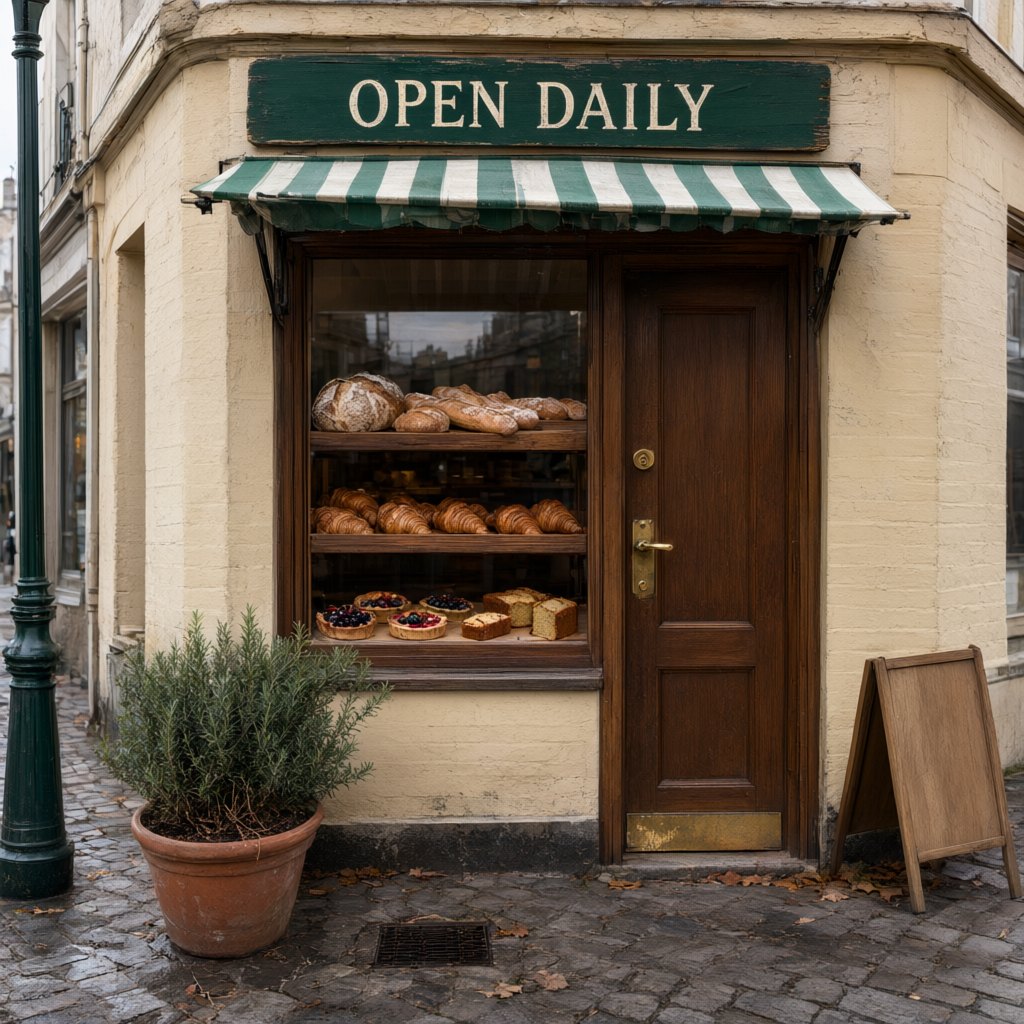
A bakery photo whose board reads OPEN DAILY. One instruction later it reads CLOSED FOR WINTER in the same cream serif, at the same size and angle, a hand-painted note appears on the blank easel sign, and the awning, window display and pavement are untouched.

Rewrite the sign, keep the street: Change only the words on the green sign board from OPEN DAILY to CLOSED FOR WINTER, in the same cream serif lettering, centered on the same board, matching its size, paint texture and perspective. On the blank wooden A-frame on the pavement, add the hand-painted words See you March 1 in white. Keep the awning, the window display, the door, the rosemary pot, the street and the light exactly as they are.
Input
  • Rewrite the sign, keep the street: Source imageSource image
Settings
  • Image to image
  • 1:1
Prompt

Change only the words on the green sign board from OPEN DAILY to CLOSED FOR WINTER, in the same cream serif lettering, centered on the same board, matching its size, paint texture and perspective. On the blank wooden A-frame on the pavement, add the hand-painted words See you March 1 in white. Keep the awning, the window display, the door, the rosemary pot, the street and the light exactly as they are.

03

Three scripts on one grid

An exhibition poster with an English headline, a Chinese and a Japanese title, dates, venue and a small opening-hours line that mixes all three. Every character is right at every size, set on a strict grid beside a photographed vase.

Three scripts on one grid: A trilingual museum exhibition poster, square format, strict Swiss grid on warm white paper. The left half is one large photograph of a blue and white porcelain vase on a grey plinth. The right column holds the type, top to bottom, every line exactly as written: a large black sans-serif headline "BLUE & WHITE"; under it the Chinese title "青花瓷器特展"; under that the Japanese title "染付の器展"; a thin black rule; "Porcelain from Jingdezhen and Arita, 1600 to 1900"; "12 March to 30 June 2027"; "Harbour Museum, Gallery 4"; and at the bottom in small type "Open daily 10:00 to 18:00 · 每日开放 · 毎日開館". Generous margins, crisp kerning, no other text, no logos.
Settings
  • Text to image
  • 1:1
Prompt

A trilingual museum exhibition poster, square format, strict Swiss grid on warm white paper. The left half is one large photograph of a blue and white porcelain vase on a grey plinth. The right column holds the type, top to bottom, every line exactly as written: a large black sans-serif headline "BLUE & WHITE"; under it the Chinese title "青花瓷器特展"; under that the Japanese title "染付の器展"; a thin black rule; "Porcelain from Jingdezhen and Arita, 1600 to 1900"; "12 March to 30 June 2027"; "Harbour Museum, Gallery 4"; and at the bottom in small type "Open daily 10:00 to 18:00 · 每日开放 · 毎日開館". Generous margins, crisp kerning, no other text, no logos.

What to make with Qwen Image 3.0 Pro

Campaign key art

Generate polished portrait or product candidates where material, light, and surface detail will be inspected closely.

Premium product visualization

Describe finish, reflections, architecture, and camera intent together for a controlled high-detail composition.

Lettering edits in photos

Replace the words on a sign, label or menu in an existing photo while the typeface, angle and everything around them stay the same.

The technology behind Qwen Image 3.0 Pro

How the model works, based on public documentation and sourced evidence.

Qwen Image 3.0 Pro is the flagship tier of Alibaba's Qwen Image 3.0 family. The same model supports text-to-image and image editing, including one to three reference images, negative prompts, and up to six output variants per call.

The official API constrains output to PNG with a total pixel budget from about 0.26 to 4.2 megapixels. Alibaba recommends Pro for complex layouts, small multilingual text, realistic materials, and source-based edits where semantic adherence and finish matter more than the Standard tier's lower cost and speed.

Editing an existing frame takes about twice as long as generating a new one, which is the trade for the Pro tier's extra detail.

Sources: github.com

When Qwen Image 3.0 Pro earns the extra budget

Qwen Image 3.0 Pro is the top tier of Alibaba's Qwen Image 3.0 family, made for the frames people inspect closely: layouts with small type in several scripts, photoreal materials, and edits that change the words inside an existing photo without disturbing anything around them. It costs 15 credits here, 3 more than the Standard model, and takes a little longer per image. Keep body copy to short lines: long paragraphs of small type can still slip a letter, so set those in a design tool. Use Pro for posters, packaging finals, key art and source photos where one wrong character or a shifted shadow would be noticed. Use Qwen Image 3.0 for everyday listings and menus, and Nano Banana 2.1 for fast, low-cost drafts.

How to generate image with Qwen Image 3.0 Pro

Create AI image with Qwen Image 3.0 Pro on Vidney in three steps.

Glowing panels with one model selected from severalStreams of light forming into an emerging imageA finished image materializing from a vortex of glowing light

Qwen Image 3.0 Pro vs Flux 3 Klein vs Nano Banana 2.1 vs GPT Image 2.5

Specs side by side with similar models, all runnable on Vidney.

Qwen Image 3.0 ProFlux 3 KleinNano Banana 2.1GPT Image 2.5
Task modesText to Image · Image to ImageText to Image · Image to ImageText to Image · Image to ImageText to Image · Image to Image
Resolution—1K · 2K · 4K1K · 2K · 4K1K · 2K · 4K
Cost15 credits per generation3 credits per generation3 credits per generation3–5 credits per generation

Related models

More AI image models you can run on Vidney.

One model that writes a new frame from text and revises an existing one from a plain instruction, both at 1K square.

12 credits per generation
MidjourneyMidjourney V8.1
Live

The Midjourney look you already know, with headlines that finally read.

18 credits per generation
Live

Generate AI image with Nano Banana Pro: text to image and image to image, all from one Vidney workspace.

12 credits per generation
Live

Generate AI image with Seedream 4.5: text to image and image to image, all from one Vidney workspace.

12 credits per generation

xAI's image model plans the layout like a designer, so the small print survives.

9–15 credits per generation

Generate AI image with Seedream 5.0 Lite: text to image and image to image, all from one Vidney workspace.

9 credits per generation

Frequently asked questions

What is Qwen Image 3.0 Pro?

Qwen Image 3.0 Pro is an AI image model you can run on Vidney. It supports text to image and image to image from a single workspace.

How much does Qwen Image 3.0 Pro cost per generation?

Qwen Image 3.0 Pro costs 15 credits per generation. The exact credit cost is shown on the generate button before you run it. That is about $0.45 per run at the Starter plan rate ($0.03 per credit).

What aspect ratios does Qwen Image 3.0 Pro support?

Qwen Image 3.0 Pro supports the following aspect ratios: 1:1, 4:3, 3:4, 16:9, 9:16.

Is Qwen Image 3.0 Pro free to use?

Partly. New accounts get 10 to 30 free credits depending on country, no card required, and Qwen Image 3.0 Pro costs 15 credits per generation. Whether your sign-up credits cover a run depends on your balance; the exact cost is always shown on the generate button before you spend a credit.

Can I use Qwen Image 3.0 Pro images commercially?

Yes. The images you generate with Qwen Image 3.0 Pro on Vidney are yours to use in commercial projects: ads, social posts, client work, and product content. You keep the output; Vidney only handles generation and storage.

Does Qwen Image 3.0 Pro add a watermark?

Only on the free plan. Free-plan downloads carry a small Vidney watermark; on any paid plan, Qwen Image 3.0 Pro images download clean, ready to publish or hand to a client. Upgrading also removes the watermark from images you already made.

What are the best Qwen Image 3.0 Pro alternatives?

The closest Qwen Image 3.0 Pro alternatives on Vidney are Flux 3 Klein, Nano Banana 2.1, and GPT Image 2.5. They all run in the same workspace from one credit balance, so you can run the same prompt on each and compare the results side by side.

Do I need an API key or a provider account to use Qwen Image 3.0 Pro?

No. Vidney runs Qwen Image 3.0 Pro for you, so there are no API keys to manage and no separate provider account to set up.

Create with Qwen Image 3.0 Pro now



