

Video effect
AI Baby Dance
Grown-ups shrink into a baby version of themselves and dance. Toddlers skip straight to the dancing.
AI baby dance videos made from one photo
Every clip below started as one still photo. The adults shrink into a baby wearing a tiny version of the same outfit, then bounce, sway and clap; the toddler in the kitchen just dances.
Same outfit, baby size
After a short glow, the person becomes a chubby baby in a tiny version of what they had on: the navy suit and red tie, the yellow raincoat and red boots. Then the baby bounces, sways, waves and claps for the rest of the clip. Hair color and skin tone carry over; small extras like glasses may not.
Start free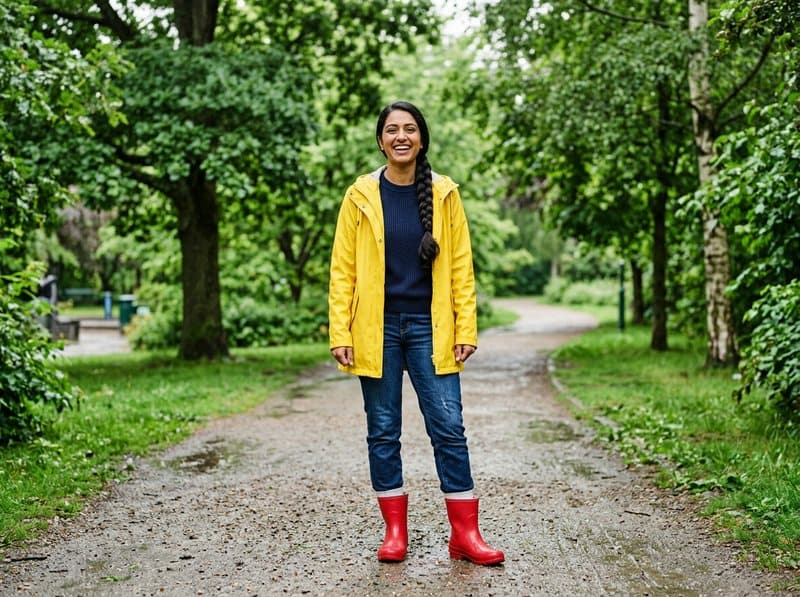 Your photo
Toddlers just dance
Upload a photo of your toddler and there is nothing to shrink: they dance where they stand, in their own clothes, in their own room. Open "Adjust the prompt" to ask for a different move, like a spin or a little march.
Start freeHow to make an AI baby dance video
Three steps, about a minute of waiting.



At a glance
- Each video costs 10 credits and lasts 5 seconds.
- New accounts receive 10 to 30 free credits, so your first video fits within the minimum free allowance.
- You can also pay once with no subscription: $2.99 for one video or $5.99 for three, and those credits stay valid for 12 months.
- The video is silent, and its aspect ratio follows your photo.
- The model is made by ByteDance, and most videos are ready in under 60 seconds.
- Free-plan downloads carry a small Vidney watermark; paid plans download without it, and so do downloads for 12 months after any one-time purchase.
Frequently asked questions
What is the AI baby dance trend?
A TikTok and Reels trend of AI clips in which a baby bounces and sways to a beat. People make them from photos of their own kids, and from photos of adults turned into babies.
Can I turn myself into a dancing baby?
Yes. Upload a photo of an adult and the clip turns them into a baby version of themselves, wearing the same outfit in baby size, and then the baby dances. Face shape, hair color and skin tone carry over; accessories like glasses may disappear.
Is it free? How many credits does it cost?
New accounts get free credits, enough for a first video. After that, one 5-second video costs 10 credits at the default settings, and the price is on the button before you confirm. Credits come with a subscription plan; the cheapest, Starter, is $9 a month. You can also pay once with no subscription: $2.99 for one video or $5.99 for three, and those credits stay valid for 12 months.
What photo works best?
A full-body photo of one person standing, head to feet in the frame, as a JPG, PNG or WebP. The background stays as it is in your photo, only the person changes and moves. A vertical photo gives a vertical clip.
Does the video come with music?
No. The default clip is silent, so you can add the baby dance sound you like in TikTok, Reels or CapCut when you post.
Do I own the video? Is there a watermark?
Yes, the video is yours to use, including commercially, subject to the source model terms. Downloads on the free plan carry a small Vidney watermark; on any paid plan they download clean.
