
Seedance 2.5 Flash Review: Speed, Credits and 7 Four-Second Tests
Published 2026-11-26 · Data measured 2026-11-26
Seedance 2.5 Flash makes sense for a four-second storyboard shot when you can judge the clip against a clear visual target. In our November 26 Vidney tests, a robot landed close to its supplied end frame, but a ramen-shop clip changed a word in its Japanese line. Use it to check framing and motion. If the scene hinges on an exact line reading, plan to record that line separately.
| Question | What we found on November 26, 2026 |
|---|---|
| How long did it take? | A median of 102 seconds from submission to confirmed completion across six clips. The shortest took 89 seconds and the longest 149. |
| What does it cost on Vidney? | Four seconds cost 32 credits at 480p or 72 at 720p. Five seconds cost 40 or 90 credits. |
| What can I make? | Text to video, image to video with optional end frame, or video guided by up to 10 reference images. The available durations are 4 to 30 seconds at 480p or 720p. |
| Can I use audio? | You can generate a soundtrack at the same credit price. Video and audio uploads are unavailable as references in this release. |
| Did every attempt finish? | Six of seven finished. The night ferry test was rejected during a content check and incurred no charge. |
Speed and price: start at 480p for a framing test
At four seconds, moving from 480p to 720p adds 40 credits. The lower setting was enough to check whether our vertical test filled a phone-shaped frame and whether the ramen sign read OPEN. Try 720p when small details or a supplied end frame matter to the shot. This batch used different scenes across resolutions, so it cannot tell you how much visual improvement to expect from changing the setting alone.
The timing includes the wait between submission and observed completion. We used one attempt per prompt and kept every outcome. We did not run the same prompts with the standard Seedance 2.5 model or test how the wait changes with demand. For upstream model capabilities, see the official Seedance 2.5 series guide. The controls and credit prices here are those shown on Vidney’s Seedance 2.5 Flash page.
End-frame control: check the actual last frame
For the square robot shot, we supplied a full-body starting image and a face close-up ref for the ending. The last frame scored 0.972 against the target using structural similarity (SSIM, where 1 indicates identical images under that comparison). The independent check resized the 960 × 960 clip frames to the 1024 × 1024 target and compared frame 96 out of 97. Earlier frames in the final seconds still differed visibly from the target.
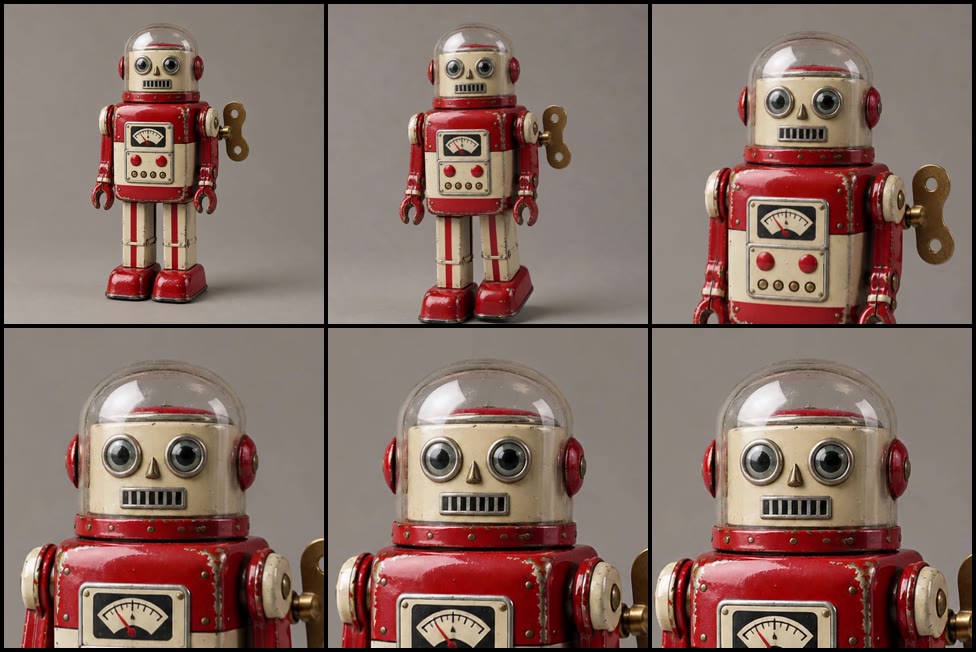

Original robot prompt
The vintage tin robot's wind-up key turns, it takes two stiff steps forward with a clockwork rattle, and the camera pushes in until its face fills the frame. Plain gray studio background, soft light.
We also supplied two reference images in a separate 720p request. That produced a wide shot with a tin robot and a rainy setting. If your priority is a specific opening or ending composition, use the corresponding frame control. Use image references when you want the clip to draw from a subject or a setting without specifying an endpoint.
The sign was right. The spoken line changed.
The 480p ramen-shop clip kept OPEN on the sign. The prompt said 「へい、お待ち!」 and the result sounded like 「はい、お待ち」. Two speech transcriptions agreed on 「はい」, while another omitted the first word, so the opening syllable merits a listen before you use it. In a separate anime prompt, the second line was timed for seconds four through eight, but the request allowed only four seconds. That case tests a mismatch in the brief, rather than how well Flash handles an eight-second exchange.
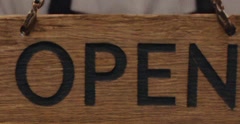
Original ramen prompt
A tiny ramen shop at night. Above the counter hangs a wooden sign that reads exactly "OPEN". The chef sets a steaming bowl in front of the camera and says in Japanese, "へい、お待ち!" Warm paper lanterns, broth bubbling.
All seven requests
Everything below was submitted once on November 26, 2026. We kept all six completed clips with sound and compressed them for playback without cutting or retiming them. Dimensions are from the original files. The missing seventh clip was a rejected request.
| Request | Input and setting | Saved outcome |
|---|---|---|
| 1. Dandelion at dusk | Text, 480p | 854 × 480 clip |
| 2. Rooftop anime conversation | Text, 480p | 854 × 480 clip. The four-second duration did not accommodate the second line. |
| 3. Night ferry | Text, 480p | Rejected during a content check. The test incurred no charge. |
| 4. Warehouse breakdance | Text, 480p | 480 × 854 clip |
| 5. Ramen-shop sign and dialogue | Text, 480p | 854 × 480 clip. Sign legible, opening word changed. |
| 6. Wind-up robot | Start and end images, 720p | 960 × 960 clip. Final-frame SSIM 0.972. |
| 7. Robot by a rainy window | Two reference images, 720p | 1280 × 720 clip |
FAQ
How many credits should I set aside to try both resolutions?
A four-second attempt at each resolution totals 104 credits. The amount is the same across the three input modes, with sound on or off.
Is 720p always 1280 × 720?
Our 720p landscape file was 1280 × 720. Our 720p square image-to-video file was 960 × 960, following the supplied opening image’s shape.
How many references can I upload?
Vidney accepts up to 10 still images in reference mode. We tested two. For a specific ending image, use the image-to-video controls.
How long should I budget for the first result?
Allow about two minutes as a planning figure. Six completed four-second clips took 89 to 149 seconds in this run.
Can I make a 30-second clip?
The available duration extends to 30 seconds. This test used four seconds throughout, so it gives no evidence about continuity or dialogue in a full 30-second cut.
What if a clip is rejected?
The rejected ferry test incurred no charge and did not use Vidney credits. On Vidney, if a request is definitively rejected after credits are deducted, those credits are returned.
Try it with one acceptance check
Pick Flash for a storyboard shot, a phone-shaped draft or a transition between two supplied stills. Before you generate, decide what has to survive the clip: the final composition, a gesture or a readable sign. For an exact spoken line, check the audio before editing it into a sequence. Choose another workflow if you need native 1080p output or must upload a reference video.
Open Seedance 2.5 Flash on Vidney, select four seconds at 480p, and use one shot with one action to establish a baseline. When the ending matters, use the start and end image slots, then pause on the very last frame.
The model in this article, on Vidney
Every model in this article, one workbench
Same workbench. Switch the model, rerun the prompt, compare side by side.