
How to Add Santa to a Photo for Free in 2026: Realistic AI Guide and Tool Comparison
Published 2026-11-29 · Data measured 2026-11-29
To add Santa Claus to a photo for free in 2026, upload a family, pet, or empty living room picture to an AI scene-editing tool instead of pasting a flat PNG sticker. On Vidney's Add Santa to Photo tool, new accounts in most countries receive 6 to 30 free starter credits with no credit card required, covering 2 to 10 realistic Santa photos at 3 credits per image on Google's Nano Banana 2.1 model (six payment-restricted countries start with 0 free credits). You pick from four tested scenes: posing beside your family, kneeling by the tree leaving gifts, eating cookies at the table, or peeking from a doorway. Faces, clothes, furniture, and room light stay intact, with a 52-second median wait across six production sample runs on October 24, 2026. Free downloads carry a small watermark, while one-time clean downloads start at $0.99 for one photo or $1.99 for three.
Disclosure and method: Vidney is our product. Competitor public free allowances, pricing pages, and workflows below were checked directly on live public pages on November 29, 2026. All Vidney timings and generated dimensions come from six logged production sample runs on October 24, 2026 using Nano Banana 2.1 (1K tier, 3 credits per image), with no new paid generations run for this guide.
Four ways to add Santa to a photo in 2026 compared
Most people searching for how to put Santa in a picture want one of two outcomes: a realistic family or pet photo without waiting in a mall line, or a living room "caught Santa on camera" proof photo for kids on Christmas Eve. Choosing the wrong type of tool is why many holiday edits end up looking pasted on.
| Method and example tools | Best fit | Free tier and paid price (checked Nov 29, 2026) | Realism and lighting match | Main trade-off |
|---|---|---|---|---|
| Dedicated AI scene tool (Vidney Add Santa to Photo) | Family photos, pets, and empty living room Santa proof | 2 to 10 free photos in most countries (6 to 30 credits, no card; 0 in 6 payment-restricted countries); paid from $0.99 for 1 photo or $1.99 for 3 | Matches room direction of light, shadows, and grain; 4 preset scenes | Free downloads include a small watermark; ~52s wait (6-run median, Oct 24, 2026) |
| No-signup daily AI web tools (Petalpic, ChristmasPFP) | Quick single-try browser test without creating an account | Petalpic: 1 free photo/day, paid $4.99 for 50 credits; ChristmasPFP: first 4 free, paid $1.99 per run | Natural AI blending for single-room or group shots | Fixed output presets; fewer dedicated indoor scenes than multi-scene editors |
| Sticker and Catch Santa apps (Catch Santa in My House, Canva) | Placing a manual Santa cutout or adding just a Santa hat | Free app download with in-app purchases; Canva Santa Hat editor online | Manual cutout stickers often mismatch indoor shadows and floor perspective | Flat pasted look on real rooms; mobile app install required for prank apps |
| General AI chat editors (ChatGPT, Google Gemini) | Custom one-off prompts and brainstorming | Free tiers with daily usage limits; account login required | Flexible prompt control when you write detailed instructions | Often alters family faces or moves room furniture; visible AI watermark on Gemini |
How to add Santa to a photo for free with AI
Follow these four steps in your browser on desktop or phone. No app installation or prompt writing is required.
- Choose a photo with open space: Pick a clear JPG, PNG, or WebP photo up to 10 MB of your family, pet, or empty living room by the tree, leaving a small open spot where Santa can stand, sit, or kneel.
- Upload your photo to Vidney: Open Vidney's Add Santa to Photo tool in your browser and upload your single photo with no software install required.
- Pick one of the four scenes and create: Choose Pose with us, Leaving gifts, Eating the cookies, or Peeking in, check whether your account has free starter allowance or the one-time price before confirming, and wait about a minute.
- Inspect faces and download: Check faces, hands, and shadow direction at full size, then save your photo or run another scene on the same original picture.
How to catch Santa in your house on Christmas Eve (living room proof)
Parents looking for "catch Santa in my house" photos usually do not want a posed portrait. They want a candid living room snapshot that looks like someone quietly stepped into the hallway at midnight and snapped proof before Santa disappeared. Two built-in scenes on Vidney's Add Santa to Photo page are designed specifically for empty-room proof shots.
- Leaving gifts by the tree: Take a horizontal photo of your decorated Christmas tree with empty floor space beside the skirt. Turn off harsh overhead ceiling lights and let the tree lights or a warm table lamp light the room. The AI places Santa kneeling beside the tree with a red gift sack, glancing over his shoulder with a finger to his lips while keeping every ornament, rug, and piece of furniture unchanged.
- Eating cookies at the table: Photograph the real plate of cookies and glass of milk you set out with an empty chair visible beside the table. The AI seats Santa in that spot holding a cookie and the glass of milk in the same indoor light.
- Peeking from a doorway: Photograph a child near the tree with an open doorway or hallway corner to one side so Santa can peek around the frame without blocking the child.
Six real production sample tests (October 24, 2026)
Every sample below ran through Vidney's live generation pipeline (Google Nano Banana 2.1, 1K tier, 3 credits per run) on October 24, 2026 using fictional AI-generated source photos so no real person's image is reused. All six generated files measured 1200 x 896 pixels directly from the model; the web preview JPEGs embedded below are resized to 1024 x 765 pixels (from 800 x 597 pixel preview inputs) for fast page loading. Observed wait times across the six concurrent jobs ranged from 35 to 64 seconds, with a 52-second median.
| Sample case | Scene preset | Generated pixels (raw) | Web preview JPEG | Observed wait (Oct 24, 2026) | What stayed intact and what was covered |
|---|---|---|---|---|---|
| Family on the sofa | Pose with us | 1200 x 896 | 1024 x 765 | 50 s | All four family faces, clothes, and living room unchanged; Santa leans in behind the right side of the sofa |
| Empty living room by tree | Leaving gifts | 1200 x 896 | 1024 x 765 | 54 s | Tree, rug, fireplace, and ornaments unchanged; Santa kneels beside the tree with a gift sack |
| Kitchen cookie table | Eating the cookies | 1200 x 896 | 1024 x 765 | 64 s | Same table, cookies, milk glass, and room; Santa sits in the chair behind the table |
| Golden retriever by fireplace | Pose with us | 1200 x 896 | 1024 x 765 | 35 s | Same dog face, coat color, and hearth; Santa sits cross-legged beside the dog, naturally covering a small plush toy on the rug |
| Girl by the Christmas tree | Peeking in | 1200 x 896 | 1024 x 765 | 44 s | Same girl, outfit, and tree; Santa peeks half-body around the doorway corner |
| Family of five | Pose with us | 1200 x 896 | 1024 x 765 | 56 s | All five faces, expressions, and hand positions preserved; Santa stands on the side, covering a small poinsettia side table behind him |
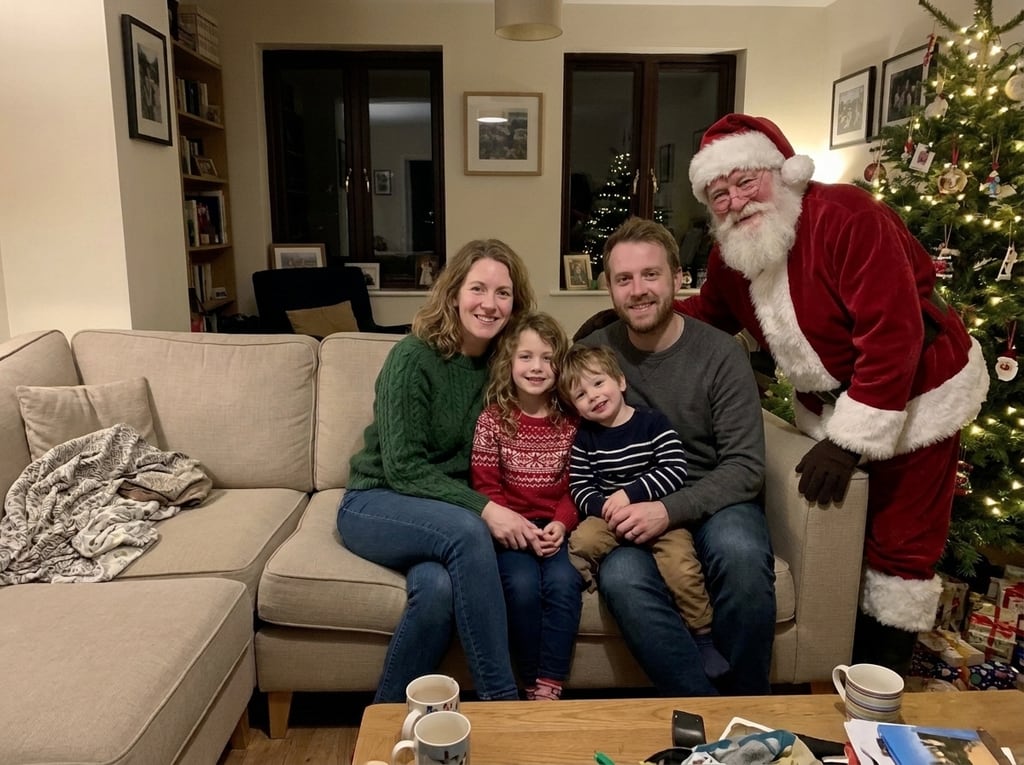
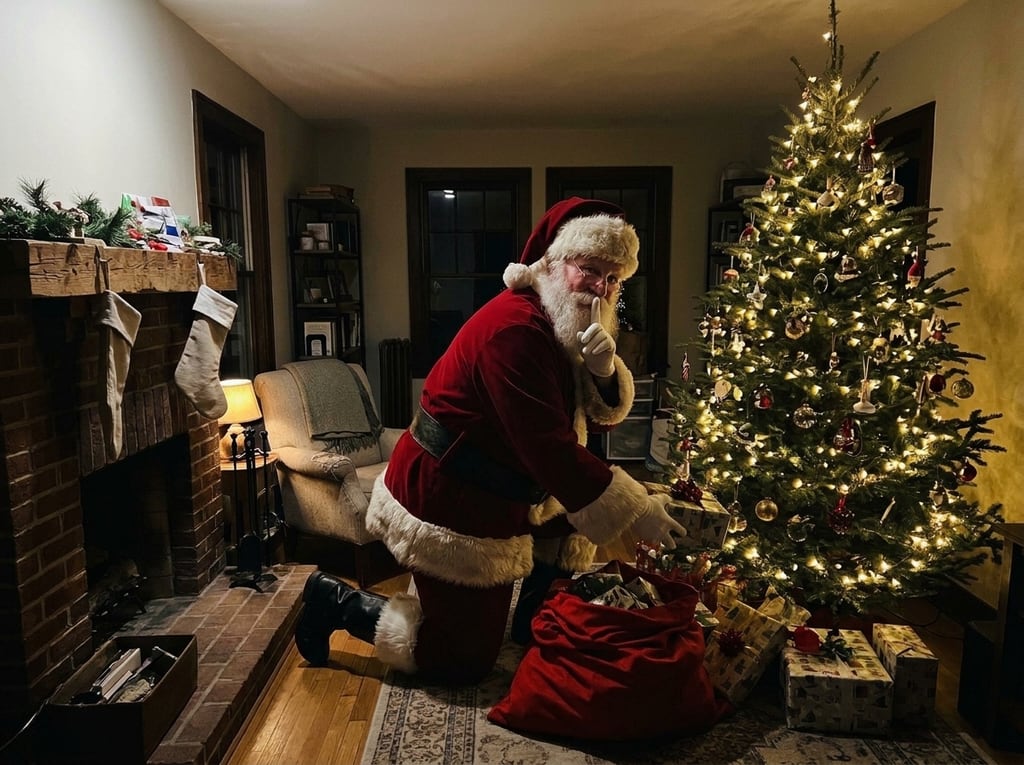
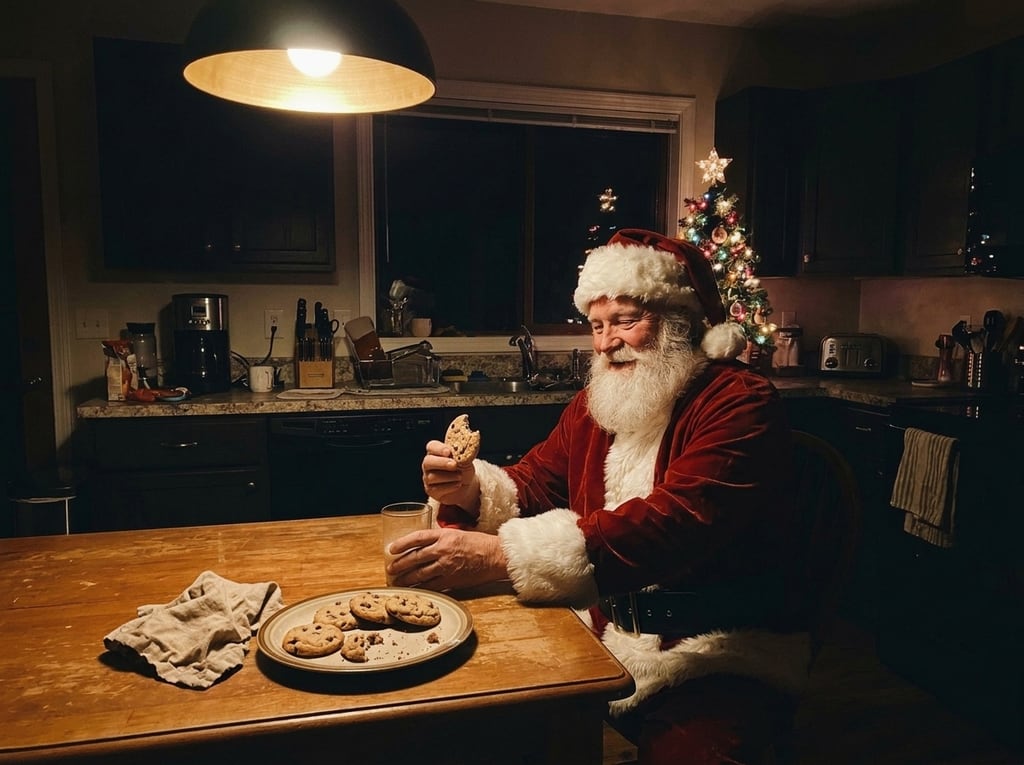
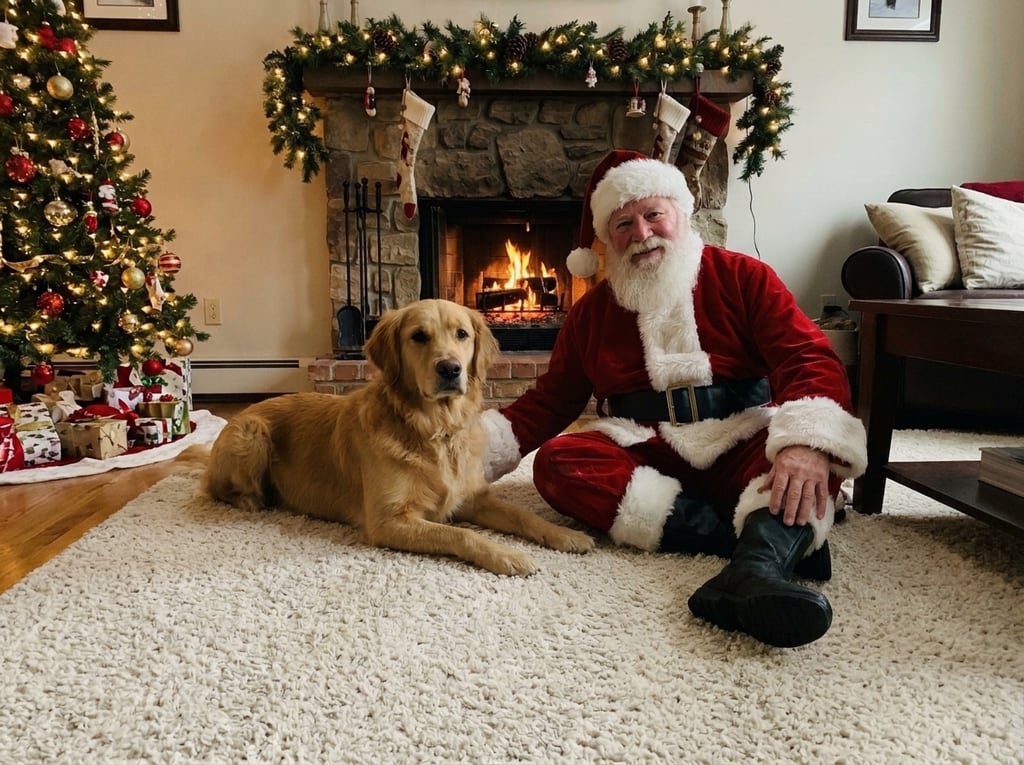
What to check before sharing or printing: inspect faces, fingers, and the floor shadow under Santa's boots at 100% zoom. Because Santa occupies real space in the scene, anything sitting directly behind where he stands (such as the small rug toy in the dog photo or the side table in the five-person family shot) can be covered naturally. If a face drifts or Santa lands in an awkward spot, re-running once on a shot with slightly more open floor space fixes most layout issues.
Vidney Santa photo pricing, free credits, and watermark rules (verified November 29, 2026)
All prices and credit tiers below come directly from Vidney's live pricing configuration (verified November 29, 2026). Every run on /photo-effects/add-santa-to-photo uses 3 credits on Nano Banana 2.1 (1K tier).
| Option | Credits included | Santa photos (3 credits each) | Price (USD, before tax) | Effective cost per photo | Watermark and validity |
|---|---|---|---|---|---|
| Free signup (high-income regions: US, CA, UK, EU, AU, JP, KR) | 30 credits (no card) | 10 photos | $0 | $0.00 | Small Vidney watermark; credits never expire |
| Free signup (upper-middle income: MX, BR, and similar regions) | 15 credits (no card) | 5 photos | $0 | $0.00 | Small Vidney watermark; credits never expire |
| Free signup (lower-income regions) | 6 credits (no card) | 2 photos | $0 | $0.00 | Small Vidney watermark; credits never expire |
| Payment-restricted regions (RU, BY, IR, KP, CU, SY) | 0 credits | 0 free photos | N/A | N/A | No free signup allowance |
| One-time: 1 photo (no subscription) | 3 credits | 1 photo | $0.99 | $0.99 | Clean download (no watermark) for 12 months |
| One-time: 3 photos (no subscription) | 9 credits | 3 photos | $1.99 | $0.66 | Clean download (no watermark) for 12 months |
| Starter monthly subscription | 300 credits / month | 100 photos / month | $9 / month | $0.09 | Clean download (no watermark) |
| Starter annual subscription | 300 credits / month | 100 photos / month | $79 / year ($6.58 / month) | ~$0.07 | Clean download (no watermark) |
If you only need one holiday photo to show your kids on Christmas morning, paying $0.99 once (or $1.99 for three tries across different rooms) avoids starting any monthly renewal and removes the watermark immediately. If you are also building a full holiday portrait from separate family snapshots, compare AI Christmas Family Photo or our AI Christmas family photo generator comparison.
Frequently asked questions
How can I add Santa to a photo for free without a credit card?
Create a free Vidney account and upload your picture on the Add Santa to Photo page. New accounts in most countries receive 6 to 30 free starter credits with no credit card required, covering 2 to 10 Santa photos at 3 credits per image (30 credits in the US, UK, Canada, EU, Australia, and Japan; 15 credits in countries like Mexico and Brazil; 6 credits in lower-income regions). Six payment-restricted countries (Russia, Belarus, Iran, North Korea, Cuba, and Syria) receive 0 free credits.
How do I make a realistic caught Santa in my house photo for my kids?
Take a photo of your empty living room next to the decorated Christmas tree or a table with cookies and milk in warm indoor lighting, then choose Leaving gifts or Eating the cookies. Keeping the camera still and leaving floor or chair space lets AI match your room's exact lighting and shadows instead of pasting a flat sticker.
Will AI change my family's faces, clothes, or living room furniture?
No. The prompt locks the existing people, pets, expressions, outfits, furniture, decorations, framing, and light, adding exactly one Santa Claus. Santa can naturally cover whatever sits directly behind him, such as a chair or a small plant, which happened in two of our six sample runs while every face and room stayed intact.
Can I add Santa next to my dog or cat?
Yes. Upload a photo of your pet and select Pose with us so Santa sits or kneels beside them without altering their coat or markings. If you want to dress your pet in a Santa suit instead, use Vidney's AI Christmas Pet Photo page.
How much does it cost to remove the watermark without a subscription?
Free-plan downloads carry a small Vidney watermark. You can pay once with no subscription at $0.99 for one photo or $1.99 for three photos ($0.66 each), and any one-time purchase unlocks clean watermark-free downloads for 12 months. For higher volume, Starter starts at $9 per month for 300 credits ($0.09 per Santa photo).
What resolution and wait time should I expect?
Across six concurrent production runs logged on October 24, 2026 using Google's Nano Banana 2.1 model (1K tier, 3 credits), every generated output measured 1200 x 896 pixels with a median wait of 52 seconds (range 35 to 64 seconds). Showcase previews displayed on this page are resized to 1024 x 765 pixels for faster loading.