
MAGI-2 Review: 10 Test Runs, Real Wait Times, and a 30-Second Clip
Published 2026-11-26 · Data measured 2026-11-26
On Vidney's standard MAGI-2 path, four 4-second text or image runs took about 3.5 to 4.5 minutes. The median across all six standard-path runs was 4 minutes 10 seconds. Our 30-second 1080p clip arrived in 16 minutes 26 seconds with both scripted English lines intact and one unplanned cut at 21.4 seconds.
| What you need to know | What we found |
|---|---|
| Best fit | Short scripted dialogue and scenes built around one clear camera move. |
| What you can start with | A text prompt, a starting image with an optional end frame, or image and audio references. |
| Wait time | About 3.5 to 4.5 minutes for four 4-second runs on the standard text or image path. One 4-second reference run took 26 minutes 13 seconds. |
| Length and price | 4 to 30 seconds at 1080p with sound on Vidney. A 5-second clip costs 40 credits at launch. |
| Test dates | November 25 and 26, 2026, Taipei time. |
MAGI-2 and MAGI-2 Preview
Vidney runs the full MAGI-2, which Sand.ai released on November 24, 2026. The August Preview is a separate, downloadable research model with a shorter clip limit.
| Capability | Full MAGI-2 | MAGI-2 Preview |
|---|---|---|
| Model size | 480 billion total parameters, about 28 billion active at a time | About 114 billion total and 6 billion active |
| Clip length | Up to 30 seconds | 10 seconds |
| Picture and sound | Synchronized video and audio, with an upscaling stage for 1080p output at 25 fps in Sand.ai's announcement | Video and audio generated together |
| Inputs | Sand.ai's native interface supports text and up to 20 references (10 images, 5 videos and 5 audio clips) | Text, or a starting image with text |
| Model weights | Sand.ai announced a future release | Code and weights available under Apache 2.0 |
Official sources. Full MAGI-2 announcement · Preview announcement · Preview model card
The 30-second test delivered the full scene and both lines
The pier clip ran for 30 seconds and kept the same grandfather and granddaughter through both lines of dialogue. The prompt opened with “One continuous 30-second shot with no cuts.” At 21.4 seconds the framing jumped closer, and the girl's net bag disappeared across the cut.
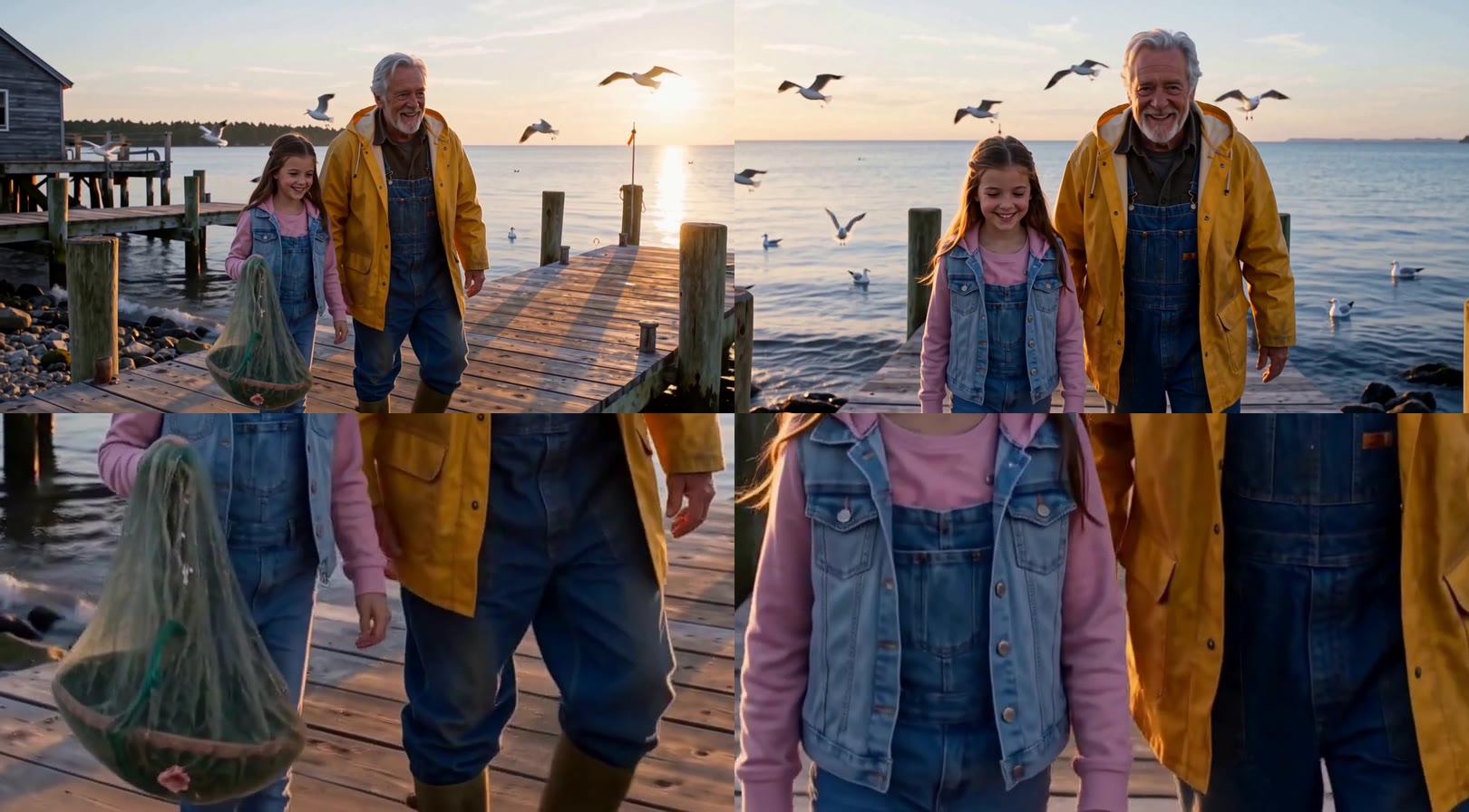
We checked the file with ffprobe and located the cut with a frame-change detector. The original file was 1920 × 1080 at 30 fps with stereo audio. Sand.ai describes the model's own 1080p output at 25 fps. The frame rate here is what we measured in the delivered file. Both videos on this page are compressed copies with the original timing and audio preserved.
A shorter clip held its camera move
Our separate 10-second dandelion clip kept one slow pullback and delivered the English line “They came back!” as written. The seeds lifted, glowed and circled the girl's face. The seed head still looked full after she blew on it.
The launch checks also found two language errors. A ramen-shop sign read “OPEN” as requested, but the chef said “はい” where the script called for “へい.” A separate night scene produced readable-looking characters with no valid wording on a background sign. For dialogue or text that needs to match a script, listen to the line and inspect the lettering before you commit the clip to an edit.
How long MAGI-2 took across 10 launch tests
The standard text and image path finished four 4-second clips in 3 minutes 33 seconds to 4 minutes 23 seconds. Across all six runs on that path, including the longer requests, the median was 4 minutes 10 seconds.
| Standard-path check | Mode | Requested length | Time to result |
|---|---|---|---|
| Backlit night scene | Text to video | 4 s | 3 min 57 sec |
| Group photo and spoken line | Image to video | 4 s | 3 min 35 sec |
| Portrait close-up | Image to video | 4 s | 3 min 33 sec |
| Toy robot between two frames | Image to video | 4 s | 4 min 23 sec |
| Two people talking in a kitchen | Text to video | 10 s | 5 min 45 sec |
| Pier scene with two lines | Text to video | 30 s | 16 min 26 sec |
Reference to video
Reference to Video uses its own path. Our one 4-second run with image and audio references took 26 minutes 13 seconds.
Route-switching tests
We tested the backup path directly on three additional 4-second text or image requests. In normal use, those modes can switch to the backup path after a failure on the standard path. A live switch can also include time spent on the first attempt.
| Backup-path check | Mode | Requested length | Time to result |
|---|---|---|---|
| Ramen-shop sign and Japanese line | Text to video | 4 s | 17 min 29 sec |
| Grandparent and child | Image to video | 4 s | 9 min 33 sec |
| Fast dance movement | Text to video | 4 s | 34 min 11 sec |
All 10 accepted launch runs returned a clip. We timed each run from submission to when the test runner first saw a result, before downloading the file. The runner checked status roughly every 20 seconds. One image request needed a corrected setting before it was accepted. In a separate check on November 25, one of three accepted requests timed out. These are small launch samples across different inputs and durations. Actual waits can vary.
Where MAGI-2 fits in a video workflow
Start with MAGI-2 when the shot needs a clear action, a spoken line and sound in the same clip. Describe the speaker, give them the exact line, and keep the camera move simple. Preview the output with sound before committing to a longer scene.
For a shot that must stay continuous, inspect the transitions and keep a backup edit in mind. Add critical lettering in post and check complex sound separately. Sand.ai also flags continuity artifacts in extremely fast motion, overly smooth fine motion in medium and wide 2D animation, and limited layering in complex soundscapes. Sand.ai's launch notes
Vidney pricing in credits
As of November 26, 2026, MAGI-2 costs 8 credits per second on Vidney across all three modes at 1080p with sound. The workbench shows the current quote before generation. See the Vidney pricing page for credit plans.
| Requested length | Vidney credits |
|---|---|
| 4 seconds | 32 |
| 5 seconds | 40 |
| 10 seconds | 80 |
| 30 seconds | 240 |
How to try MAGI-2 on Vidney
Open the MAGI-2 model page and pick the mode that matches what you already have.
- Use Text to Video for a script, Image to Video for a starting image and optional end frame, or Reference to Video for image and audio guidance. In reference mode, Vidney accepts up to 10 images and 5 audio clips.
- Choose the duration. For dialogue, put the line in quotation marks and name the speaker. For a continuous shot, describe a single camera move through the action.
- Check the credit quote and generate. Watch the entire result with sound before you use it. For a first check, 4 seconds costs 32 credits at the November 26 launch rate.
FAQ
Can MAGI-2 generate 30 seconds of video with sound?
Yes. Our November 26 pier result ran for 30 seconds at 1920 × 1080 with stereo audio and both scripted lines. It had a cut at 21.4 seconds.
Is the full MAGI-2 open source?
Sand.ai announced plans to release the flagship weights. The downloadable research release is the 114-billion-parameter Preview, with a 10-second clip length. Full announcement · Preview model card
How long should I set aside for a clip?
On the standard path, four 4-second text or image clips took about 3.5 to 4.5 minutes. Our 10-second text run took 5 minutes 45 seconds and our 30-second text run took 16 minutes 26 seconds. The single 4-second reference run took 26 minutes 13 seconds.
Does MAGI-2 get exact dialogue right?
The two scripted English lines in the pier clip matched the prompt. In the November 25 ramen-shop test, the Japanese greeting changed from “へい” to “はい.” Listen for small word changes even when the speech and lip movements look convincing.
Can I bring my own references into Vidney?
Yes. Image to Video accepts a starting image and an optional end frame. Reference to Video accepts up to 10 images and 5 audio clips as of November 26, 2026.
What does a 30-second clip cost on Vidney?
It costs 240 credits at the November 26 launch rate. Check the quote for your chosen duration in the workbench.
Use MAGI-2 for a scripted scene that benefits from built-in sound. Start with a short clip, check the words and camera movement, then use the 30-second setting when the extra screen time serves the scene. For a brief that calls for an exact continuous take, leave time to review and edit the result.
The model in this article, on Vidney
Every model in this article, one workbench
Same workbench. Switch the model, rerun the prompt, compare side by side.