
How to Make Your Pet Talk with AI from One Photo
Published 2026-11-11 · Data measured 2026-11-11
Open the AI Talking Pet tool and upload a clear photo of your dog or cat facing the camera. In Adjust the prompt, replace the words inside the quotation marks with one short line you want your pet to say. Select Create to generate a 5-second video with a voice and a moving mouth, then download the MP4.
| What you need to know | Answer |
|---|---|
| Best use | A short joke, reaction or spoken greeting from one pet. |
| Input | One clear pet photo and the words you want it to say. |
| Default length | 5 seconds. The three archived files below are about 5.062 seconds each. |
| Default cost | 10 credits, equivalent to $0.30 at the $9 monthly Starter plan's 300-credit rate. This is an allocation of plan cost, not a one-video checkout price. |
| One-time option | The public page lists $2.99 for one video or $5.99 for three. Check the offer before paying. |
| Free use and watermark | Signup grants 6 to 12 credits depending on region. Free-plan downloads carry a watermark. |
| Evidence dates | Samples archived October 21, 2026; files and current settings checked November 11, 2026. Exact generation timestamps are unavailable. |
Make a talking pet video from one photo
Use a clear face photo, change only the quoted speech, and check the result with sound before sharing it.
- Open Vidney's AI Talking Pet tool. Upload one photo you own or have permission to use. Choose a single dog or cat facing the camera, with the face large enough to inspect and the mouth unobstructed. A chest-up portrait is a useful starting point.
- Open Adjust the prompt. Replace the sentence inside the English double quotation marks. Keep the rest of the prompt unchanged for the first attempt. The default sentence is
Excuse me, human. Where is my dinner? - Check the cost on the Create button. The current preset uses Seedance 1.5 Pro, a 5-second duration and generated speech. It does not accept an uploaded recording or offer a voice picker.
- Generate the clip. Unmute the player and start from the beginning. Read your original line while listening at normal speed. Check the opening word, the last word and anything between them that changes the meaning.
- Download and check the actual file once more. Watch for changes to the face, fur markings and background as well as the words. Keep a copy of the exact sentence beside the file.
Start with one short thought you can comfortably say in the available time. Reading it aloud is a planning check, not a guarantee of the AI's speaking speed. We have not tested a maximum word count, so this guide does not give one.
Use a repeatable word check
Make two passes: listen once before reading the automatic transcript, then listen again while following the requested sentence.
For each clip, record matched, different or uncertain for the first word, final word and complete line. Use uncertain whenever you have to guess. Ask another listener to check the file if a name or other essential word is unclear. Share a word-sensitive message only after those checks are resolved.
| Archived example | First word to check | Final word to check | Complete line to compare |
|---|---|---|---|
| Grey cat | Excuse | dinner | Excuse me, human. Where is my dinner? |
| Pug | I | it | I did not eat your sock. The cat did it. |
| Shiba Inu | Five | park | Five more minutes. Then we go to the park. |
Check the downloaded file as well as the preview. Start at the beginning at 1× speed, with the player and device unmuted. If the first word is uncertain, return to the start rather than beginning playback in the middle of the sentence.
Three archived scripts you can check yourself
The useful comparison is the requested line beside the archived transcript and playable video, with uncertainty left visible.
These are all three public examples associated with the current English talking-pet template, not a selection of only matching transcripts. The archive is dated October 21, 2026. It used AI-generated pet photos, not customer uploads or a test of your own pet's identity. The template was the same except for the quoted line.
| Example | Requested line | Words requested | Archived automatic transcript |
|---|---|---|---|
| Grey cat | Excuse me, human. Where is my dinner? | 7 | Excuse me, human. Where is my dinner? |
| Pug | I did not eat your sock. The cat did it. | 10 | Did not eat your sock the cat did it |
| Shiba Inu | Five more minutes. Then we go to the park. | 9 | Five more minutes, then we go to the park. |
The pug transcript starts with Did, while the requested line starts with I. That is a transcription discrepancy. It does not establish that the generated audio omitted the word. The cat and Shiba transcripts match the requested words after punctuation and capitalization are ignored; that comparison does not establish good pronunciation or accurate mouth movement.
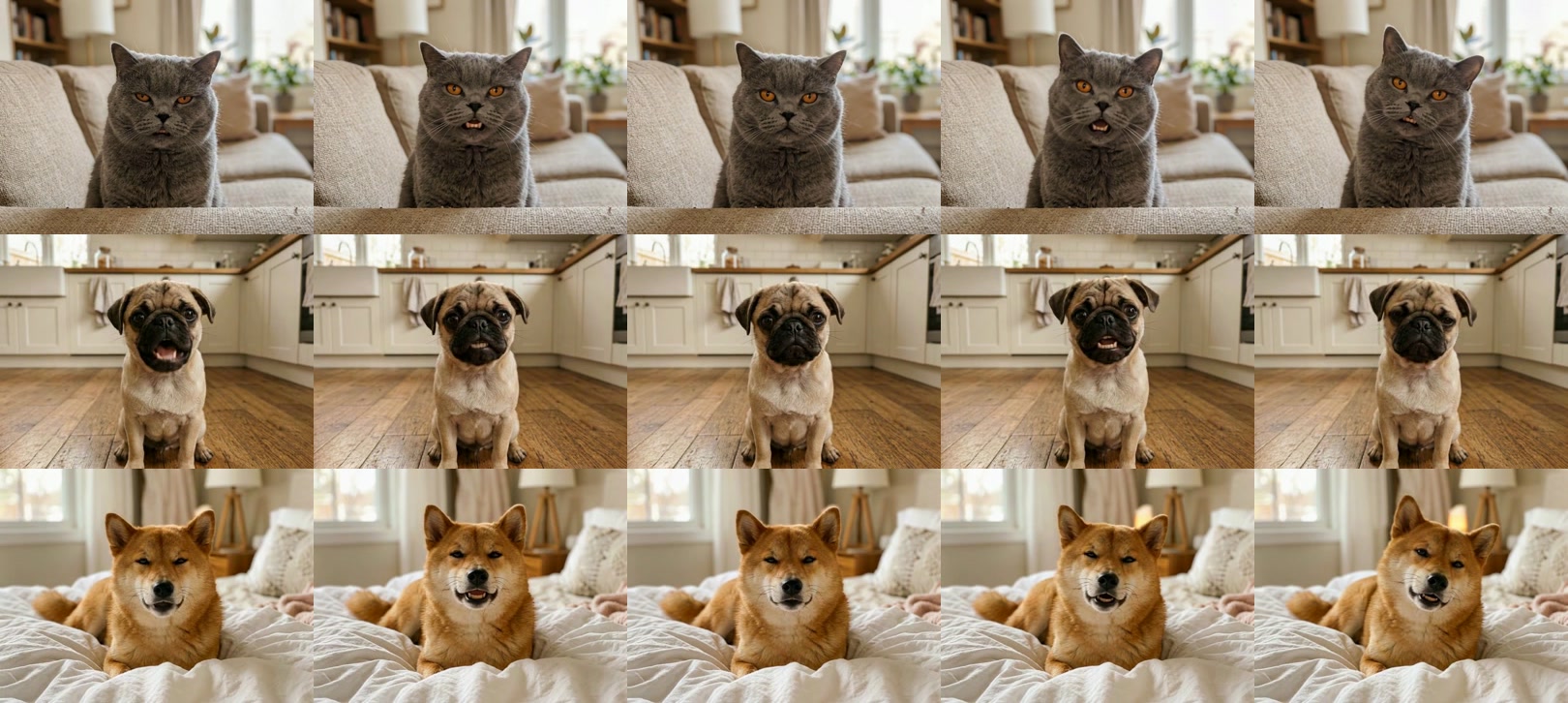
The public files are compressed display copies at 752 by 560 pixels, below 720p. They are included as historical evidence, not as a promise of current output quality. No trim, audio replacement, retiming or AI upscaling was added for this article.
If a word seems missing, check in this order
Check playback first, then the audio itself, and use automatic transcription only as a comparison aid.
| What you notice | Next check | What the result can tell you |
|---|---|---|
| The picture moves but you hear nothing | Unmute both the player and device. Start again, then try the downloaded file in another player. | Silence in one player does not prove the file has no audio. |
| A transcript skips a word | Listen from the beginning while reading the exact requested sentence. Repeat the uncertain part. | Automatic speech recognition can differ from what is audible. A missing word in its text needs investigation. |
| You cannot decide what was said | Ask another listener to compare the original line with the file. Keep the result marked uncertain. | An uncertain word is not ready for a word-sensitive message. |
| The spoken sentence is wrong | Shorten or simplify the line and review a new result, or choose a workflow that accepts a prepared recording. | This is a correction to that clip, not evidence of a universal word limit. |
| The words sound right but the mouth looks wrong | Watch the complete clip at normal speed. Inspect the beginning and end as well as the middle. | A correct transcript cannot prove good lip synchronization. |
For a name, number or message that must be exact, do not accept a plausible sentence as a substitute. Check every word. If the wording matters more than the novelty, record the approved line first and use an audio-driven workflow.
Choose the workflow by where the voice comes from
Use generated speech for a quick reaction; use a recording-based workflow when you need to supply the exact voice track.
The following comparison covers publicly documented inputs, checked November 11, 2026. We did not create accounts or run a quality comparison across these tools. Input support does not guarantee accurate synchronization.
| Tool or approach | Documented voice input | Useful distinction |
|---|---|---|
| Vidney AI Talking Pet | Generated voice from the quoted line. No recording upload, voice picker or fixed voice setting on this page. | A short spoken reaction from a photo, followed by your own word check. |
| Mango AI Talking Animals | Typed text, audio upload or direct recording. | Its page exposes separate audio input choices. Check plan access before committing. |
| JoyPix Talking Animals | Text-to-speech, uploaded audio or recording. | You can prepare the audio before the animation step. |
| DomoAI Pet Talk | Script, external audio or text-to-speech through Talking Avatar. | Its guide recommends a short line and a visible pet face. |
| Kling's published pet tutorial | The demonstrated method animates mouth movement, then adds a separate voice track in an editor. | Mouth motion and a spoken soundtrack are distinct steps in this tutorial. |
Need singing instead of spoken dialogue? Use the separate AI Singing Pet workflow. Its settings and song tests do not validate a talking-pet script.
Understand the credits and watermark before generating
The current default is 10 credits per 5-second talking clip, while signup credits and one-time purchases are separate offers.
We executed the same local pricing function used by the effect on November 11, 2026. It returned 10 credits with audio enabled. Starter monthly is listed at $9 for 300 credits, so allocating that plan cost gives $0.30 per default clip. You buy the plan or available one-time offer, not a standalone $0.30 checkout.
The public talking-pet page currently lists $2.99 for one video and $5.99 for three without a subscription. Signup grants 6, 10 or 12 credits depending on region. Check your actual balance and the button's price before generating; this audit did not create a new account or test a purchase.
Free-plan downloads carry a Vidney watermark. The published policy says paid plans download without it, as do downloads during the 12 months after a one-time purchase. We checked the published policy, not an account's paid download entitlement.
What these samples establish, and what they do not
This is a file and transcript audit of a small historical set, not a speech accuracy benchmark.
On November 11, 2026, we used ffprobe to inspect the three public MP4 files and ffmpeg to decode each complete file. All three decoded without errors and contained a stereo AAC audio track at 44.1 kHz. Their container durations were approximately 5.062 seconds. The corresponding archived original files were approximately 5.050 seconds; container duration includes encoding details and is not a measure of how many spoken words fit.
We compared the requested words with the archived automatic transcripts after ignoring punctuation and capitalization. Word counts here are counts of those English sentence strings. The exact recognizer version and transcription settings are unavailable. We did not rerun transcription for this article.
The current default prompt matches the archived grey-cat prompt exactly. The other two examples use the same template with their quoted lines changed. We reused all three public files without altering them. This audit adds no new generations and no test spending.
No fresh normal-speed audiovisual review is claimed here. We therefore give no score for voice quality, lip synchronization, motion, visual appeal or pet identity. We also did not run a script-length ladder, repeat each line or test real owner photos. Three different lines cannot establish a success rate or a maximum word count.
Who should use this approach
Choose this workflow for a playful, short reaction you can listen to and approve before sharing.
It is a useful starting point when you have one clear pet portrait and want generated dialogue. Choose a recording-based workflow instead when a specific voice, a long narration or exact approved wording is central to the job. Either way, review the complete output before sending it to someone else.
Open AI Talking Pet and edit the quoted line.
Frequently asked questions
Can I make my dog or cat talk from one photo?
Yes. The current Vidney talking-pet preset accepts one photo and generates a 5-second clip with speech. Start with a clear, front-facing portrait and check the result with sound.
How many words fit in five seconds?
We have no verified maximum. The three archived examples requested 7, 10 and 9 words; they were not a controlled length experiment. Try one short thought, then listen to the actual result.
Does the pug transcript prove the AI dropped a word?
No. Its archived transcript contains 9 words against a 10-word request. Without resolving the actual audio, that discrepancy cannot distinguish a transcription error from a speech error.
Can I use my own voice in Vidney's talking-pet effect?
This page has no recording upload or voice picker as checked November 11, 2026. If you need a specific recording, choose a workflow that explicitly accepts audio input.
Is the first video free?
The default costs 10 credits. Signup currently grants 6 to 12 credits depending on region, so compare your actual balance with the Create button before you start. Free-plan downloads have a watermark.
Can I pay once without subscribing?
The public page lists $2.99 for one video or $5.99 for three on November 11, 2026. These are listed offers; this audit did not test checkout or a paid download.
Do these English samples prove another language works?
No. This article audits 3 English clips. A different language, name or speaking style needs its own listening check rather than an assumption based on these examples.
Can my pet sing a birthday message instead?
Use the separate pet birthday singing effect. It has a different 8-second setup; these 5-second speaking samples do not test that workflow.