
Vidney

AI画像生成

Qwen Image 3.0 Pro

仕上げ品質の生成と元画像に忠実な編集を担うQwen Image 3.0の高精細版です。

Vidney ワークベンチ

モデル 22 件
0/2000
必要:15 クレジット

出力

サンプル

Qwen Image 3.0 Pro が得意なこと

01

どのスケールにも質感

小雨の朝の茶室。畳の目、漆、湯気、濡れた石、光る障子が、それぞれの質感を保ってひとつの画面に収まっています。手前の湯のみから奥の庭まで、細部がくっきりしています。

どのスケールにも質感: Photoreal interior of a small Japanese tea house at dawn during light rain, square format: tatami with visible weave, a low black lacquer table with a single ceramic cup and a thread of steam, shoji screens glowing with grey morning light, wet dark stepping stones and a bamboo ladle in the garden seen through the open engawa, a blank hanging scroll on the wall. Directional light from the screens on the left, soft shadows, fine wood grain on every post, precise texture at every scale from the cup to the garden. 50mm lens look, deep focus. No people, no text, no watermark.
設定
  • テキストから画像
  • 1:1
プロンプト(英語の原文)

Photoreal interior of a small Japanese tea house at dawn during light rain, square format: tatami with visible weave, a low black lacquer table with a single ceramic cup and a thread of steam, shoji screens glowing with grey morning light, wet dark stepping stones and a bamboo ladle in the garden seen through the open engawa, a blank hanging scroll on the wall. Directional light from the screens on the left, soft shadows, fine wood grain on every post, precise texture at every scale from the cup to the garden. 50mm lens look, deep focus. No people, no text, no watermark.

02

看板を書き換え、通りはそのまま

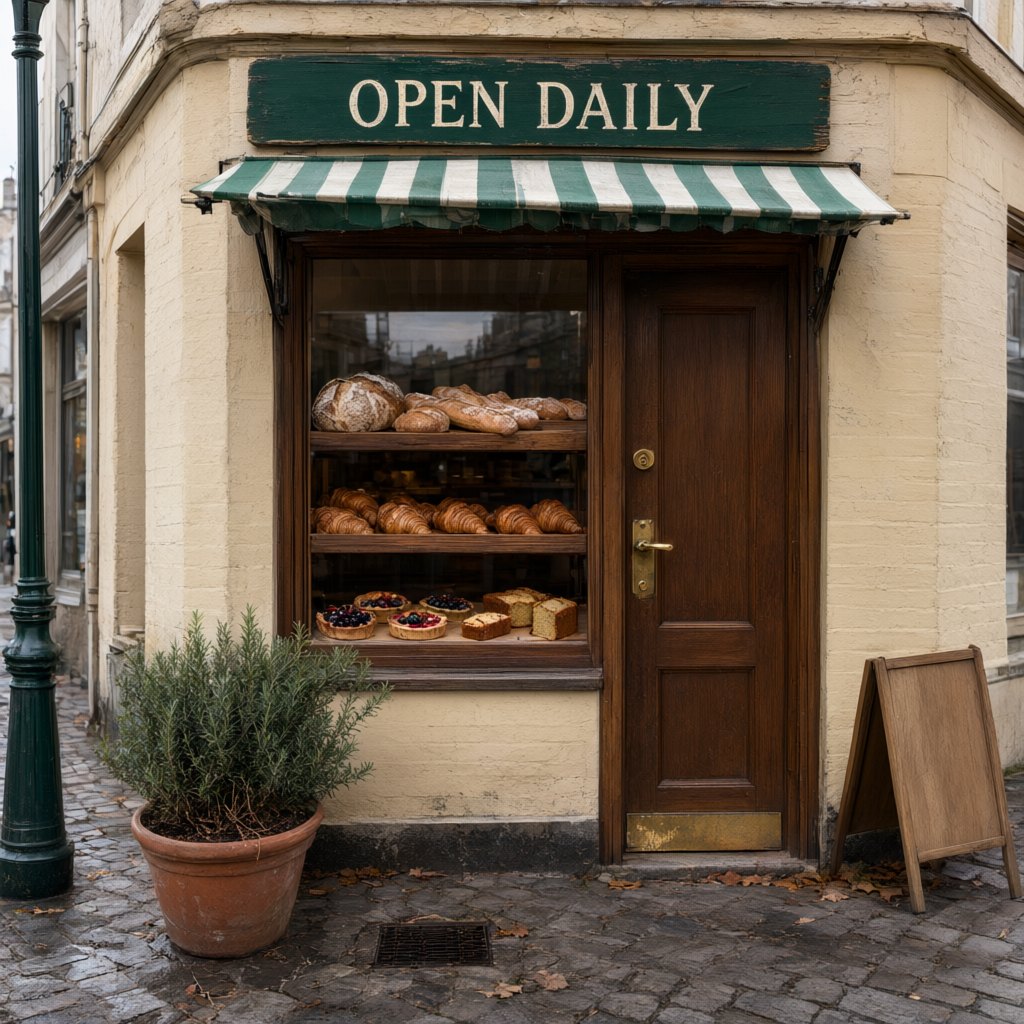
看板に OPEN DAILY とあるパン屋の写真。指示ひとつで看板は CLOSED FOR WINTER に変わり、同じクリーム色のセリフ体、同じ大きさと角度のままです。何も書かれていなかったスタンド看板には手書きの一言が加わり、オーニングもショーウィンドウも歩道も手つかずです。

看板を書き換え、通りはそのまま: Change only the words on the green sign board from OPEN DAILY to CLOSED FOR WINTER, in the same cream serif lettering, centered on the same board, matching its size, paint texture and perspective. On the blank wooden A-frame on the pavement, add the hand-painted words See you March 1 in white. Keep the awning, the window display, the door, the rosemary pot, the street and the light exactly as they are.
入力
  • 看板を書き換え、通りはそのまま: 元画像元画像
設定
  • 画像から画像
  • 1:1
プロンプト(英語の原文)

Change only the words on the green sign board from OPEN DAILY to CLOSED FOR WINTER, in the same cream serif lettering, centered on the same board, matching its size, paint texture and perspective. On the blank wooden A-frame on the pavement, add the hand-painted words See you March 1 in white. Keep the awning, the window display, the door, the rosemary pot, the street and the light exactly as they are.

03

3つの文字、ひとつのグリッド

英語の見出し、中国語と日本語のタイトル、会期、会場、3つの文字が混ざった開館時間の小さな一行が入った展覧会ポスター。どの大きさでもすべての文字が正確で、花瓶の写真の横に厳密なグリッドで組まれています。

3つの文字、ひとつのグリッド: A trilingual museum exhibition poster, square format, strict Swiss grid on warm white paper. The left half is one large photograph of a blue and white porcelain vase on a grey plinth. The right column holds the type, top to bottom, every line exactly as written: a large black sans-serif headline "BLUE & WHITE"; under it the Chinese title "青花瓷器特展"; under that the Japanese title "染付の器展"; a thin black rule; "Porcelain from Jingdezhen and Arita, 1600 to 1900"; "12 March to 30 June 2027"; "Harbour Museum, Gallery 4"; and at the bottom in small type "Open daily 10:00 to 18:00 · 每日开放 · 毎日開館". Generous margins, crisp kerning, no other text, no logos.
設定
  • テキストから画像
  • 1:1
プロンプト(英語の原文)

A trilingual museum exhibition poster, square format, strict Swiss grid on warm white paper. The left half is one large photograph of a blue and white porcelain vase on a grey plinth. The right column holds the type, top to bottom, every line exactly as written: a large black sans-serif headline "BLUE & WHITE"; under it the Chinese title "青花瓷器特展"; under that the Japanese title "染付の器展"; a thin black rule; "Porcelain from Jingdezhen and Arita, 1600 to 1900"; "12 March to 30 June 2027"; "Harbour Museum, Gallery 4"; and at the bottom in small type "Open daily 10:00 to 18:00 · 每日开放 · 毎日開館". Generous margins, crisp kerning, no other text, no logos.

Qwen Image 3.0 Proで作れるもの

キャンペーンのキービジュアル

素材、光、表面のディテールを細かく確認する、仕上げ品質の人物や商品候補を生成できます。

高品質な商品ビジュアライゼーション

仕上げ、反射、建築、カメラ意図をまとめて記述し、制御された高精細構図を作れます。

写真の中の文字修正

既存の写真の看板、ラベル、メニューの文字を差し替え、書体も角度も周りもそのまま残します。

Qwen Image 3.0 Proに追加予算を使う場面

Qwen Image 3.0 Pro は Alibaba の Qwen Image 3.0 シリーズの最上位で、じっくり見られる画像のためのモデルです。複数の文字体系の小さな文字が並ぶレイアウト、写真のような質感、そして写真の中の文字だけを書き換えて周りを一切動かさない編集が得意です。ここでは1回15クレジットで、標準版より3クレジット高く、1枚あたり少し時間がかかります。本文は短い行にとどめてください。小さな文字の長い段落ではまだ1文字ずれることがあるので、そうした部分はデザインツールで組むのが確実です。ポスター、パッケージの最終稿、キービジュアル、1文字の誤りや影のずれが目立つ写真の修正に向いています。日常の商品画像やメニューには Qwen Image 3.0、速くて安い下書きには Nano Banana 2.1 を使ってください。

Qwen Image 3.0 Proで画像を生成する方法

VidneyでQwen Image 3.0 Proを使い、3ステップでAI画像を作成します。

Glowing panels with one model selected from severalStreams of light forming into an emerging imageA finished image materializing from a vortex of glowing light

Qwen Image 3.0 Pro vs Flux 3 Klein vs Nano Banana 2.1 vs GPT Image 2.5

類似モデルとスペックを並べて比較。すべて Vidney で実行できます。

Qwen Image 3.0 ProFlux 3 KleinNano Banana 2.1GPT Image 2.5
タスクモードテキストから画像 · 画像から画像テキストから画像 · 画像から画像テキストから画像 · 画像から画像テキストから画像 · 画像から画像
解像度—1K · 2K · 4K1K · 2K · 4K1K · 2K · 4K
コスト1回の生成につき15クレジット1回の生成につき3クレジット1回の生成につき3クレジット1回の生成につき3〜5クレジット

関連モデル

Vidneyで実行できるAI画像モデルをほかにもご覧ください。

公開中

1つのモデルで、文章から新しい画面を作り、一言の指示で既存の画面を直せます。

1回の生成につき12クレジット
MidjourneyMidjourney V8.1
公開中

見慣れた Midjourney の絵に、ようやく読める見出しが付きました。

1回の生成につき18クレジット
公開中

Nano Banana ProでAI画像を生成。テキストから画像と画像から画像を、Vidneyの1つのスタジオで。

1回の生成につき12クレジット
公開中

Seedream 4.5でAI画像を生成。テキストから画像と画像から画像を、Vidneyの1つのスタジオで。

1回の生成につき12クレジット

Grok Imagine Image 2.0でAI画像を生成。テキストから画像と画像から画像を、Vidneyの1つのスタジオで。

1回の生成につき9〜15クレジット
公開中

Seedream 5.0 LiteでAI画像を生成。テキストから画像と画像から画像を、Vidneyの1つのスタジオで。

1回の生成につき9クレジット

よくある質問

Qwen Image 3.0 Proとは何ですか?

Qwen Image 3.0 ProはVidneyで実行できるAI画像モデルです。1つのスタジオでテキストから画像と画像から画像に対応しています。

Qwen Image 3.0 Proは1回の生成でいくらかかりますか?

Qwen Image 3.0 Proは1回の生成につき15クレジットです。正確なクレジットコストは、実行前に生成ボタンへ表示されます。Starterプランの単価(1クレジット$0.03)で、1回あたり約$0.45です。

Qwen Image 3.0 Proはどのアスペクト比に対応していますか?

Qwen Image 3.0 Proは次のアスペクト比に対応しています:1:1、4:3、3:4、16:9、9:16。

Qwen Image 3.0 Proは無料で使えますか?

条件によります。新規アカウントには国・地域に応じて10〜30クレジットが無料で付与され、カード登録は不要です。Qwen Image 3.0 Proは1回の生成につき15クレジットなので、無料クレジットで1回試せるかは残高次第です。正確なコストはクレジットを使う前に必ず生成ボタンに表示されます。

Qwen Image 3.0 Proで作った画像は商用利用できますか?

はい。VidneyでQwen Image 3.0 Proを使って生成した画像は、商用プロジェクトに自由に使えます。広告、SNS投稿、クライアントワーク、商品ビジュアルなどに利用可能です。成果物の権利はあなたのもので、Vidneyは生成と保存を担うだけです。

Qwen Image 3.0 Proは透かし(ウォーターマーク)を入れますか?

無料プランのみです。無料プランでダウンロードすると小さなVidneyの透かしが入ります。有料プランならQwen Image 3.0 Proで生成した画像は透かしなしでダウンロードでき、そのまま公開やクライアントへの納品に使えます。アップグレードすると、それまでに作った画像も透かしなしになります。

Qwen Image 3.0 Proの代わりに使えるおすすめのモデルは?

VidneyでQwen Image 3.0 Proに最も近いのはFlux 3 Klein、Nano Banana 2.1およびGPT Image 2.5です。どれも同じワークスペース内で共通のクレジット残高から使えるので、同じプロンプトをそれぞれのモデルで実行して、結果を並べて見比べられます。

Qwen Image 3.0 Proを使うのにAPIキーやプロバイダーアカウントは必要ですか?

いいえ。Vidneyがあなたに代わってQwen Image 3.0 Proを実行します。管理すべきAPIキーも、別途用意するプロバイダーアカウントもありません。

今すぐQwen Image 3.0 Proで作成



