
Vidney

AI画像生成

Qwen Image 3.0

1つのモデルで、文章から新しい画面を作り、一言の指示で既存の画面を直せます。

Vidney ワークベンチ

モデル 22 件
0/2000
必要:12 クレジット

出力

サンプル

Qwen Image 3.0 が得意なこと

01

そのまま印刷できるコーヒーラベル

ブランド、焙煎所、産地、精製方法、フレーバー、内容量をひとつのクラフト袋に。6行、4種類の文字サイズ、すべて書いたとおりの綴りで、紙袋は紙の質感のままです。

そのまま印刷できるコーヒーラベル: E-commerce hero photograph of a stand-up kraft paper coffee bag with a matte cream label, square format, on a seamless warm beige background with a few roasted coffee beans scattered in front. The label text is large, crisp and spelled exactly: NORTH RIDGE in a bold black serif across the top, COFFEE ROASTERS in small spaced capitals under it, ETHIOPIA GUJI in medium black capitals in the middle, Washed · Light Roast on the next line, Peach · Jasmine · Honey on the line below, and 250 g at the bottom right of the label. Soft window light from the left, a gentle shadow, realistic paper texture and printing. No other text, no logos.
設定
  • テキストから画像
  • 1:1
プロンプト(英語の原文)

E-commerce hero photograph of a stand-up kraft paper coffee bag with a matte cream label, square format, on a seamless warm beige background with a few roasted coffee beans scattered in front. The label text is large, crisp and spelled exactly: NORTH RIDGE in a bold black serif across the top, COFFEE ROASTERS in small spaced capitals under it, ETHIOPIA GUJI in medium black capitals in the middle, Washed · Light Roast on the next line, Peach · Jasmine · Honey on the line below, and 250 g at the bottom right of the label. Soft window light from the left, a gentle shadow, realistic paper texture and printing. No other text, no logos.

02

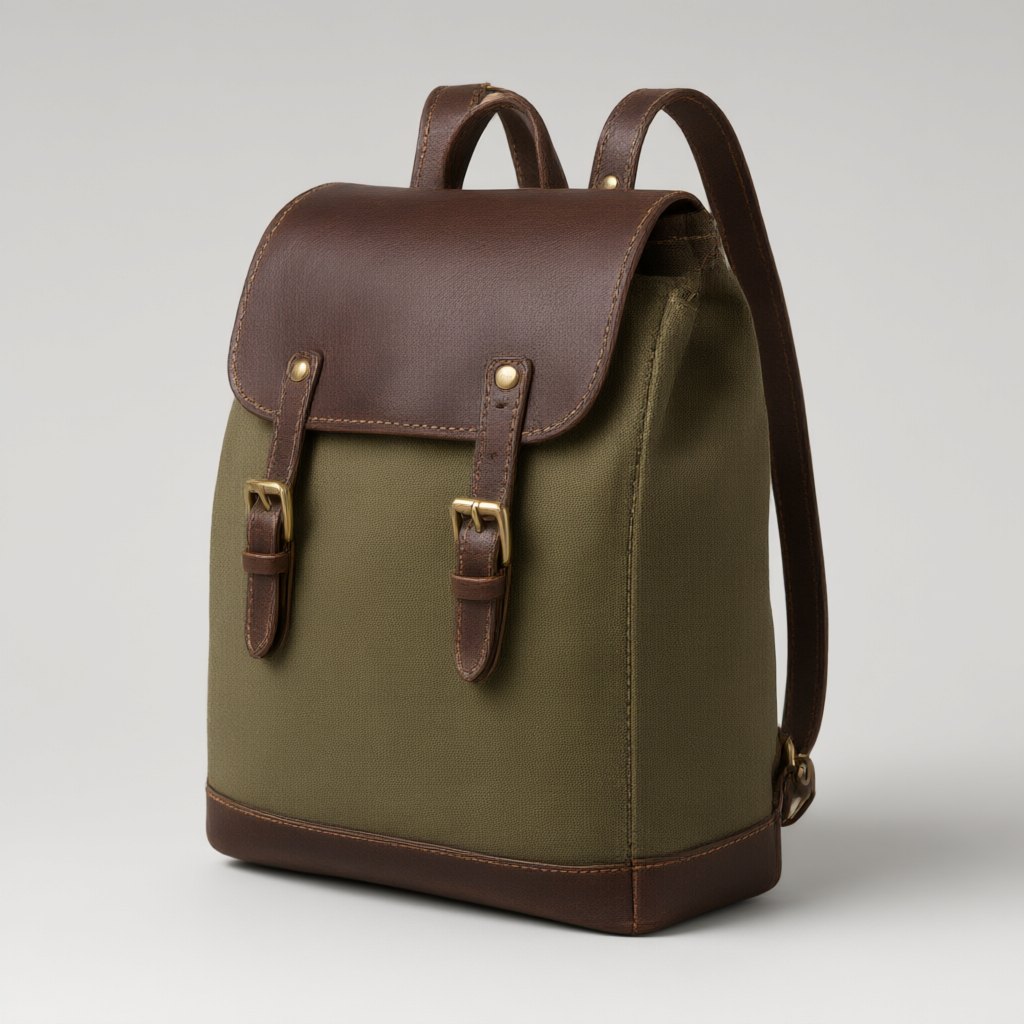
同じリュック、別のカラー

オリーブ色のリュックを渡し、ネイビーのキャンバス、タンのレザー、シルバーのバックルに変えるよう指示。形、ステッチ、ストラップの位置、スタジオの光はそのままなので、新しい写真を元の写真と並べて出品できます。

同じリュック、別のカラー: Recolor this backpack: make the canvas navy blue, the leather flap, straps and base tan, and the buckles silver. Keep the shape, the stitching, the camera angle, the lighting, the shadow and the grey background exactly the same.
入力
  • 同じリュック、別のカラー: 元画像元画像
設定
  • 画像から画像
  • 1:1
プロンプト(英語の原文)

Recolor this backpack: make the canvas navy blue, the leather flap, straps and base tan, and the buckles silver. Keep the shape, the stitching, the camera angle, the lighting, the shadow and the grey background exactly the same.

03

チョークで書いた韓国語メニュー

ハングルのカフェ黒板。タイトル、ドリンクと焼き菓子4品と価格、最後に一行。文字も価格もすべて入力どおりで、手書きのチョーク文字に見えます。

チョークで書いた韓国語メニュー: A café menu chalkboard hanging on a red brick wall, square format, shot straight on. White chalk hand lettering, every word spelled exactly as written. Title at the top: 오늘의 메뉴. Below it four lines, each with its price aligned on the right: 아메리카노 4,500 / 카페 라떼 5,000 / 말차 라떼 5,500 / 버터 스콘 3,800. A small chalk drawing of a coffee cup in the bottom left corner and one footer line at the bottom: 매일 아침 직접 구워요. A warm Edison bulb hangs above the board. No other text.
設定
  • テキストから画像
  • 1:1
プロンプト(英語の原文)

A café menu chalkboard hanging on a red brick wall, square format, shot straight on. White chalk hand lettering, every word spelled exactly as written. Title at the top: 오늘의 메뉴. Below it four lines, each with its price aligned on the right: 아메리카노 4,500 / 카페 라떼 5,000 / 말차 라떼 5,500 / 버터 스콘 3,800. A small chalk drawing of a coffee cup in the bottom left corner and one footer line at the bottom: 매일 아침 직접 구워요. A warm Edison bulb hangs above the board. No other text.

Qwen Image 3.0で作れるもの

商品ページ用の画像

ブランド名、種類、容量がはっきり読めるパッケージや商品写真を、そのままストアに載せられます。

色違い・素材違い

承認済みの商品写真の見た目をひとつだけ変え、変えてはいけない部分を指示します。

メニュー、看板、SNS投稿

英語、韓国語など Alibaba が対応をうたう言語の文字を入れた正方形画像を、そのままデザインレビューへ。

Qwen Image 3.0が適するチーム

Qwen Image 3.0 は Alibaba の Qwen Image 3.0 シリーズの標準版で、ひとつのモデルでプロンプトから新しい画像を作り、短い指示で既存の画像を編集できます。得意なのは文字です。Alibaba は12言語の文字描画をうたっており、ラベルやメニュー、看板の英語や韓国語は入力したとおりの綴りで返ってきます。ここでは1K画像の生成も編集も1回12クレジットです。商品ページの画像、メニュー、SNS投稿、手早い色違い作りに向いています。細かい文字が複数の言語にまたがるレイアウトや、写真の中の文字を書き換える編集には Qwen Image 3.0 Pro(15クレジット)を、低コストの下書きや2K・4K出力には Nano Banana 2.1(3クレジット)を選んでください。

Qwen Image 3.0で画像を生成する方法

VidneyでQwen Image 3.0を使い、3ステップでAI画像を作成します。

Glowing panels with one model selected from severalStreams of light forming into an emerging imageA finished image materializing from a vortex of glowing light

Qwen Image 3.0 vs Flux 3 Klein vs Nano Banana 2.1 vs GPT Image 2.5

類似モデルとスペックを並べて比較。すべて Vidney で実行できます。

Qwen Image 3.0Flux 3 KleinNano Banana 2.1GPT Image 2.5
タスクモードテキストから画像 · 画像から画像テキストから画像 · 画像から画像テキストから画像 · 画像から画像テキストから画像 · 画像から画像
解像度—1K · 2K · 4K1K · 2K · 4K1K · 2K · 4K
コスト1回の生成につき12クレジット1回の生成につき3クレジット1回の生成につき3クレジット1回の生成につき3〜5クレジット

関連モデル

Vidneyで実行できるAI画像モデルをほかにもご覧ください。

公開中

仕上げ品質の生成と元画像に忠実な編集を担うQwen Image 3.0の高精細版です。

1回の生成につき15クレジット
公開中

Nano Banana ProでAI画像を生成。テキストから画像と画像から画像を、Vidneyの1つのスタジオで。

1回の生成につき12クレジット
公開中

Seedream 4.5でAI画像を生成。テキストから画像と画像から画像を、Vidneyの1つのスタジオで。

1回の生成につき12クレジット

Grok Imagine Image 2.0でAI画像を生成。テキストから画像と画像から画像を、Vidneyの1つのスタジオで。

1回の生成につき9〜15クレジット
公開中

Seedream 5.0 LiteでAI画像を生成。テキストから画像と画像から画像を、Vidneyの1つのスタジオで。

1回の生成につき9クレジット
MidjourneyMidjourney V8.1
公開中

見慣れた Midjourney の絵に、ようやく読める見出しが付きました。

1回の生成につき18クレジット

よくある質問

Qwen Image 3.0とは何ですか?

Qwen Image 3.0はVidneyで実行できるAI画像モデルです。1つのスタジオでテキストから画像と画像から画像に対応しています。

Qwen Image 3.0は1回の生成でいくらかかりますか?

Qwen Image 3.0は1回の生成につき12クレジットです。正確なクレジットコストは、実行前に生成ボタンへ表示されます。Starterプランの単価(1クレジット$0.03)で、1回あたり約$0.36です。

Qwen Image 3.0はどのアスペクト比に対応していますか?

Qwen Image 3.0は次のアスペクト比に対応しています:1:1、4:3、3:4、16:9、9:16。

Qwen Image 3.0は無料で使えますか?

条件によります。新規アカウントには国・地域に応じて10〜30クレジットが無料で付与され、カード登録は不要です。Qwen Image 3.0は1回の生成につき12クレジットなので、無料クレジットで1回試せるかは残高次第です。正確なコストはクレジットを使う前に必ず生成ボタンに表示されます。

Qwen Image 3.0で作った画像は商用利用できますか?

はい。VidneyでQwen Image 3.0を使って生成した画像は、商用プロジェクトに自由に使えます。広告、SNS投稿、クライアントワーク、商品ビジュアルなどに利用可能です。成果物の権利はあなたのもので、Vidneyは生成と保存を担うだけです。

Qwen Image 3.0は透かし(ウォーターマーク)を入れますか?

無料プランのみです。無料プランでダウンロードすると小さなVidneyの透かしが入ります。有料プランならQwen Image 3.0で生成した画像は透かしなしでダウンロードでき、そのまま公開やクライアントへの納品に使えます。アップグレードすると、それまでに作った画像も透かしなしになります。

Qwen Image 3.0の代わりに使えるおすすめのモデルは?

VidneyでQwen Image 3.0に最も近いのはFlux 3 Klein、Nano Banana 2.1およびGPT Image 2.5です。どれも同じワークスペース内で共通のクレジット残高から使えるので、同じプロンプトをそれぞれのモデルで実行して、結果を並べて見比べられます。

Qwen Image 3.0を使うのにAPIキーやプロバイダーアカウントは必要ですか?

いいえ。Vidneyがあなたに代わってQwen Image 3.0を実行します。管理すべきAPIキーも、別途用意するプロバイダーアカウントもありません。

今すぐQwen Image 3.0で作成



