
Vidney

AI 圖像生成器

Qwen Image 3.0

同一個模型,既能從文字寫出新畫面,也能用一句話改掉既有畫面,輸出是乾淨的方形高清。

Vidney 工作台

22 個模型
0/2000
需要:12 點數

輸出

範例

Qwen Image 3.0 的強項

01

可以直接印的咖啡標籤

品牌、烘豆商、產區、處理法、風味和重量都在同一個牛皮紙袋上。六行字、四種字級,全部照原文拼對,紙袋看起來仍然是紙。

可以直接印的咖啡標籤: E-commerce hero photograph of a stand-up kraft paper coffee bag with a matte cream label, square format, on a seamless warm beige background with a few roasted coffee beans scattered in front. The label text is large, crisp and spelled exactly: NORTH RIDGE in a bold black serif across the top, COFFEE ROASTERS in small spaced capitals under it, ETHIOPIA GUJI in medium black capitals in the middle, Washed · Light Roast on the next line, Peach · Jasmine · Honey on the line below, and 250 g at the bottom right of the label. Soft window light from the left, a gentle shadow, realistic paper texture and printing. No other text, no logos.
設定
  • 文字生圖片
  • 1:1
提示詞(英文原文)

E-commerce hero photograph of a stand-up kraft paper coffee bag with a matte cream label, square format, on a seamless warm beige background with a few roasted coffee beans scattered in front. The label text is large, crisp and spelled exactly: NORTH RIDGE in a bold black serif across the top, COFFEE ROASTERS in small spaced capitals under it, ETHIOPIA GUJI in medium black capitals in the middle, Washed · Light Roast on the next line, Peach · Jasmine · Honey on the line below, and 250 g at the bottom right of the label. Soft window light from the left, a gentle shadow, realistic paper texture and printing. No other text, no logos.

02

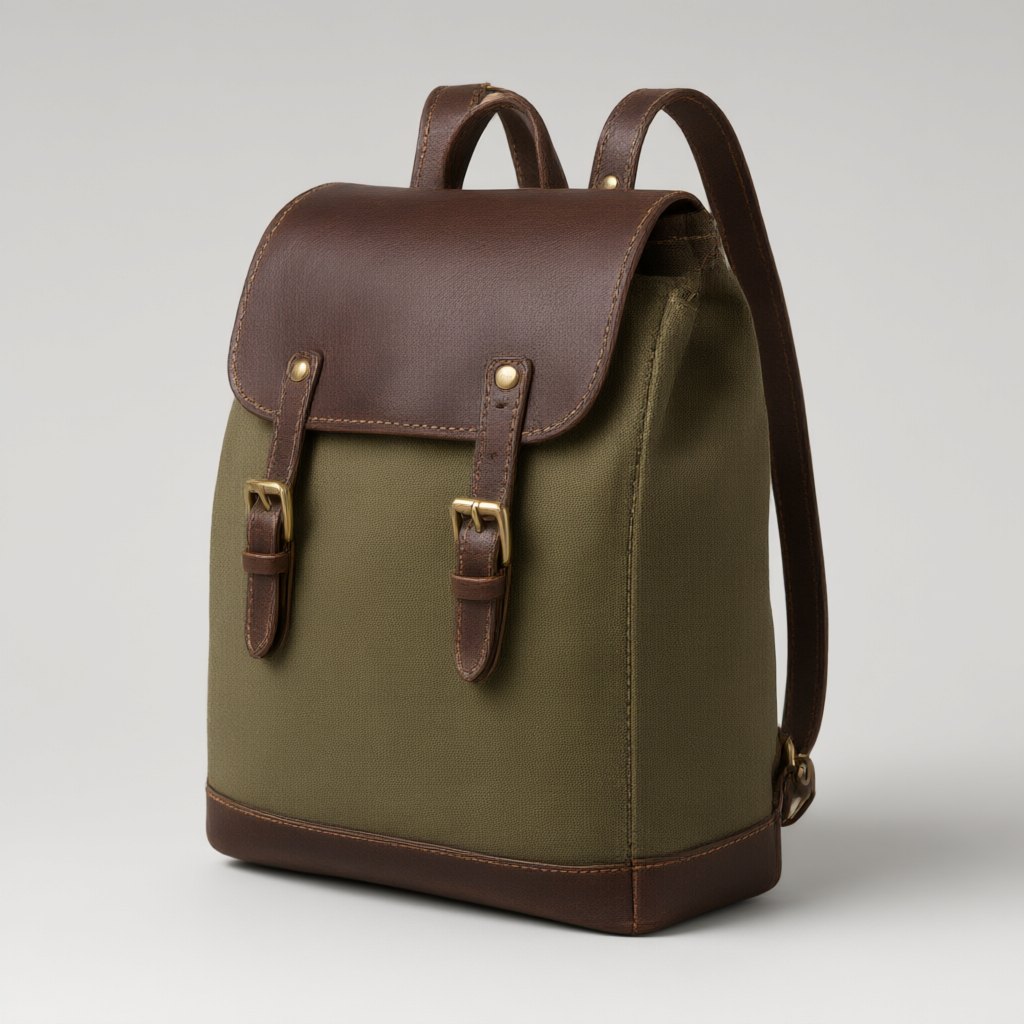
同一個背包,換一套配色

給它一個橄欖綠背包,要求換成海軍藍帆布、棕褐色皮革和銀色扣環。形狀、車線、背帶位置和棚拍光線都留在原處,新照片可以直接排在舊照片旁邊上架。

同一個背包,換一套配色: Recolor this backpack: make the canvas navy blue, the leather flap, straps and base tan, and the buckles silver. Keep the shape, the stitching, the camera angle, the lighting, the shadow and the grey background exactly the same.
輸入
  • 同一個背包,換一套配色: 原圖原圖
設定
  • 圖片生圖片
  • 1:1
提示詞(英文原文)

Recolor this backpack: make the canvas navy blue, the leather flap, straps and base tan, and the buckles silver. Keep the shape, the stitching, the camera angle, the lighting, the shadow and the grey background exactly the same.

03

粉筆寫的韓文菜單

一塊韓文咖啡店黑板:標題、四樣飲品和點心加上價格,再一行頁尾。每個字和每個價格都照打的回來,筆跡像是手寫的粉筆字。

粉筆寫的韓文菜單: A café menu chalkboard hanging on a red brick wall, square format, shot straight on. White chalk hand lettering, every word spelled exactly as written. Title at the top: 오늘의 메뉴. Below it four lines, each with its price aligned on the right: 아메리카노 4,500 / 카페 라떼 5,000 / 말차 라떼 5,500 / 버터 스콘 3,800. A small chalk drawing of a coffee cup in the bottom left corner and one footer line at the bottom: 매일 아침 직접 구워요. A warm Edison bulb hangs above the board. No other text.
設定
  • 文字生圖片
  • 1:1
提示詞(英文原文)

A café menu chalkboard hanging on a red brick wall, square format, shot straight on. White chalk hand lettering, every word spelled exactly as written. Title at the top: 오늘의 메뉴. Below it four lines, each with its price aligned on the right: 아메리카노 4,500 / 카페 라떼 5,000 / 말차 라떼 5,500 / 버터 스콘 3,800. A small chalk drawing of a coffee cup in the bottom left corner and one footer line at the bottom: 매일 아침 직접 구워요. A warm Edison bulb hangs above the board. No other text.

可用 Qwen Image 3.0 製作的內容

商品頁圖片

包裝與商品照上清楚印出品牌、口味與容量,可以直接放上商店頁。

顏色與材質版本

改掉已定稿商品照中的一個可見屬性,並寫明哪些細節必須保持不變。

菜單、招牌與社群貼文

以英文、韓文或阿里巴巴列出的其他語言排字的方形圖,直接進設計審核。

哪些團隊適合考慮 Qwen Image 3.0

Qwen Image 3.0 是阿里巴巴 Qwen Image 3.0 系列裡的日常版本:同一個模型能從提示詞畫出新圖,也能照一句指令修改既有的圖。它的強項是文字。阿里巴巴列出它能寫 12 種語言的文字,標籤、菜單和招牌上的英文或韓文都會照你打的字拼回來。在這裡一張 1K 圖或一次編輯是 12 點數。商品頁圖、菜單、社群貼文和快速換色都適合用它。版面密、小字跨多種文字、要改掉照片裡原有字樣時,選 Qwen Image 3.0 Pro(15 點數);想要低成本草稿或 2K、4K 輸出,選 Nano Banana 2.1(3 點數)。

如何用 Qwen Image 3.0 生成 圖像

在 Vidney 用 Qwen Image 3.0 三步驟做出 AI 圖像。

Glowing panels with one model selected from severalStreams of light forming into an emerging imageA finished image materializing from a vortex of glowing light

Qwen Image 3.0 vs Flux 3 Klein vs Nano Banana 2.1 vs GPT Image 2.5

與同類模型的規格並排對比,全部可在 Vidney 執行。

Qwen Image 3.0Flux 3 KleinNano Banana 2.1GPT Image 2.5
任務模式文字生成圖像 · 圖像生成圖像文字生成圖像 · 圖像生成圖像文字生成圖像 · 圖像生成圖像文字生成圖像 · 圖像生成圖像
解析度—1K · 2K · 4K1K · 2K · 4K1K · 2K · 4K
費用每次生成 12 點數每次生成 3 點數每次生成 3 點數每次生成 3–5 點數

相關模型

更多你能在 Vidney 上執行的 AI 圖像模型。

已上線

Qwen Image 3.0 的高細節版本,適合精修生成與忠於來源的編輯。

每次生成 15 點數
已上線

用 Nano Banana Pro 生成 AI 圖像:文字生成圖像與圖像生成圖像,全部在同一個 Vidney 工作台完成。

每次生成 12 點數
已上線

用 Seedream 4.5 生成 AI 圖像:文字生成圖像與圖像生成圖像,全部在同一個 Vidney 工作台完成。

每次生成 12 點數

用 Grok Imagine Image 2.0 生成 AI 圖像:文字生成圖像與圖像生成圖像,全部在同一個 Vidney 工作台完成。

每次生成 9–15 點數
已上線

用 Seedream 5.0 Lite 生成 AI 圖像:文字生成圖像與圖像生成圖像,全部在同一個 Vidney 工作台完成。

每次生成 9 點數
MidjourneyMidjourney V8.1
已上線

你熟悉的 Midjourney 質感,這回大標題終於讀得出來。

每次生成 18 點數

常見問題

Qwen Image 3.0 是什麼?

Qwen Image 3.0 是一個你能在 Vidney 上執行的 AI 圖像模型。它在同一個工作台支援 文字生成圖像與圖像生成圖像。

Qwen Image 3.0 每次生成多少錢?

Qwen Image 3.0 每次生成 12 點數。確切點數在你執行前會顯示在生成按鈕上。以 Starter 方案單價(每點 US$0.03)計算,每次約 US$0.36。

Qwen Image 3.0 支援哪些長寬比?

Qwen Image 3.0 支援以下長寬比:1:1、4:3、3:4、16:9、9:16。

Qwen Image 3.0 可以免費用嗎?

要看情況。新帳號依國家或地區可獲得 10 到 30 點免費點數,免綁信用卡;Qwen Image 3.0 每次生成 12 點數,免費點數夠不夠跑一次要看你的餘額。確切點數一律會在你按下按鈕、扣點之前顯示。

用 Qwen Image 3.0 生成的圖像可以商用嗎?

可以。你在 Vidney 用 Qwen Image 3.0 生成的圖像,版權歸你,能放心用在商業專案:廣告投放、社群貼文、接案交付、蝦皮與電商主圖都沒問題。成品是你的,Vidney 只負責生成與儲存。

Qwen Image 3.0 會加浮水印嗎?

只有免費方案會加。免費方案下載的檔案會帶一個小小的 Vidney 浮水印;任何付費方案下載 Qwen Image 3.0 生成的圖像都不帶浮水印,可以直接發佈或交給客戶。升級之後,之前生成的圖像下載時也不會再有浮水印。

Qwen Image 3.0 的最佳替代方案有哪些?

在 Vidney 上,與 Qwen Image 3.0 最接近的替代方案是 Flux 3 Klein、Nano Banana 2.1、與GPT Image 2.5。這些模型都在同一個工作台運作、共用同一個點數餘額,你可以用同一段提示詞在每款模型上各跑一次,並排比較生成結果。

使用 Qwen Image 3.0 需要 API 金鑰或服務商帳號嗎?

不需要。Vidney 會替你執行 Qwen Image 3.0,沒有 API 金鑰要管理,也不必另外設定服務商帳號。

立即用 Qwen Image 3.0 創作



