Vidney

AI 이미지 생성기

MOSS Image

Generate artwork around Chinese and English lettering.

동영상

이미지

Vidney 워크벤치

모델 31개
0/2000
필요: 6 크레딧

출력

샘플

Text layout examples

01

Two languages on one sign

The English headline and Traditional Chinese line use separate rows.
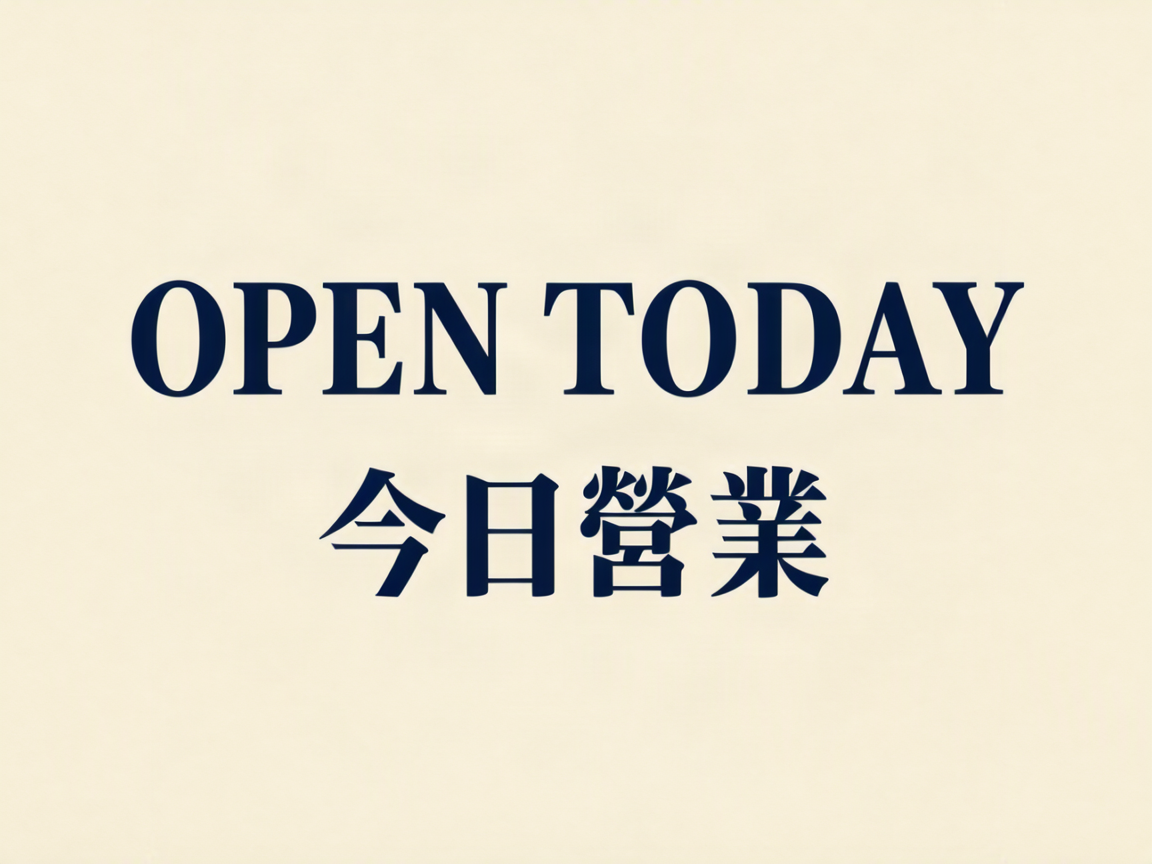
Two languages on one sign: A minimalist bilingual notice printed on warm ivory paper, dark navy lettering, centered straight-on flat scan. Render exactly two lines in large type. First line: OPEN TODAY. Second line: 今日營業. Do not add any other writing.
설정
  • 텍스트→이미지
  • 4:3
프롬프트(영어 원문)

A minimalist bilingual notice printed on warm ivory paper, dark navy lettering, centered straight-on flat scan. Render exactly two lines in large type. First line: OPEN TODAY. Second line: 今日營業. Do not add any other writing.

02

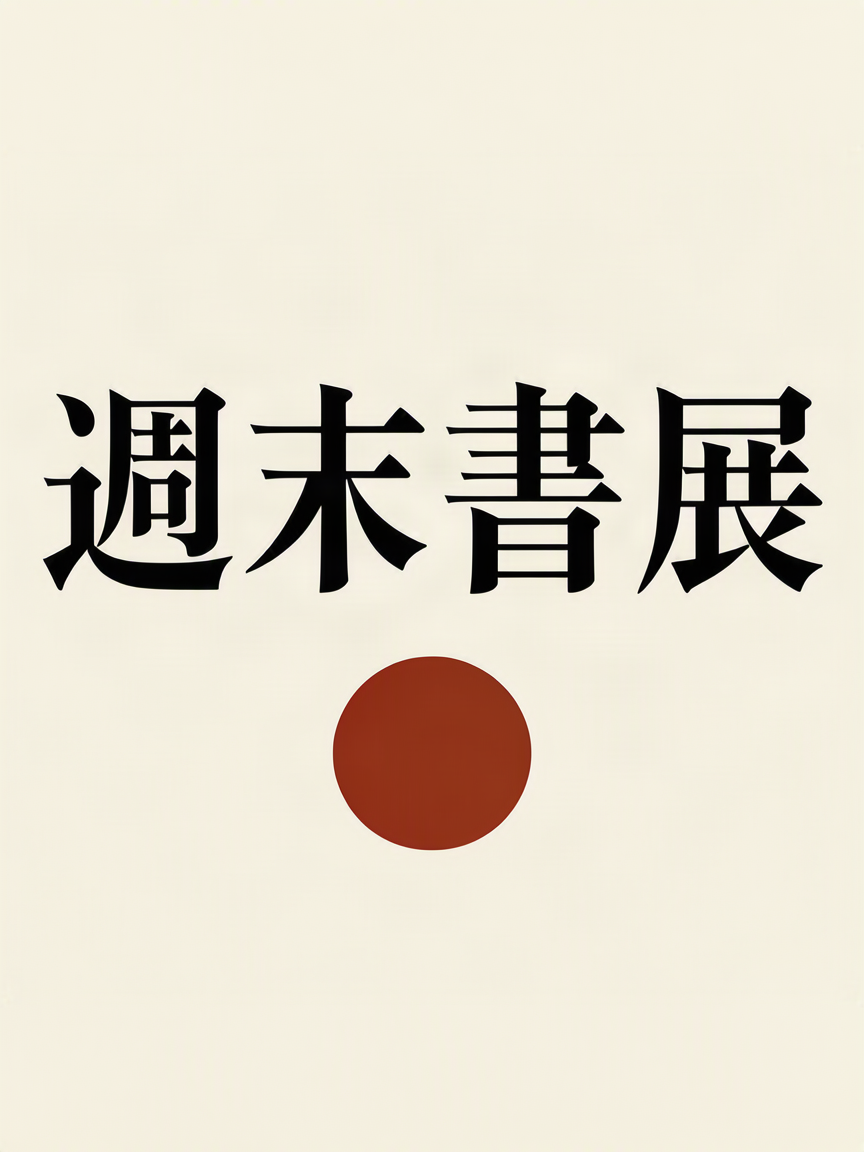
A Traditional Chinese book fair sign

Four characters sit above a single circle.

A Traditional Chinese book fair sign: Flat sign on cream paper. Print exactly these four Traditional Chinese characters as one large centered line: 週末書展. Add a single solid rust-red circle under the line. Plain background with no objects, borders, marks or other writing.
설정
  • 텍스트→이미지
  • 3:4
프롬프트(영어 원문)

Flat sign on cream paper. Print exactly these four Traditional Chinese characters as one large centered line: 週末書展. Add a single solid rust-red circle under the line. Plain background with no objects, borders, marks or other writing.

03

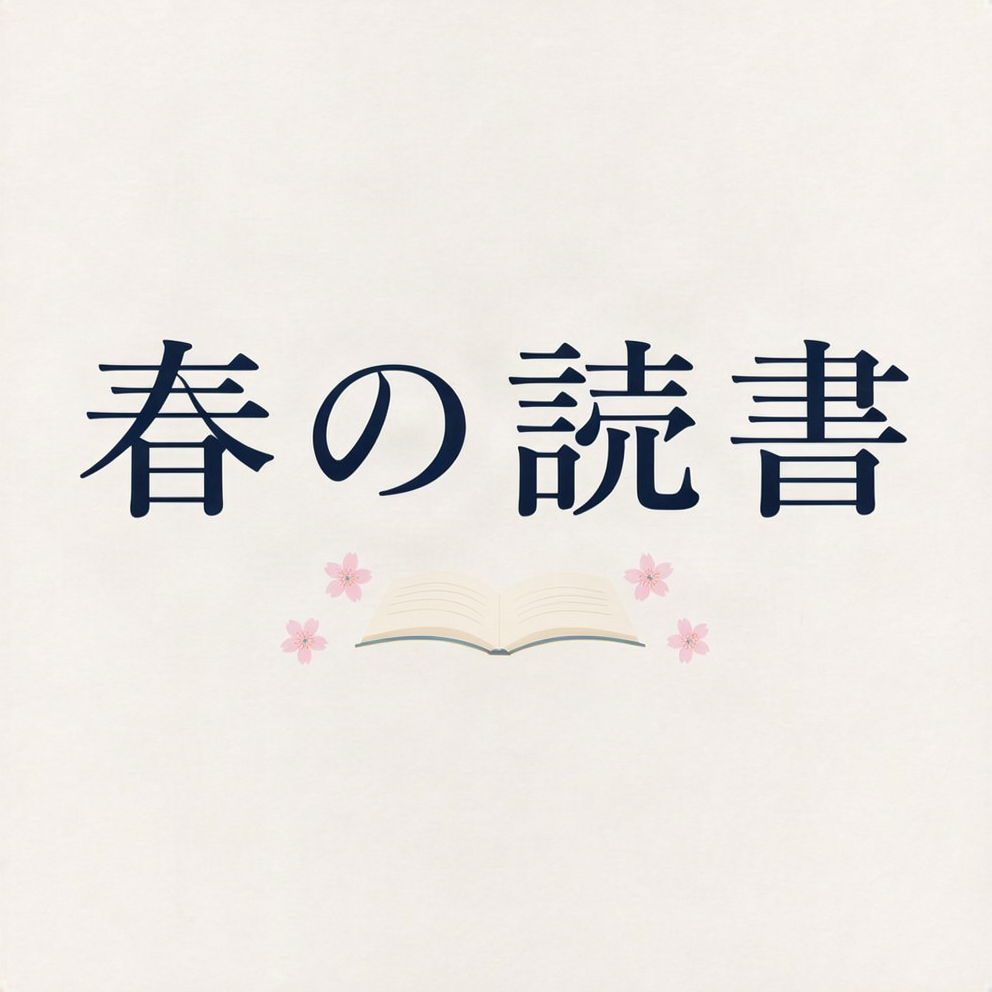
A Japanese bookshop notice

The short title sits above a book and cherry blossoms.

A Japanese bookshop notice: A Japanese bookshop notice on off-white paper. One large horizontal Japanese title in dark navy, precisely the hiragana and kanji: 春の読書. Beneath it a small illustration of an open book and cherry blossoms. No other text.
설정
  • 텍스트→이미지
  • 1:1
프롬프트(영어 원문)

A Japanese bookshop notice on off-white paper. One large horizontal Japanese title in dark navy, precisely the hiragana and kanji: 春の読書. Beneath it a small illustration of an open book and cherry blossoms. No other text.

04

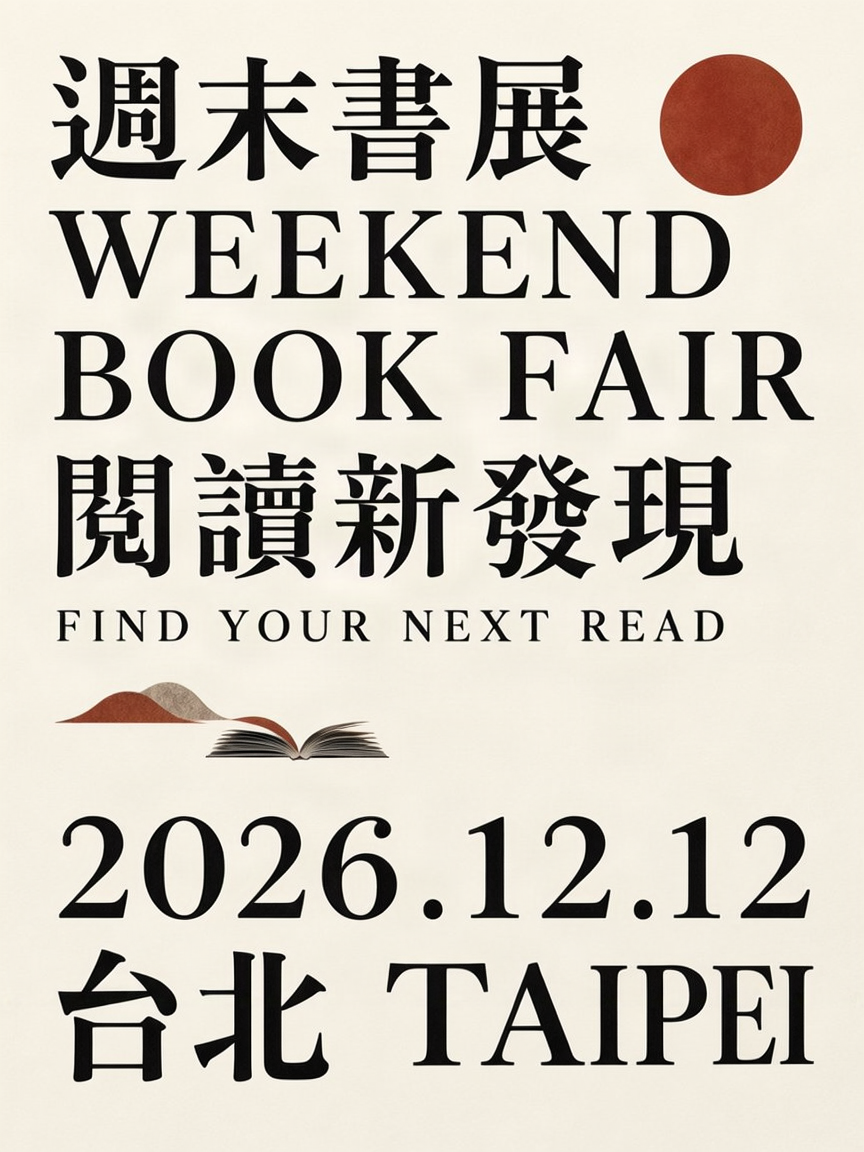
A bilingual book fair poster

A Chinese and English title and subtitle lead down to a date and location.

A bilingual book fair poster: Design a complete vertical bilingual book fair poster, displayed straight-on as flat print artwork, no mockup. Ivory paper, dark ink, one vermilion circle and a small abstract open book illustration kept clear of the type. Use a clean editorial grid with generous margins. Render exactly these six lines, one line per quoted string, in this order: "週末書展", "WEEKEND BOOK FAIR", "閱讀新發現", "FIND YOUR NEXT READ", "2026.12.12", "台北 TAIPEI". The first two lines form the prominent title. The next two are the subtitle in smaller type. Place the date and venue together at the bottom with high contrast and enough size to read. Match every character, letter and period. No logos or extra writing.
설정
  • 텍스트→이미지
  • 3:4
프롬프트(영어 원문)

Design a complete vertical bilingual book fair poster, displayed straight-on as flat print artwork, no mockup. Ivory paper, dark ink, one vermilion circle and a small abstract open book illustration kept clear of the type. Use a clean editorial grid with generous margins. Render exactly these six lines, one line per quoted string, in this order: "週末書展", "WEEKEND BOOK FAIR", "閱讀新發現", "FIND YOUR NEXT READ", "2026.12.12", "台北 TAIPEI". The first two lines form the prominent title. The next two are the subtitle in smaller type. Place the date and venue together at the bottom with high contrast and enough size to read. Match every character, letter and period. No logos or extra writing.

Artwork with a job for each line

A poster with a clear reading order

Put the event title in quotes and name its position. Describe the illustration and reserve another area for the date.

Chinese and English in one layout

Quote each language separately and describe its placement and relative size. Check both lines on the result.

Start with the words and their placement

OpenMOSS built MOSS Image for text to image generation with an emphasis on Chinese and English lettering and layout. Describe what should go at the top, where the visual focus belongs and which words should be visible. Check the spelling, line breaks and small print before publishing. 출력 이미지는 약 1 MP입니다.

MOSS Image 모델로 이미지 생성하는 방법

Vidney에서 MOSS Image 모델로 AI 이미지를 세 단계로 만들어 보세요.

Glowing panels with one model selected from severalStreams of light forming into an emerging imageA finished image materializing from a vortex of glowing light

MOSS Image vs MiniMax H3 Image vs Kling Image 4.0 vs Seedream 5.5

유사 모델과 사양을 나란히 비교. 모두 Vidney에서 실행 가능.

MOSS ImageMiniMax H3 ImageKling Image 4.0Seedream 5.5
작업 모드텍스트 투 이미지텍스트 투 이미지 · 이미지 투 이미지텍스트 투 이미지 · 이미지 투 이미지텍스트 투 이미지 · 이미지 투 이미지
해상도—2K · 4K2K · 4K · 8K1K · 1.5K · 2K
비용생성당 6 크레딧생성당 6 크레딧생성당 12 크레딧이미지 한 장당 4크레딧 이상

관련 모델

Vidney에서 실행할 수 있는 더 많은 AI 이미지 모델.

사용 가능

MiniMax의 네이티브 4K 이미지 생성 및 다중 참조 편집 모델.

생성당 6 크레딧
사용 가능

문장으로 구도를 잡고 사진으로 방향을 정하세요.

생성당 6 크레딧
MidjourneyMidjourney V7
사용 가능

Midjourney V7 모델로 AI 이미지 생성: 텍스트 투 이미지 및 이미지 투 이미지, 모두 하나의 Vidney 워크스페이스에서.

생성당 6 크레딧
사용 가능

Nano Banana 모델로 AI 이미지 생성: 텍스트 투 이미지 및 이미지 투 이미지, 모두 하나의 Vidney 워크스페이스에서.

생성당 6 크레딧
사용 가능

Flux Kontext 모델로 AI 이미지 생성: 텍스트 투 이미지 및 이미지 투 이미지, 모두 하나의 Vidney 워크스페이스에서.

생성당 6–12 크레딧
사용 가능

Seedream 4.0 모델로 AI 이미지 생성: 텍스트 투 이미지 및 이미지 투 이미지, 모두 하나의 Vidney 워크스페이스에서.

생성당 6–9 크레딧

자주 묻는 질문

MOSS Image(이)란 무엇인가요?

MOSS Image 모델은 Vidney에서 실행할 수 있는 AI 이미지 모델입니다. 하나의 워크스페이스에서 텍스트 투 이미지를 지원합니다.

MOSS Image 모델은 생성당 비용이 얼마인가요?

MOSS Image 모델은 생성당 6 크레딧이 듭니다. 정확한 크레딧 비용은 실행 전에 생성 버튼에 표시됩니다. Starter 요금제 기준(크레딧당 US$0.03)으로 1회 약 US$0.18입니다.

MOSS Image 모델은 어떤 화면 비율을 지원하나요?

MOSS Image 모델은 다음 화면 비율을 지원합니다: 1:1, 4:3, 3:4, 16:9, 9:16.

MOSS Image 모델은 무료로 사용할 수 있나요?

네. Vidney 가입 시 제공되는 무료 크레딧으로 MOSS Image 모델을 카드 등록 없이 바로 써볼 수 있습니다. 이후에는 생성당 6 크레딧이 들며, 정확한 비용은 크레딧을 쓰기 전에 항상 생성 버튼에 표시되므로 예상 밖 과금이 없습니다.

MOSS Image 모델로 만든 이미지를 상업적으로 사용할 수 있나요?

네. Vidney에서 MOSS Image 모델로 생성한 이미지는 광고, SNS 게시물, 외주 작업, 제품 콘텐츠 등 상업 프로젝트에 자유롭게 쓸 수 있습니다. 결과물 권리는 사용자에게 있으며, Vidney는 생성과 저장만 처리합니다.

MOSS Image 모델은 워터마크를 넣나요?

무료 플랜에서만 넣습니다. 무료 플랜으로 다운로드하면 작은 Vidney 워터마크가 들어가고, 유료 플랜에서는 MOSS Image 모델로 생성한 이미지를 워터마크 없이 받아 바로 게시하거나 클라이언트에 전달할 수 있습니다. 업그레이드하면 이전에 만든 이미지도 워터마크 없이 받을 수 있습니다.

가장 괜찮은 MOSS Image 대안은 무엇인가요?

Vidney에서 MOSS Image에 가장 가까운 대안은 MiniMax H3 Image, Kling Image 4.0 및 Seedream 5.5입니다. 모두 같은 워크스페이스에서 하나의 크레딧 잔액으로 실행되기 때문에, 같은 프롬프트를 각 모델에 돌려 보고 결과를 나란히 비교할 수 있습니다.

MOSS Image 모델을 사용하려면 API 키나 프로바이더 계정이 필요한가요?

아니요. Vidney가 MOSS Image 모델을 대신 실행합니다. 관리할 API 키도, 따로 설정할 프로바이더 계정도 없습니다.

지금 MOSS Image 모델로 만들어 보세요